
Vandaag of morgen in huis

Kwaliteit gegarandeerd

Welkomstaanbiedingen ontgrendelen: GRATIS bezorging | Tot 80% korting | Gratis 30 dagen JoyPlus-proefperiode
Download de app
A white gaming mouse works well with a light-coloured PC set-up, but colour says little about performance. The main differences come down to weight, sensor, connection and shape. If you only look at DPI or RGB, you could end up with a mouse that’s too heavy, runs out of battery quickly or doesn’t feel comfortable in your hand.
In this buying guide, you’ll find out which specifications are worth checking and which models suit different play styles.
A wireless mouse with a high DPI may boast impressive figures, but you won’t necessarily use its maximum DPI setting when gaming. For FPS games, the sensor, tracking, firmware and mouse mat all play a part too. Check whether you can adjust the DPI and save multiple profiles or settings.
A lightweight gaming mouse weighing around 50 to 65 grams can feel comfortable for quick movements, but a narrow or compact shape won’t suit every hand. Check the length, width, height and hand orientation. An ergonomically shaped right-handed mouse isn’t automatically suitable for left-handed use.
Brands usually quote battery life under specific conditions. For some models, for example, the product description says that the long battery life applies when using a lower polling rate or Bluetooth mode. RGB lighting, 2.4GHz wireless use and a high polling rate can increase power consumption. Also check whether you can use the mouse while it’s charging.
Many competitive FPS players choose a mouse weighing under about 70 grams. A lighter mouse can be easier to lift and move quickly. It’s a personal choice, though: a larger ergonomic gaming mouse may provide more support during long sessions, while a compact, symmetrical shape may suit smaller hands or a fingertip or claw grip.
Before buying, check:
DPI determines how far the cursor moves in response to a given physical mouse movement. A sensor with 26,000, 30,000 or 44,000 DPI mainly gives you more settings to choose from; you don’t have to use the maximum. A gaming mouse for FPS games should respond consistently and predictably at the sensitivity you choose.
The polling rate tells you how often the mouse reports its position to your computer:
A gaming mouse with an 8K polling rate is mainly of interest if you’ve set up your system to support it. The difference won’t be equally noticeable to every player.
A white wireless gaming mouse usually connects via a 2.4GHz receiver, Bluetooth or both. 2.4GHz is generally designed for low latency while gaming; Bluetooth is handy for laptops and devices where you want to keep a USB receiver free.
Also consider:
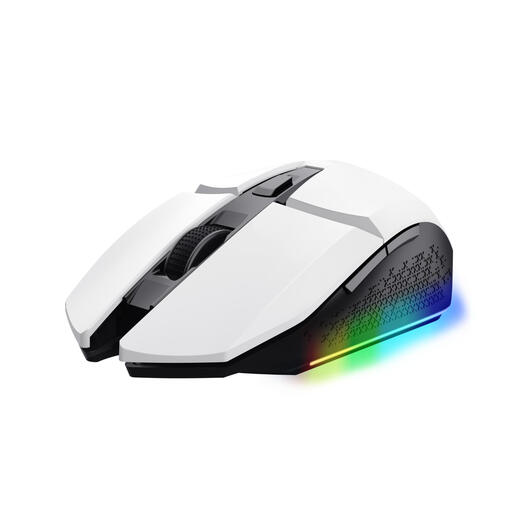
Why it suits this profile: This white computer mouse combines wireless use, RGB lighting and six buttons, with an adjustable range of 800 to 4,800 DPI.
The specifications state both the battery life of up to 80 hours and that you can keep playing while it charges. This gives you a clearer idea of what to expect.
2.4GHz connection, rechargeable battery, six buttons and four RGB options.
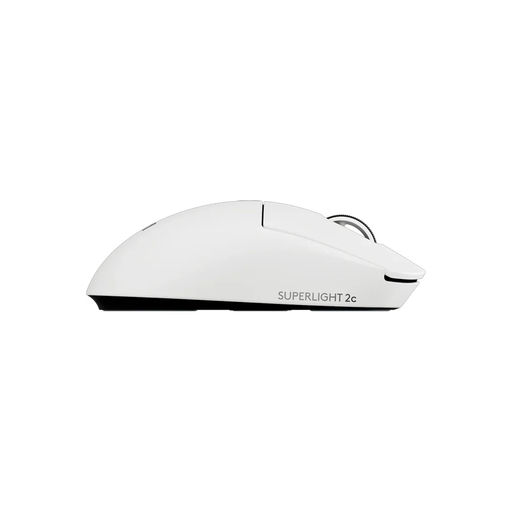
Why it suits this profile: Its compact shape and 53-gram weight suit FPS players looking for a lightweight mouse with programmable thumb buttons.
The product details list the weight, compact dimensions and battery life of up to 95 hours separately, making it easier to compare each claim.
HERO 2 sensor up to 44,000 DPI, polling rate up to 8,000 Hz and five programmable buttons.

Why it suits this profile: This model is aimed at users looking for a lightweight gaming mouse with an 8K wireless polling rate, plenty of buttons and long battery life.
The product description explicitly states the setting at which battery life reaches up to 750 hours: 1,000 Hz. Power consumption may differ at 8,000 Hz.
53 grams, up to 30,000 DPI, 10 programmable buttons and an optical switch rated for 120 million clicks.
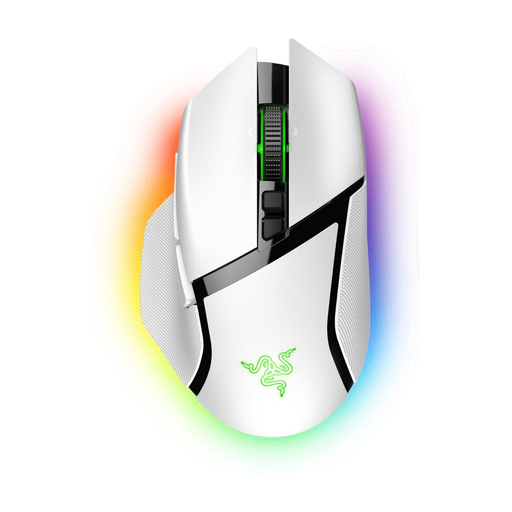
Why it suits this profile: Its ergonomic shape, 11 buttons and RGB lighting are designed for players who want to customise a wide range of functions.
Its higher weight of 112 grams is clearly stated in the specifications. That makes it easier to choose this model for its support and features, rather than for its white design alone.
Focus Pro sensor up to 30,000 DPI, Bluetooth and 2.4GHz wireless, plus customisable Chroma RGB lighting.
We’ve put together a complete, up-to-date list of products that meet these strict selection criteria and the applicable European safety regulations.
It depends on the connection and settings. A 2.4GHz receiver is generally designed for low latency. Also check the polling rate, keep the receiver close to the mouse and use the right software. Bluetooth is handy for everyday use, but is less commonly chosen for competitive FPS sessions.
Its lifespan depends on the switches, cable or battery, how intensively it’s used and how well it’s maintained. Manufacturers sometimes state a click lifespan, but product descriptions make clear that this is a quoted specification, not an individual guarantee. Keep the sensor and mouse feet clean, and protect the mouse from moisture and hard knocks.
A mouse with a built-in battery needs charging, while models with AA batteries need replacement batteries. A higher polling rate, RGB lighting and a constant 2.4GHz connection can shorten battery life. So don’t just look at the maximum DPI; compare the quoted battery life for the connection mode you plan to use.
