
Vandaag of morgen in huis

Kwaliteit gegarandeerd

Welkomstaanbiedingen ontgrendelen: GRATIS bezorging | Tot 80% korting | Gratis 30 dagen JoyPlus-proefperiode
Download de app
A white computer mouse gives your desk a calm, coordinated look. However, colour says little about ease of use. A mouse that looks good can be awkward in practice if it is too small, has noisy clicks or uses a connection that does not suit your laptop.
For home workers, office professionals, students and gamers, three purchasing pitfalls are particularly important:
A white wireless mouse usually uses a 2.4GHz radio connection with a USB receiver, Bluetooth or both.
A model with multiple connection options is practical if you switch between a Windows PC, MacBook, tablet or second computer. However, check whether all functions are available on your operating system. Manufacturers often mention Windows and macOS, but support for Android, Linux, Chrome OS or iPadOS may vary from one model to another.
An ergonomic mouse should not only feel comfortable, but also suit the length and width of your hand. A mouse that is too small forces your fingers into a curved position. A model that is too large may be difficult to control.
Look out for:
An ergonomic shape does not automatically prevent all discomfort. Rest your forearm comfortably on the desk, keep the mouse close to the keyboard and take regular breaks.
For everyday use, an optical mouse is generally suitable for office work, studying and working from home. According to the product specifications, the Logitech B100 has a sensor resolution of 800 DPI. That is sufficient for standard navigation and word processing.
An adjustable DPI value can be useful if you want greater control. According to the listed specifications, the Trust Sura offers 1,500 DPI and a DPI switch. The Rapoo VT3 MAX goes up to 30,000 DPI according to the manufacturer. Such a high value is mainly relevant for gaming, large screens or users who want extremely fast cursor movement.
With a quiet mouse, you should consider the complete range of controls. According to Logitech, the Logitech M650 L Left features SilentTouch technology and five buttons. The HOFOTEK M311 states that it offers quiet clicks, an optical sensor and DPI levels from 800 to 4,000. Also check the battery type, expected battery life and whether the battery is rechargeable or replaceable.
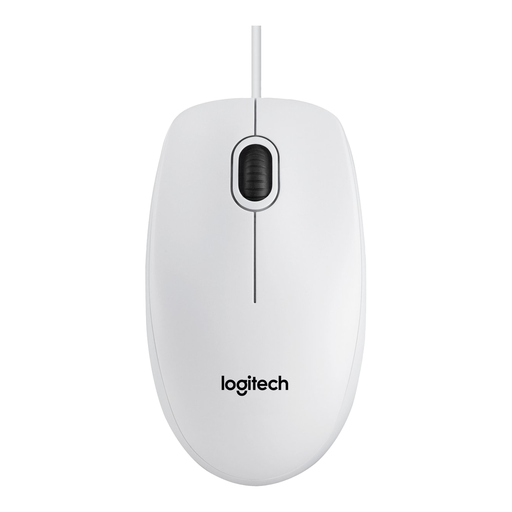
Why it suits this profile: This wired white computer mouse is designed for straightforward everyday use in study, home-working or office environments.
The USB cable avoids battery costs and, according to the product information, the plug-and-play installation requires no special software.
800 DPI, optical sensor, 85 grams and suitable for left- and right-handed use.
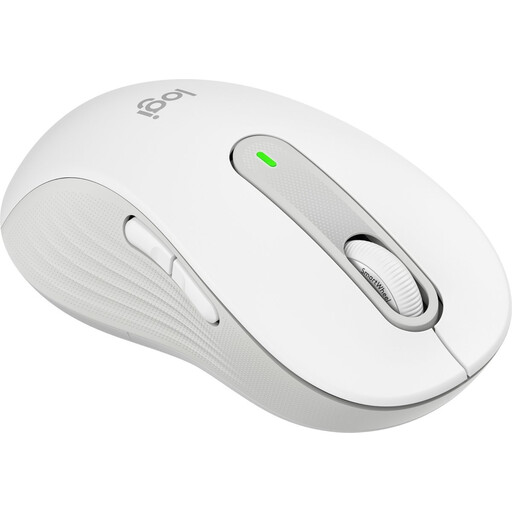
Why it suits this profile: The larger left-handed shape and wireless connection are well suited to working for long periods on a laptop or desktop computer.
The hand preference and size are clearly stated. According to Logitech’s own research, SilentTouch can reduce click noise by up to 90 per cent.
Bluetooth and Logi Bolt, optical sensor, 2,000 DPI and one AA battery according to the product information.
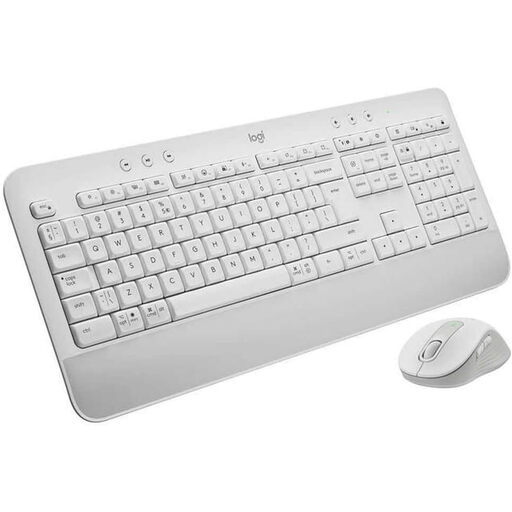
Why it suits this profile: A white keyboard and mouse set is practical when you want to create a coordinated workspace and need a numeric keypad.
The set lists both Bluetooth and radio connectivity. Before buying, check the stated QWERTZ layout and German language.
Full-size keyboard, 118 keys, numpad, wrist rest and support for Windows, macOS, Linux and other listed systems.

Why it suits this profile: This white gaming mouse is designed for players who care about low weight, polling rate, DPI and programmable buttons.
The product specifications list 2.4GHz wireless connectivity, an 8K polling rate and a weight of 53 grams. Check in advance whether your PC supports the required software.
Up to 30,000 DPI, ten programmable buttons and, according to the manufacturer, battery life of up to 750 hours at 1,000Hz.
We have put together a complete, up-to-date list of products that fully meet these strict selection criteria and the applicable European safety regulations.
That depends on the model. Check the product page to see whether Windows and macOS are explicitly listed. A Bluetooth mouse can pair directly, while a wireless model with a USB receiver needs a free port. Some models also support Linux, Chrome OS, Android or iPadOS.
Battery life varies depending on the model, battery type, connection and settings. A mouse with AA or AAA batteries requires replacement batteries. Rechargeable gaming models have a built-in battery and need to be charged periodically via USB. Claims such as ‘up to 750 hours’ come from the manufacturer; actual battery life may vary depending on polling rate, lighting and use.
Yes, provided the shape suits your hand and the connection is stable. For long periods of office work, an ergonomic shape, quiet clicks, suitable DPI and straightforward operation are more important than a striking appearance. Left-handed users should look specifically for a left-handed mouse or a symmetrical model.
