
Vandaag of morgen in huis

Kwaliteit gegarandeerd

Welkomstaanbiedingen ontgrendelen: GRATIS bezorging | Tot 80% korting | Gratis 30 dagen JoyPlus-proefperiode
Download de app
A white PC with addressable lighting looks smart, but a polished product photo tells you little about compatibility. If you focus only on colour and RGB effects, you could end up with a radiator that won’t fit, too few connections or fans that don’t work well together.
When choosing white ARGB PC components, these are the three main pitfalls to watch out for:
Start with the case. Check the motherboard form factor, maximum graphics card length and maximum CPU cooler height. A white midi tower case is a practical choice for many gaming PCs, but internal space varies considerably between models.
According to the product information, the Corsair FRAME 5000D RS ARGB Midi Tower Case White supports ATX, EATX, micro-ATX and Mini-ITX motherboards. The maximum graphics card length is 450 mm, and the maximum air cooler height is 175 mm. Radiator support up to 420 mm is also listed. Always check the case manual and the exact mounting position before buying.
For a white Corsair PC case or a similar model, also check:
A white AIO liquid cooler combines a radiator, pump and fans. A 240mm CPU cooler typically uses two fans, while a 360mm CPU cooler needs three. A larger radiator may suit powerful processors, but it also requires a compatible case with enough room.
According to the listed product specifications, the Corsair Nautilus 240 RS ARGB White has two fans, PWM control and support for Intel LGA 1851 and 1700, and AMD AM5 and AM4, among other sockets. The 360mm version in this range has three fans and a larger radiator.
When choosing an AIO, pay particular attention to:
Specifications such as airflow, speed and noise level are useful for comparison, but they don’t tell you on their own how quiet a complete PC will be. The fan curve, case layout and ambient temperature also play a part.
A 140mm ARGB case fan can move more air than a smaller fan at the same speed, but only if your case has 140 mm mounting points. The Corsair RS140 ARGB comes as a set of two white fans. The listed product specifications state a speed range of 330 to 1700 RPM, PWM support and eight individually addressable LEDs per fan.
Don’t assume RGB PC fans all use the same cables. Check:
An ARGB extension cable can help keep your build tidy, but “fits every connection” isn’t technically accurate. For example, the Corsair CL-9011132-WW has an iCUE Link connection at both ends and is 0,60 metres long. According to the product information, the CL-9011134-WW requires extra care because of the difference between 5V and 12V. Never connect a 5V ARGB cable to a 12V RGB header.
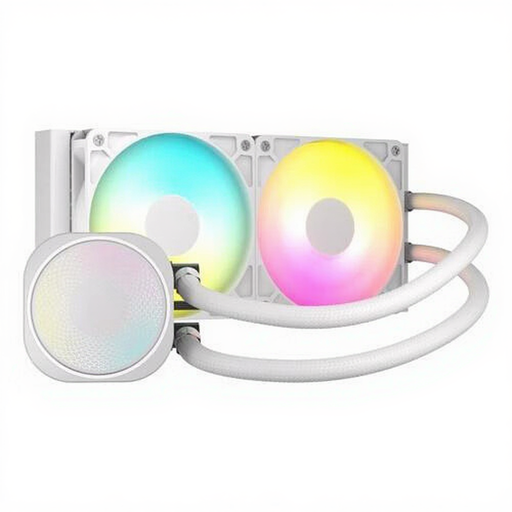
Why it suits this profile: A 240mm cooler is straightforward to install and works with many popular Intel and AMD sockets. It’s a sensible choice for a first PC upgrade where space and budget both matter.
The size is clearly specified. Before ordering, check that your case supports a 240mm radiator.
Two fans, PWM support, ARGB lighting and compatibility with LGA 1851, LGA 1700, AM5 and AM4 according to the product information.
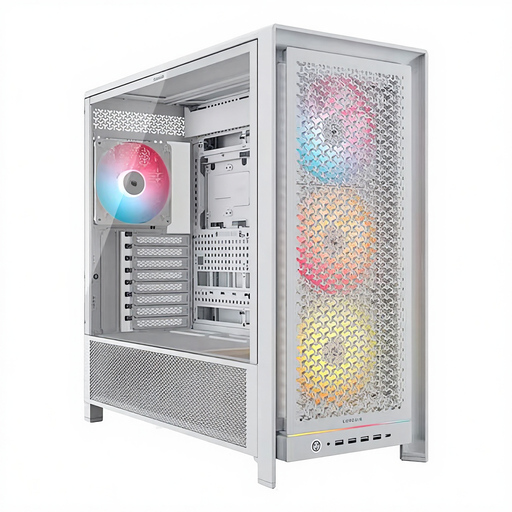
Why it suits this profile: This spacious white midi tower case is suitable for builds with a large motherboard, long graphics card and extensive cooling.
The product specifications list multiple radiator positions, cable management, dust filters and four included 140mm ARGB fans.
Supports ATX, EATX, micro-ATX and Mini-ITX motherboards, graphics cards up to 450 mm and CPU coolers up to 175 mm.
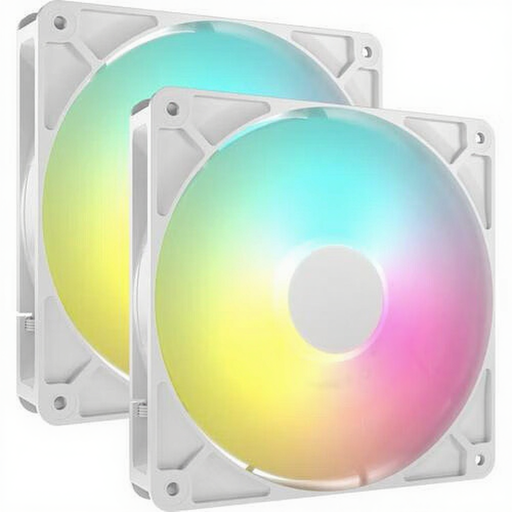
Why it suits this profile: Ideal if you want to upgrade your existing PC cooling with larger fans and synchronised lighting.
The size, PWM connection and speed range are listed. Check in advance that your case has 140mm mounting points.
Set of two fans, 330–1700 RPM, maximum stated airflow of 95,5 CFM and eight individually addressable LEDs per fan.
We’ve put together a complete, up-to-date list of products that meet these strict selection criteria and current European safety regulations.
No. Check whether your motherboard has a 5V 3-pin ARGB header. A 4-pin 12V RGB header is a different system. If your motherboard doesn’t have a compatible connection, you may need a suitable controller. Also check that the connector for a proprietary system, such as iCUE Link, matches the cable.
No. A 240mm CPU cooler may be enough for many systems. A 360mm CPU cooler needs more space and may be worth considering for a processor that produces more heat or for sustained heavy workloads. Choose based on your processor, case and preferred noise levels, rather than simply going for the largest size.
Dust filters reduce the amount of dust that gets into your case, but they don’t eliminate the need for maintenance. Clean the filters and fans regularly, keep air intakes clear and check that cables aren’t obstructing airflow. Dust can show up more readily on white components, so this is especially worth bearing in mind if you have a glass-sided case.
