What should you look for?
First, assess the sound in your own meeting app and room. Then choose only the image features that suit what you want to show or how you plan to move during your presentation.
| What to consider |
What to look for |
Who it matters to |
| Clear audio |
Test the microphone and your meeting app’s noise cancellation while people are talking in the background. If you’re using a directional microphone setting, stay within its pickup area. |
When I give my summary with colleagues talking nearby, I want my voice to be easy to follow. Around 36% of consumers put clear audio first. |
| Showing documents |
Check whether the camera can be pointed towards your desk and what software you’ll need. This feature is particularly useful if you’ll be showing printed materials. |
When I want to show a printed chart or notes, I need a usable desk view. Around 29% of consumers prioritise desk demonstrations. |
| Moving in shot |
Decide whether you need physical camera tracking and test the framing from your different speaking positions. Assess the audio separately. |
If I stand up or walk around while explaining something, I want to stay in shot without compromising clear audio. Around 21% of consumers prioritise freedom of movement. |
| Installation and privacy |
Check the connection, supported operating system and whether you’re allowed to install software. Also consider how you’ll cover the camera when it’s not in use. |
When I use equipment on a work computer, I want to know in advance which software is permitted and how to cover the camera. Around 14% of consumers start with installation and privacy. |
Webcams on Joybuy
This selection includes fixed webcams with microphone features and cameras with automatic or physical framing. Choose image features to suit your presentation, and test the audio separately in your own meeting app.
 No image available
Philips 4000 Series 4K UHD Webcam SPL6408BT/00
A fixed webcam option if you’ll be staying at your desk during your presentation.
The product title lists 4K UHD, 8 MP, autofocus, dual built-in microphones and a privacy cover.
Joybuy
 No image available
Philips 2K QHD PC Webcam SPL6308S/00
A fixed webcam option to compare if you’ll mostly be sitting in shot during your presentation.
The product title lists 2K QHD, a microphone with noise cancellation and a clip for desktop or laptop use.
Joybuy
 No image available
Insta360 Link 2C Standard Bundle, Graphite Black
An option to compare if you want automatic framing; assess the microphone separately in the noisy room.
The product title lists a 4K webcam, auto-framing, HDR and a microphone with AI noise cancellation.
Joybuy
 No image available
Insta360 Link 2 Standard Bundle
An option for presenters who move around while explaining something; the manufacturer describes this model as having a camera that physically moves with you.
The product title lists a 4K webcam for PC or Mac, AI tracking and a microphone with AI noise cancellation.
Joybuy
 No image available
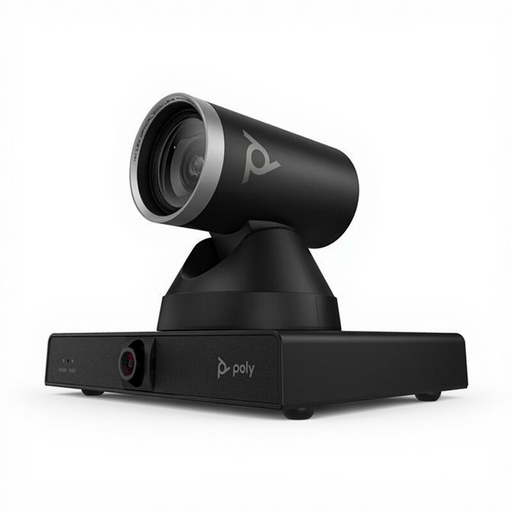
HP Poly Studio E60 Smart Camera 4K MPTZ
A camera to consider if you’re looking for a meeting-room setup with presenter tracking; check that it suits your workspace and installation requirements.
The product title lists 4K and 12x optical zoom.
Joybuy
Frequently asked questions
Do I need 4K to present my research summary?
Not just because you’re giving a presentation. First decide whether you want to show documents with the camera or share digital content, then assess audio clarity separately. Logitech lists Full HD and Show Mode for the Brio 500, so showing something on your desk doesn’t automatically mean you need 4K.
How should I set up the audio before my presentation?
Select the microphone in your meeting app and test it in a noisy office that reflects the conditions you’ll be presenting in. Microsoft Support explains noise cancellation in Teams. If you’re using the PowerConf C200’s directional microphone setting, AnkerWork advises staying directly in front of the camera.
Which software should I check in advance?
Logitech lists Logi Tune for the Brio 500’s advanced features, while OBSBOT lists OBSBOT Center for the Tiny 2 Lite settings. Check that your work computer supports the required software and that you’re allowed to install it.
What are the rules on online returns and guarantees in the Netherlands?
For an online consumer purchase from a business, you generally have a 14-day cooling-off period, subject to conditions and exceptions; the Dutch government explains this. The Netherlands also has a statutory guarantee, with no single fixed statutory guarantee period, as explained by the Dutch government. Any additional guarantee does not replace these rights.
Can I record a presentation with colleagues?
That depends on what is being recorded and on the organisation’s responsibility and legal basis for doing so. Business.gov.nl describes identifiable images and sound recordings as personal data; the Dutch Data Protection Authority explains the possible legal bases under the GDPR. Don’t assume that a privacy slider replaces consent or another valid legal basis.


