
Small-parts repairer
You want to show screws, contacts and repair steps up close. That’s why a suitable focusing distance and a close-up that shows the component at a large enough size are important.


For a fixed repair bench and recording via a computer, a downward-facing webcam is a practical starting point. If you need to switch between a wide view and extreme close-ups, a mirrorless camera with a suitable lens is a better choice. Check the focusing distance and framing at the height where you plan to mount the camera: 4K alone doesn’t guarantee that small components will appear sharp and large enough. Interchangeable lenses give you more options for close-ups, but you’ll need a lens and setup that suit your workbench.
You want to show screws, contacts and repair steps up close. That’s why a suitable focusing distance and a close-up that shows the component at a large enough size are important.
You want to show your hands and the entire repair area from a fixed position, ideally with a simple connection to a computer.
You want to record longer repair sessions and perhaps include spoken instructions. In that case, consider recording time, power and a microphone connection.
First, decide whether showing small components or the entire work surface is your priority. Then choose your camera setup and check the focusing distance, framing and recording time you need.
| What to consider | What to look for | Who is this important for? |
|---|---|---|
| Showing small components clearly | Check the focusing distance and magnification of the exact lens or webcam from your planned mounting position. Canon states that the RF 35mm macro lens offers magnification of up to 1:2; Sony states that the E 30mm F3.5 Macro has 1.0× magnification and a minimum focusing distance of 9.5 cm. | If I want to show contacts or small screws clearly, the camera needs to focus close enough. Around 36% of consumers give close-up shots their highest priority. |
| Fitting the work surface and your hands in the frame | Make a test recording from the planned height and check that the entire repair area fits in the frame. Logitech describes Show Mode as a way to show work on a desk; the final framing also depends on your setup. | If you want to film your hands and work surface at the same time, a suitable wide view is more useful than a close-up alone. Around 29% of consumers prioritise this overall view. |
| Recording time | Test a full session using the settings you plan to use, and check the power supply and storage. Nikon states that the Z 30 can record continuously for up to 125 minutes; this manufacturer specification doesn’t automatically apply to every setting or setup. | If a repair takes a long time, I don’t want the recording to stop unexpectedly. Around 21% of consumers give continuous recording their highest priority. |
| Spoken instructions | Check whether the exact camera model has a microphone input, or decide whether you’d prefer to record audio separately. Nikon states that the Z 30 can be used with an external microphone. | If you talk through the steps, you’ll want your instructions to be easy to follow, so choose your audio setup in advance. Around 14% of consumers put clear spoken instructions ahead of the other considerations. |
Resolution alone doesn’t tell you whether a lens or webcam can focus close enough. Focusing distance and magnification depend on the optics you choose.
Test a small component at your planned working distance and check what’s included with the camera bundle you’ve chosen.
According to Elgato, the Facecam MK.2 has a fixed focus range of 30–120 cm. This may be restrictive if the camera needs to sit close above small components.
Before settling on a mounting position, compare the distance from the lens to the work surface with the specification for the exact model.
A page featuring a product name doesn’t automatically confirm that the exact variant is available at that time.
When buying, check the exact model variant and its current availability.
The EOS R50 has an RF lens mount. For close-ups, the RF 35mm F1.8 MACRO IS STM is available as a separate lens option.
The ZV-E10 II is a camera with an interchangeable E-mount lens. The E 30mm F3.5 Macro is a separate lens option for small components.
The MX Brio is a USB webcam for a computer-based workspace. Show Mode is designed to show work on a desk.
The Facecam MK.2 is a USB webcam for a fixed recording position connected to a computer.
The Z 30 is a mirrorless camera for video creators who also want to record spoken instructions and longer sessions.
This selection includes cameras and webcams for recording video at a workspace. For each model, check that the focusing distance, connection and angle of view suit your repair bench.
 No image available
This pocket camera may suit anyone looking for a compact camera for video recording. Check separately whether the frame shows small components at a large enough size.
The product name lists a 1″ CMOS sensor, 4K/240 fps, 3-axis stabilisation, 2× lossless zoom, 107 GB of built-in storage and a 2-inch rotating screen.
 No image available
This desktop webcam may suit a fixed computer workspace. Before mounting it, check that the distance from the work surface is suitable for your close-ups.
The product name lists autofocus, built-in dual microphones, a privacy cover and EU Version.
 No image available
This PC webcam may suit a desktop or laptop setup. Check the framing from the position where you plan to mount it.
The product name lists 2K QHD, a clip mount, a noise-cancelling microphone and EU Version.
 No image available
This webcam for PC and Mac may suit computer-based recordings of desk work. Make a test recording to see how the workbench fits in the frame.
The product name lists 4K, a 1/2-inch sensor, Auto-Framing, HDR and a microphone with AI noise reduction.
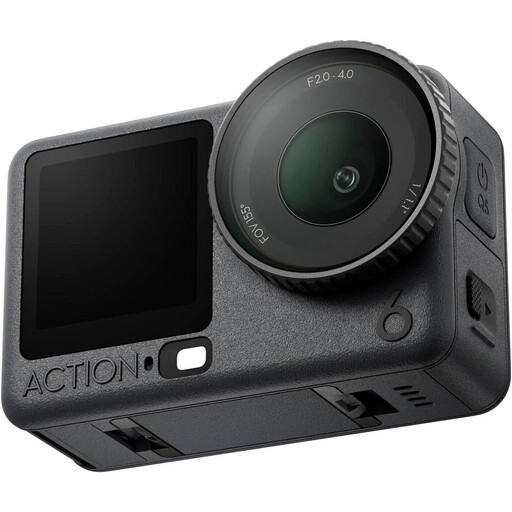 No image available
This model is described as an action camera. Check that your chosen mount and recording position give you a suitable view of your repair bench.
No. Resolution alone doesn’t tell you whether small components will appear sharp and large enough. From your camera position, check the focusing distance, magnification and framing of the exact lens or webcam. The separate Sony and Canon macro lenses each have their own stated magnification values.
Position the camera at the planned height and make a test recording of both a wide view and a close-up. For a webcam, check its stated focus range; with a mirrorless camera, both the camera body and your chosen lens affect what you can do.
If a product is faulty, the seller may be responsible for providing a remedy under the Dutch statutory guarantee; there isn’t one fixed statutory guarantee period for every product. Online purchases also generally come with a 14-day cooling-off period from delivery, subject to legal exceptions.
There’s a difference between filming for private use and publishing footage publicly. According to the Dutch Data Protection Authority, the exception for personal or household use doesn’t apply when footage is shared more widely. If recognisable people appear in your video, check the applicable privacy requirements in advance.