
Weather data recorder
Regularly enters temperature, rainfall or other readings one after another and wants to weigh up whether a dedicated numeric keypad matters more than desk space.


If you often enter readings one after another, choose a layout with a numeric keypad if that’s your main way of entering data. A compact keyboard can leave more room beside it for mouse work, while a split design may suit you if you want to try a different hand position. Check the keyboard layout and software compatibility too, and readjust your sit-stand workstation whenever you change posture.
Regularly enters temperature, rainfall or other readings one after another and wants to weigh up whether a dedicated numeric keypad matters more than desk space.
Works with tables and charts for extended periods and wants to find a suitable hand position while keeping the workstation properly adjusted. Arboportaal advises adapting your workstation to your own body measurements.
Often switches between tables and charts, and weighs up the space beside the keyboard against having a dedicated numeric keypad.
Start with the choice that has the biggest impact on your everyday work: a numeric keypad for entering lots of readings, more room for your mouse when working on charts, or a different keyboard shape if you want to change your hand position.
| What to consider | What to look for | Who should give this more weight? |
|---|---|---|
| Entering readings | Check whether the keyboard has an integrated numeric keypad and whether its layout suits the way you enter data. Logitech states that the K120 has a numeric keypad; the CHERRY STREAM KEYBOARD TKL does not. | I regularly enter sequences of numbers and want a dedicated group of number keys close to hand. Around 36% of consumers put numeric input at the top of their list when choosing. |
| Hand position and workstation | If possible, try out the shape and layout. Adjust your desk to suit your body measurements, and alternate between sitting and standing. Arboportaal emphasises the importance of adjusting your workstation. | During longer work sessions, I want to assess whether a different keyboard shape and a properly adjusted workstation suit me. For around 29% of consumers, hand position is the top priority during prolonged work. |
| Room for mouse work | Weigh up the space beside the keyboard against the need for a dedicated numeric keypad. The CHERRY STREAM KEYBOARD TKL is more compact because it has no numeric keypad. | I often switch between tables and charts and want enough room for my mouse. For around 21% of consumers, space for mouse work is the top priority when choosing. |
| Repeated software tasks | Check that the software and action you want to use work with your computer and charting programme. Logitech describes Smart Actions for the MX Keys S when used with Logi Options+. | I repeat certain tasks and want to check whether a shortcut can perform them in my programme. Around 14% of consumers prioritise repeatable tasks. |
A compact layout such as the CHERRY STREAM KEYBOARD TKL has no numeric keypad, while the Logitech K120 does. This difference can matter if you enter lots of readings.
Take the amount of number entry you do into account, not just the size of the keyboard.
If you later find that you need a separate numeric keypad, you’ll need to buy an extra accessory and make room for it on your desk.
A split design changes the layout and may take some getting used to. The shape alone cannot replace a properly adjusted workstation and regularly changing your posture.
If possible, try the layout and readjust your workstation when you switch between sitting and standing.
The Smart Actions described for the Logitech MX Keys S use Logi Options+; whether an action is useful also depends on the software task you want to set up.
Check compatibility and test one task you perform regularly first.
Setting it up takes time, and you may not end up with a useful shortcut if the action you want isn’t supported.
The K120, ERGO K860 and MX Keys S offer different layouts and features to compare.
The STREAM KEYBOARD and STREAM KEYBOARD TKL show the difference between a conventional layout and a more compact version.
The Pro Fit Ergo Wireless Keyboard is a split version worth comparing if you’re looking for a different hand position.
The K3 Max is a compact, programmable mechanical keyboard for anyone who can do without a numeric keypad.
This selection includes keyboards with a numeric keypad for entering readings and working with spreadsheets, plus a compact model without a numeric keypad for anyone who values extra space beside the keyboard more highly.
 No image available
Suitable for a fixed workstation where an integrated numeric keypad is useful for entering readings or working with spreadsheets.
Full-size layout, wired, black and plug-and-play, according to the product name and description.
 No image available
Suitable for a fixed workstation if you want a numeric keypad and a wired connection.
The product name lists a numeric keypad, volume knob, hot-swappable switches and Beige Switch.
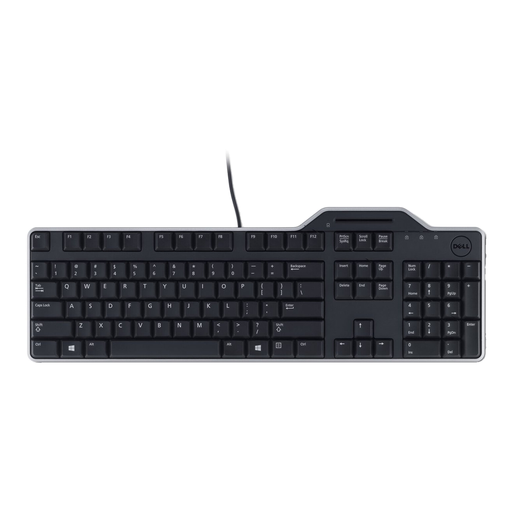 No image available
Suitable for numeric input if the AZERTY layout suits the way you work.
The product information lists a numeric keypad and wired USB connection. The description mentions quiet, spill-resistant keys and a detachable wrist rest.
 No image available
Suitable for numeric input if you’re looking for a Dutch layout and use a Mac with Apple silicon.
The product information lists Bluetooth, a rechargeable battery and an included USB-C cable. The stated compatibility is with Mac models featuring Apple silicon.
 No image available
Suitable if extra space beside the keyboard matters more to you than having a dedicated numeric keypad.
The product information lists 61 keys, a US QWERTY layout and RGB lighting. This 60% layout has no numeric keypad.
For an employee who works with a screen for more than two hours a day, the screen and keyboard must not be attached to one another, according to Arboportaal. A laptop user must therefore be able to use a separate screen or keyboard. This rule is not a general purchasing requirement for every private user.
Arboportaal advises adjusting your display equipment to your own body measurements, changing posture regularly and taking short breaks. Readjust your workstation when you change the desk height; a particular keyboard shape is no substitute for making these adjustments.
Logitech recommends cleaning its keyboards regularly, about once a week, to help prevent stubborn stains. Follow the cleaning instructions for your specific model.
For a consumer purchase, statutory warranty applies according to ACM ConsuWijzer for as long as you could reasonably expect the product to work properly; the seller must put right any fault covered by the warranty. According to the Dutch government, a 14-day cooling-off period applies to many distance purchases, although there are exceptions. Check the terms of the specific purchase and whether you’re buying as a consumer.