Who is this relevant for?

People who write long documents

If you type for long stretches, you may want to consider the position of your hands and forearms without treating a keyboard as a remedy for discomfort. Cochrane describes the evidence for ergonomic measures to prevent arm and neck problems among office workers as unclear.

People with an approaching deadline

If you have little time to get used to a different key layout while writing to a deadline, a familiar, fixed layout may be an important factor in your choice. RTINGS describes the Wave Keys as quiet, but notes that its keys are somewhat close together.

People who work near a bright window

By a bright window, it helps to distinguish between how easy the keys are to read and glare on your screen. Arboportaal recommends positioning your viewing direction parallel to the window when working at a screen.

What should you consider when choosing?

Wave keyboard with a fixed layout

A good fit if: you would rather not change the way you type much when working to a deadline.

Bear in mind: you can’t adjust the position of each hand independently, so check that the key spacing and wrist rest feel comfortable.

Fixed split keyboard

A good fit if: you want clearly separated key groups but prefer to keep one keyboard on your desk.

Bear in mind: the distance between the key groups is fixed, and the keyboard may take up more desk space.

Keyboard with two separate halves

A good fit if: you want to adjust the distance and angle of each half independently.

Bear in mind: check the exact model, connection and layout; getting used to an unfamiliar layout can take time.

What to consider What to look for when buying Who is this most relevant for?
Hand and forearm position Compare the shape of the key groups, whether the halves can be adjusted and how much room you have for your mouse. If I want to position my hands differently during long writing sessions, I look at how much room there is to adjust the keyboard; around 36% of consumers prioritise hand position.
Familiar typing Check the key layout and, where possible, the spacing between keys and the position of punctuation marks. If I have little time to get used to a new layout when working to a deadline, familiar typing matters a lot; around 29% of consumers prioritise this concern.
Visibility by a bright window Check whether the key legends are easy to read; consider screen position and window coverings separately. When I want to see both the keys and screen clearly in bright daylight, I consider the legibility of the keys as well as my workstation setup; around 21% of consumers prioritise visibility.
Connectivity and desk space Check the exact model, operating system support, connection type and space required. If I want to keep using my existing computer and workstation, I check the connection type and dimensions in advance; around 14% of consumers prioritise these practical considerations.

Common mistakes

  • Assuming an ergonomic keyboard is a proven treatment

    An ergonomic design is no proof that it will prevent individual problems. Cochrane describes the evidence for ergonomic measures to prevent arm and neck problems among office workers as unclear.

    Choose a keyboard that suits you and your workstation setup, alternate screen work with other tasks, and seek appropriate professional advice if discomfort persists.

  • Buying a keyboard to fix screen glare

    A keyboard won’t change the light falling on your screen. Arboportaal treats glare as an issue relating to your workstation setup, screen position and window coverings.

    Address the light separately, then check whether the key legends are easy for you to read.

  • Assuming every split keyboard has two separate halves

    A fixed split keyboard can have two separate key groups within a single board. R-Go’s manual confirms that the halves of the Split Break v2 can be positioned separately.

    Check the design of the exact model and measure the space available in your setup.

  • Not checking the key layout or connection

    Keyboards can vary in their language layout and connection type, such as USB-A, Bluetooth or a USB receiver. A model with a different layout may also take some getting used to.

    Before buying, check the key legends, punctuation, connection type and operating system support.

Brands to consider

Logitech

The Wave Keys and ERGO K860 offer fixed, curved layouts for long typing sessions; neither has independently positionable halves.

  • RTINGS describes the Wave Keys as quiet and relatively compact for a full-size keyboard.
  • RTINGS notes that the Wave Keys’ keys are close together; the ERGO K860 is larger, with more space between the keys.

R-Go Tools

The Split Break v2 is designed for people who want two keyboard halves that can be positioned separately.

  • The manufacturer’s manual confirms that the halves can be positioned separately and describes wired and wireless models.
  • Check which model and key layout you choose; a break indicator is no proof that discomfort will be prevented.

Perixx

The PERIBOARD-512 is a wired keyboard with a fixed, curved split layout and an integrated wrist rest.

  • Perixx Europe lists USB-A, dimensions of 485 × 236 × 44 mm and several available keyboard layouts.
  • The two key sections can’t be adjusted separately; check the language variant.

Trust

Keyra is a wireless keyboard with a fixed split layout.

  • Trust says it can connect to up to three devices via Bluetooth or a USB receiver.
  • Claims about reducing strain and boosting productivity come from Trust; check the key layout and compatibility of the model you choose.

Kinesis

The Freestyle2 is an option for people who want to position the two keyboard halves separately.

  • Kinesis lists different connecting cable lengths and optional tenting accessories.
  • Check the model and key legends; the features listed don’t confirm that a Dutch layout is available.

Joybuy products

This Joybuy selection includes keyboards and keyboard-and-mouse sets for a range of writing and work setups. Check the layout, connection type and dimensions for each model; the products below don’t represent every split design discussed.

Corsair K70 PRO TKL Magnetic-Mechanical Gaming Keyboard, US QWERTY, MGX v2, black

Corsair K70 PRO TKL Magnetic-Mechanical, US QWERTY, MGX v2, black

A wired option if you’re looking for a keyboard without a numeric keypad.

TKL layout; wired USB connection; detachable padded wrist rest, according to the product description. The title specifies a US QWERTY layout.

Joybuy
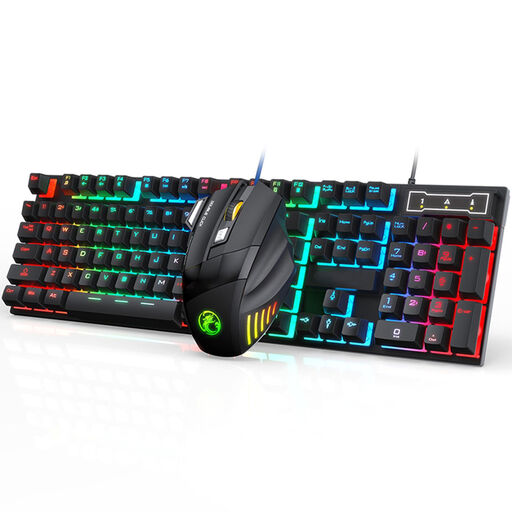
Wired keyboard and mouse set

Wired keyboard and mouse set

A set for using a keyboard and mouse together at a fixed workstation.

The product description lists 104 keys, a wired USB connection and an ergonomic mouse.

Joybuy

REDRAGON wired mechanical keyboard with 94 keys, phone stand and wrist rest

REDRAGON wired mechanical keyboard with 94 keys

A wired model with a wrist rest if you’d like one included with your keyboard.

94 keys; wired connection; the product description lists a detachable wrist rest and phone stand.

Joybuy

Trust Lyra keyboard with mouse, US English QWERTY, blue

Trust Lyra keyboard with mouse, US English QWERTY, blue

A compact option if you’re looking for a wireless connection and adjustable height.

The product description lists connection via USB receiver or Bluetooth and three adjustable height settings. The title specifies US English QWERTY.

Joybuy

MageGee TS91 60% wired keyboard, 61 keys, US QWERTY, white and black

MageGee TS91 60%, 61 keys, US QWERTY, white and black

A compact option to consider if desk space is limited.

61 keys; wired connection; US QWERTY layout. The product description states that the USB connection isn’t waterproof.

Joybuy

Frequently asked questions

Does backlighting help with glare on your screen?

No, backlit keys won’t change the light falling on your screen. For glare, Arboportaal recommends, among other things, positioning your viewing direction parallel to the window and using suitable window coverings. Check how easy the key legends are to read separately.

How should you position two separate keyboard halves?

Position the halves so you can reach the keys without forcing your hands to twist, and adjust the distance to suit your desk. The R-Go Split Break v2 manual confirms that the halves can be positioned separately; there’s no single fixed distance that suits everyone.

Can an ergonomic keyboard replace varying your tasks?

No, switching to a different keyboard doesn’t replace varying your tasks. Arboportaal recommends alternating screen work with tasks that don’t require a screen to limit intensive computer work.

What if you’re unhappy with the layout after buying online, or the keyboard breaks too soon?

For a standard online purchase as a consumer, you generally have a statutory cooling-off period of up to 14 days after delivery, subject to applicable exceptions. You’re also covered by the statutory guarantee if the product doesn’t perform as you could reasonably expect with normal use; the retailer is your point of contact.

Can an ergonomic keyboard prevent discomfort?

You can’t assume that based on the design alone. Cochrane describes the evidence for ergonomic measures to prevent arm and neck problems among office workers as unclear, so consider how well the keyboard suits you and your workstation setup too.
