What should you look for?
First, check which software your course requires, then see what’s available at the different places where you study. Only then compare the configuration you need for your assignments.
| What to consider |
What should you check? |
Who should prioritise this? |
| Moving between workspaces |
Check that a screen and input devices are available at each location, and that the desktop’s connections are suitable. |
If I often move between rooms, I want to know whether I can connect my computer straight away. Around 36% of consumers prioritise being able to change workspaces. |
| Course software |
Ask which programmes and versions are required. Esri lists Windows for ArcGIS Pro 3.7; QGIS is available for Windows, macOS and Linux. |
I don’t want to find out after buying that my chosen system can’t run the software I need. Around 29% of consumers prioritise software compatibility. |
| More demanding assignments |
Compare the requirements of the specific software and assignment with the memory, processor and graphics hardware. |
If my assignments involve larger analyses or 3D work, I want to choose a suitable configuration without paying for unnecessary extra hardware. Around 21% of consumers prioritise performance for more demanding assignments. |
| Complete workstation |
Check which components are included with the exact configuration and whether its connections are compatible with your existing screen. |
I want to know in advance whether I’ll need extra equipment as well as the computer to study. For around 14% of consumers, a complete workstation is their main buying priority. |
Joybuy product picks
Below are compact PCs for a study setup where you may move the computer case between workspaces. For each model, check that the operating system, connections and included components suit your course and the equipment available at each location.
 No image available
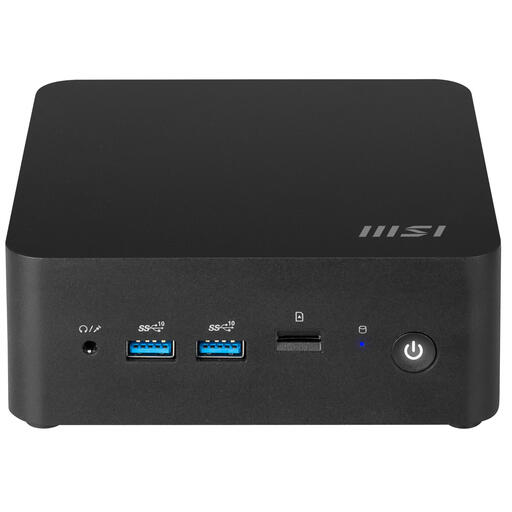
MSI CUBI NUC 1MG-244BEU barebone mini PC
Its compact 0.84-litre size could suit a setup where you move the computer case and use peripherals at each location.
The product title lists it as a barebone model, with a 0.84-litre case and Intel SoC 100U. Check which components are included with the version you choose.
The product description lists two HDMI ports and two Thunderbolt 4 ports; check that these suit the screens and peripherals you use.
View at Joybuy
 No image available
SOYO Y5Pro Mini PC, Intel Core i5-8250U/8350U
This model may be worth considering if you’re looking for a mini PC to use at a workspace with a screen and input devices available.
The product title lists Windows 11, 8 GB DDR4 memory and a 256 GB SATA SSD. Check that the configuration meets your course’s software requirements.
View at Joybuy
 No image available
FIREBAT R3 Mini PC, AMD Ryzen 5 7430U
The mini PC format suits a study space where you want to move the computer case and connect peripherals on site.
The product title lists 16 GB RAM and a 512 GB SSD. Check the requirements of your own applications and assignments.
The title mentions Wi-Fi 6, Bluetooth 5.2 and support for three 4K screens; compare the connections with your own setup.
View at Joybuy
 No image available
ACEMAGIC E3B Mini Desktop, AMD Ryzen 5 7430U
This compact desktop could suit a study space where you move the computer case between equipped workspaces.
The product title lists Windows 11 Pro, 16 GB LPDDR4X memory and a 512 GB SATA SSD.
The title mentions HDMI 2.0, DisplayPort 1.4b and USB-C. Check that the connections are suitable for the screens you use.
View at Joybuy
 No image available
ACEMAGIC AK1PLUS Mini PC, Intel Celeron N5095
This mini PC format is worth considering if you can use a screen and input devices at the different places where you study.
The product title lists Windows 11 Pro, an Intel Celeron N5095 (4C/4T), 16 GB LPDDR4X memory and a 256 GB SATA SSD. Compare the configuration with your course’s software requirements.
The title mentions HDMI 2.0. Check that the connection is compatible with the screens at your study locations.
View at Joybuy
Frequently asked questions
Can I get by with just a mini PC for my studies?
You can if you have access to a suitable screen, power and input devices where you need them, and the PC can run your study software. Also ask whether you’ll need to work independently on a laptop during lectures; TU Delft says this applies to first-year students in the Faculty of Civil Engineering and Geosciences, not as a general requirement for all courses.
Does a desktop for water management have to run Windows?
You can’t tell from the course name alone. QGIS is available for macOS and Linux, while Esri lists Windows as a supported operating system for ArcGIS Pro 3.7. Check the full software list for your course.
What should I check when connecting and maintaining it?
Check the display and USB connections on your chosen configuration, and see which components are included. Milieu Centraal recommends repairing or replacing components rather than immediately replacing an ageing device; consider this before trading in a computer that still works.
What are my rights when buying online in the Netherlands?
When you buy online from a business, you’ll generally have up to 14 days from delivery to change your mind, although there are exceptions; ACM ConsuWijzer explains this period. You’re also entitled to a product that works properly. According to the Dutch government, the Netherlands has no fixed statutory two-year guarantee period; if a product is faulty, the seller is your point of contact.


