Don’t rush out to buy a streamer if quiz questions are hard to read from the side: the viewing angle depends on the TV screen, not the streaming box. If the picture looks good from your seat but the quiz app you want is missing, a suitable media player could help. Check the app and connection first.
Who is this relevant to?
The side-seat viewer
You find quiz questions harder to make out from your usual seat and want to check first whether the screen or its position is the cause. RTINGS.com and the Consumers’ Association explain why a TV’s viewing angle matters when you’re watching from the side.
The viewer with an older smart TV
The picture looks fine from your seat, but the app for the quiz you want is missing or no longer works. The Consumers’ Association explains that smart TV apps can disappear; NPO describes NPO Start as a way to watch programmes.
The viewer who wants to cast
You want to start an available quiz programme from your phone or use a separate media player. Check support for the specific app and the HDMI connection; Google TV Help and Google Store Netherlands explain the connection and casting options for the Google TV Streamer.
What should you look for when choosing?
Start by checking the picture from your usual seat at the side. If it’s easy to read, check whether the quiz you want is available through your existing TV app or a suitable external viewing option.
| What to consider |
What to look for |
Who is this important for? |
| Picture clarity from the side |
Check the quiz text from your usual seat and look up the viewing angle for the exact TV model. If possible, try turning the TV. |
If I find quiz questions harder to read from my usual seat at the side, I want to know first whether changing the setup will help. Around 40% of consumers prioritise a picture that’s easy to read from the side. |
| Access to the quiz you want |
Find the specific quiz and episode on your preferred service, and check that the app or casting feature works on the device you want to use. |
If the quiz app is missing from my TV, I’ll look for a working way to watch the programme before choosing a device. Around 40% of consumers prioritise access to the quiz they want. |
| Connecting and using the device |
Check that your TV has a spare HDMI input and find out which cables and other accessories you’ll need for the exact model. |
If I’d rather avoid a complicated connection or extra steps, I want to check first whether the TV app or casting feature will do the job. Around 20% of consumers prioritise ease of connection and use. |
Common buying mistakes
-
Buying a streamer to fix a poor viewing angle
When you watch from the side, the picture quality is determined by the TV screen. Switching to a different streaming source won’t change the screen’s viewing angle.
First, check your existing TV from your usual seat at the side. Then consider whether you need a different source, a new setup or another screen.
-
Assuming every smart TV app will always be available
The Consumers’ Association points out that smart TV apps can disappear and that continued support isn’t guaranteed.
Check whether the quiz you want is currently available through the TV app or a supported casting feature. Only choose a separate player if it gives you the viewing option you need.
-
Confusing a 4K specification with a better viewing angle from the side
A streamer’s resolution doesn’t tell you how the TV screen will look from the side.
Assess the picture from your own seat and check the features of the exact TV model. Choose a streamer based on the app and connection you need.
Brands to consider
Google
The Google TV Streamer (4K) is a separate HDMI media player for a TV with a screen that already meets your needs. Google Cast also lets you use compatible apps.
- Google TV Help explains HDMI compatibility; Google Store Netherlands explains casting from compatible apps.
- You’ll need to buy an HDMI cable separately for the Streamer. Check whether the quiz app you want is available; a media player won’t improve the TV screen’s viewing angle.
Apple
Apple TV 4K is a separate HDMI media player for anyone who wants to use the NPO Start app on Apple TV.
- NPO explains how to control subtitles in the NPO Start app on Apple TV.
- Apple states that the HDMI cable is sold separately. For other quiz services, check separately whether the app you want is available.
Xiaomi
The Xiaomi TV Stick 4K (2nd Gen) is a compact streaming option for a TV with HDMI, provided a wireless connection is available.
- Xiaomi lists HDMI and a supported wireless connection as requirements.
- Before buying, check that the app for the specific quiz you want works on this model.
Joybuy products
This selection includes TVs with built-in smart TV features: a portable model and a larger screen model. They are not separate streaming sticks.
 No image available
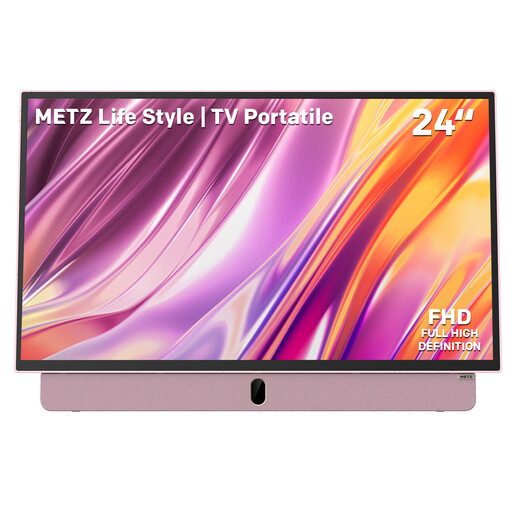
Metz MPE7000Z 24-inch portable TV
An option if you’re looking for a portable TV with built-in Google TV features; it won’t, on its own, fix a limited screen viewing angle.
24-inch FHD LED screen with a matte anti-glare coating and built-in battery. The product name also lists HDMI, USB and Wi-Fi 5.
Joybuy
 No image available
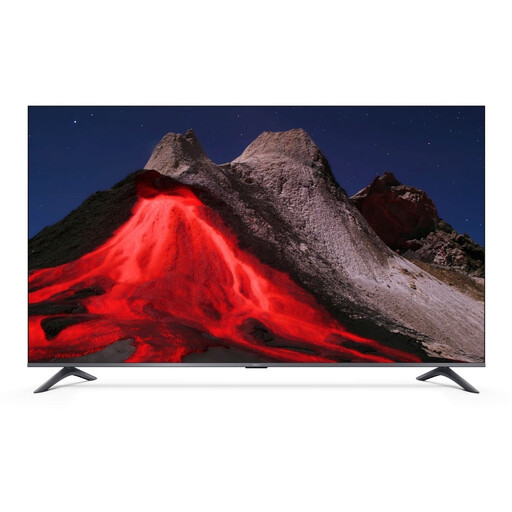
Xiaomi TV A Pro 55, 55-inch 4K UHD QLED TV
An option if you’re considering built-in smart TV features and a different screen. Check how it looks from your own seat at the side before making a decision.
The product name lists Google TV and compatibility with Google Cast and Apple AirPlay.
Joybuy
Frequently asked questions
Will a 4K streaming box make quiz text easier to read from the side?
Not if the limitation is the TV screen’s viewing angle. Check the picture from your own seat; a streamer’s maximum resolution doesn’t tell you how the screen will look from the side.
How do I connect a separate media player?
Check that your TV has a spare HDMI input, then follow the instructions for the exact device. An HDMI cable is sold separately for the Google TV Streamer and Apple TV 4K; also check which network connection you’ll need.
Do I always need a paid subscription to watch an NPO quiz?
No. NPO describes a free way to catch up on programmes, usually for at least a week. Check that the quiz and episode you want are available.
What are my rights when I buy a media player online?
According to the Netherlands Authority for Consumers and Markets, online purchases usually come with a 14-day cooling-off period from the day the product is delivered; exceptions apply. The Dutch Government also states that smart devices are entitled to security updates. This alone doesn’t tell you whether a specific model on sale meets all the requirements.
What should I check to ensure imported electronics are safe?
The Dutch Government states that electronic devices placed on the market in the EU must have a CE marking. Check the information provided with the specific product; this general rule doesn’t confirm that an individual product complies.


