What should you look for when choosing?
First measure the space and decide how you’ll watch the match. Then compare the picture and sound options that suit your set-up.
| What to consider |
What should you check? |
Who is this important for? |
| Picture visibility |
Can you darken the room? Compare the stated light output using the same measurement standard and take your preferred screen size into account. |
If daylight or the lights will be on, I want everyone to be able to follow the court and score. Around 33% of consumers prioritise visibility in ambient light. |
| A suitable image size |
Measure the distance from the lens to the screen and the available screen width. Use a calculator for the specific model. |
With a fixed location for the projector or screen, I want to know in advance what image size will work there. Around 27% of consumers prioritise projection distance and a suitable image size. |
| Live coverage |
Check the provider, access to the match and the permitted playback method; test the entire connection in advance. |
If the group is getting together for a particular match, I want to know in advance that my provider and playback device can show that broadcast on the projector. Around 20% of consumers put access to live coverage first. |
| Sound and set-up |
Check the audio output and how easy it is to move the projector. Test the sound in the room using your intended source. |
With several viewing spots, I want to hear the commentary and be able to move the projector if needed. Around 13% of consumers give group sound and quick set-up top priority. |
| Use and aftercare |
Check the light source, maintenance instructions, included accessories and the seller’s terms. |
If I use the projector regularly, I also want to know what maintenance the model needs and what aftercare is available. Around 7% of consumers prioritise use and post-purchase support. |
Projectors at Joybuy
This selection from Joybuy includes portable projectors and models with specified connection or adjustment options for watching together. Check the stated specifications and projection distance for the exact variant and your room.
 No image available
XGIMI Vibe One Full HD 1080p with projection screen and stand, Match Night EU Edition
A good fit for a portable set-up if the built-in battery and included projection screen with stand suit your plans.
The title lists 250 ISO lumen, Google TV and JBL audio. According to the product description, maximum video playback on battery power is 1,2 hours in Eco mode; a brighter setting shortens playback time.
View at Joybuy
 No image available
XGODY N7 Cine Smart Projector
May suit a set-up with an external HDMI source and native 1080p; check in advance that the projection distance works in your room.
The product information lists HDMI compatibility and automatic focus and keystone correction. The stated lumen ratings vary within the product information, so check the specifications for the exact variant before comparing them.
View at Joybuy
 No image available
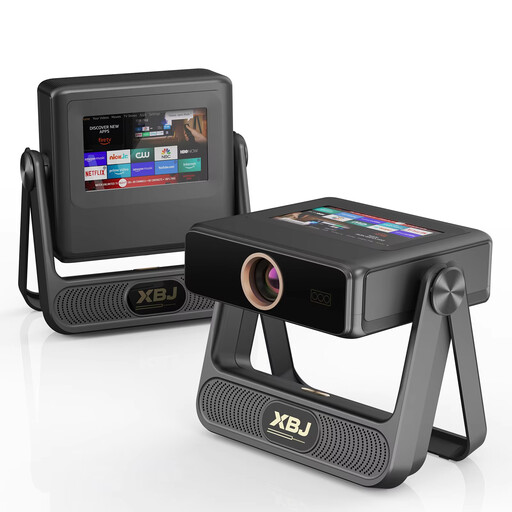
XBJ A5Pro Outdoor Smart Projector, Grey
This model may suit a set-up with an external games console or media source; the product information lists compatibility with PS5 and Switch.
The title lists native 1080p, 900 ANSI lumen and automatic focus and keystone correction. These are product specifications, not a guarantee of picture quality in your room.
View at Joybuy
 No image available
XGIMI MoGo 4 Full HD 1080p, Match Night EU Edition, with EA SPORTS FC 26 Game Code
A portable model with a built-in battery may suit you if you want to move the projector between viewing spots.
The title lists 450 ISO lumen, Google TV, Harman Kardon audio and a battery life of 2,5 hours. Check that the stated battery life and sound set-up suit your viewing plans.
View at Joybuy
 No image available
Projector with built-in apps and 180° rotation
May suit you if you want to position the projector in different ways and use an external HDMI source or TV stick.
The title lists an image size of 50–200 inches, digital zoom of 50%–100%, 180° rotation and HDMI compatibility. Check what image size you can achieve from your projector’s position.
View at Joybuy
Frequently asked questions
How can you tell in advance how large the image will be?
Measure the distance from the planned lens position to the screen and work out how much screen width is available. Enter these details for the specific model in a projection calculator, rather than relying only on the maximum stated image size.
Will a projector with streaming apps automatically show your tennis match?
No. First check with the provider that the match is available and find out which playback method will work. Ziggo states that casting with Ziggo GO via Chromecast or AirPlay offers picture quality of up to 720p; this doesn’t automatically apply to other providers or connection methods.
Can I show the match to guests in a publicly accessible venue?
That depends on the broadcast, the rights and the venue; a home subscription doesn’t automatically give you permission to screen it publicly. For certain premium sports screenings at a venue, Ziggo specifies a sports package and business licence. Check the terms with the provider or rights holder for the specific tennis match.
What should you check for maintenance or if something goes wrong?
Follow the maintenance instructions for the exact model and, for a lamp-based model, check the stated operating life for each mode. In the Netherlands, there is no fixed statutory warranty period for all products. If a product doesn’t meet what you could reasonably expect with normal use, the seller is responsible for providing an appropriate solution.


