Who is this relevant to?

Practising to hear how you sound

You want to hear whether your book review sounds clear, so you’re choosing based on recording and playback first, rather than professional audio terminology. Philips and OM SYSTEM describe features for recording and playing back speech.

Reader with a small desk

You want to leave room for your book and notes, and need a recorder you can set down and operate easily. Compare the dimensions and check that the microphone won’t be obstructed. Philips and OM SYSTEM list features relating to operation and positioning.

Practising and replaying tricky passages

You record several attempts and want to find sentences easily or play them back more slowly. Features vary by model, as Philips, OM SYSTEM and Zoom explain for their respective recorders.

What should you look for when choosing?

Compact voice recorder

Choose this option: if you want to start a practice recording quickly and listen back on the device. Philips lists one-touch recording for the DVT1170; OM SYSTEM describes playback features for the WS-883.

Bear in mind: the controls for finding and replaying recordings vary. Philips says the DVT1170’s built-in microphone records on one channel.

Portable stereo audio recorder

Choose this option: if you also want to edit recordings, use the recorder as a USB microphone or connect an external microphone. Zoom and Tascam list these features for the H1essential and DR-05XP respectively.

Bear in mind: you may not need these extra features for practising on your own. Check the storage, power requirements and microphone positioning beforehand.

Phone with a recording app

Choose this option: if you first want to see whether recording and listening back on a device you already own will do the job.

Bear in mind: recording with an app depends on your phone’s battery and available storage.

What matters What should you check? Who will find this important?
Making your voice easy to understand Check the exact model’s microphone setup, recording options and headphone socket. Make a short test recording in the place where you usually practise. If I want to judge whether my book review sounds clear, I want to listen back to my voice in my usual spot. Around 36% of consumers say making their voice easy to understand is their top priority.
Space and controls Compare the stated dimensions and button layout with the space available. Make sure your book or hands won’t cover the microphone. With a small desk, I want to keep my book and notes within reach while starting a recording. For around 29% of consumers, desk space and controls come first.
Finding passages again Check whether the model has bookmarks, date search, repeat playback or playback speed controls, and how to use these features. If I want to listen to a tricky sentence again, I want to find that passage without having to replay the whole recording each time. Around 21% of consumers say finding and replaying passages is their top priority.
Ready-to-use setup and essentials Check the supported storage, power source and which essentials are included with the version you’ve chosen. If I want to get started straight away, I don’t want to discover halfway through practising that I still need to sort out storage or power. For around 14% of consumers, being able to use a product straight away with as little extra preparation as possible matters most.

Things to consider when choosing

  • Assuming a high bit rate guarantees clear speech

    The recording format or bit rate alone won’t tell you how your voice will sound at your desk. Zoom and Tascam describe features of their specific recorders, but these can’t tell you how your own recording space will affect the sound.

    Start with your listening and operating needs, then make a short test recording in your usual spot.

  • Confusing playback with easy repeat listening

    Being able to play back a recording doesn’t necessarily mean you can quickly find a particular sentence. Timestamps, calendar search and playback speed are different features.

    Decide whether you want to compare complete attempts or often replay a single sentence, then check how to use that feature on the exact model.

  • Focusing only on the recorder and forgetting the essentials

    Models may differ in their internal memory, card use and power source. This affects what you’ll need to have ready before your first recording.

    Check the packaging, storage requirements and power source before choosing. Some models may need a compatible memory card or batteries.

Brands to consider

Philips

The VoiceTracer DVT1170 is a straightforward option for recording yourself speaking.

  • Philips lists 8 GB of internal memory, WAV recording, one-touch recording and a built-in microphone with one recording channel for the DVT1170.
  • Mono recording isn’t stereo recording, and the specifications can’t tell you how clear your voice will sound at your desk.

OM SYSTEM

The WS-883 is an option if you value speech-focused playback and search features as well as recording.

  • OM SYSTEM lists stereo recording, calendar search, a built-in stand and direct USB transfer for the WS-883.
  • These features don’t prove that the controls will be easy for everyone to use. Check whether you can find the playback features you need.

Zoom

The H1essential is a portable recorder to consider if you also want to use a USB microphone function or an external microphone.

  • Zoom lists X/Y microphones, 32-bit float recording and a microphone input for the H1essential.
  • These features don’t guarantee that a voice will be clear in every room. Check the storage requirements and positioning.

Tascam

The DR-05XP is an option if you also want to use portable stereo recordings in audio or video editing.

  • Tascam lists several recording formats, built-in microphones, an external input and a USB-C audio interface for this model.
  • You may not need these extra features just to listen back to your own recordings. Manufacturer information about recording quality isn’t an independent listening test.

Joybuy products

This selection is aimed at recording your own spoken practice review. It includes voice recorders and audio or MP3 players whose product names mention a recording function.

Plaud Note Pro AI voice recorder, silver

Plaud Note Pro AI voice recorder (silver)

The product name describes an AI voice recorder for capturing spoken notes. Consider this option if you’re looking for notes and summaries as well as recording.

The product name mentions AI notes and summaries.

Joybuy

Digital voice recorder, 64 GB, with transcription function

Digital voice recorder, 64 GB, with transcription function

The product name mentions voice recording and transcription. Consider this model if you’d also like to work with text while practising.

The product name lists 64 GB of storage and a transcription function.

Joybuy
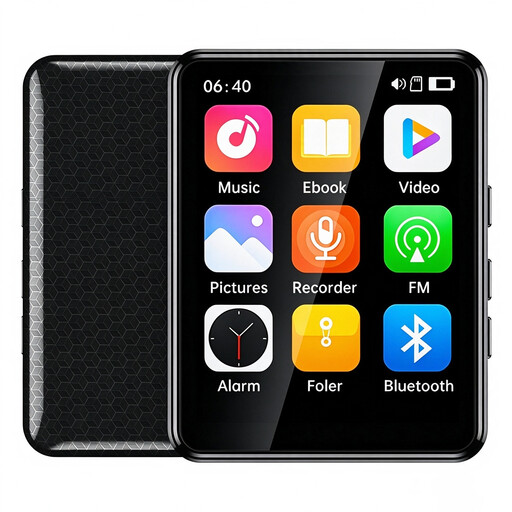
VIELLAN MP3 player with voice recording, 64 GB, colour screen and touchscreen

VIELLAN MP3 player, 64 GB, 2.4-inch colour screen and touchscreen

The product name lists voice recording as a feature of this MP3 player. Check whether the controls suit the way you want to start and find your practice recordings.

The product name lists 64 GB of memory, Bluetooth and a 2.4-inch colour touchscreen.

Joybuy

Digital audio player with recording function and 1.8-inch display

Digital audio player with 1.8-inch display and voice recording

The product name mentions voice recording via a built-in microphone. Check whether the controls suit the way you want to capture a practice attempt.

The product name lists Bluetooth, a 1.8-inch display and an e-book function.

Joybuy
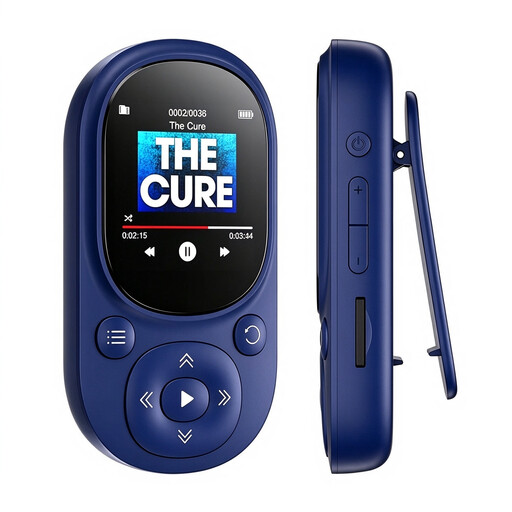
Bluetooth MP3 player, 64 GB, blue, with voice recording

Bluetooth MP3 player, 64 GB, Bluetooth 5.3, 1.44-inch display, blue

The product name lists voice recording as a feature. Check that you can use the recording controls easily while practising.

The product name lists 64 GB of memory, Bluetooth 5.3 and a microSD card slot supporting cards up to 128 GB.

Joybuy

Frequently asked questions

How do you get started practising at a small desk?

Place the recorder so your book and hands don’t cover the microphone, then make a short recording in your usual spot. Check how to start and stop the model you’ve chosen, and how to find recordings again. Philips lists one-touch recording for the DVT1170, while OM SYSTEM lists calendar search for the WS-883.

Do you need a memory card for every recorder?

No, it depends on the model. Philips lists 8 GB of internal memory for the DVT1170, and OM SYSTEM also lists 8 GB for the WS-883. The Zoom H1essential manual explains how to insert and format a microSD card. Check the requirements for the exact model.

What warranty and cancellation period apply to online purchases in the Netherlands?

ACM ConsuWijzer states that, in principle, online purchases come with a statutory 14-day cancellation period from the day the product is delivered, subject to some exceptions. You also have a statutory guarantee. What you can expect from a product depends on the product and the circumstances. Check the terms that apply to your purchase.

Do you need permission to record your book review?

Recording only your own voice is different from recording other people who can be identified. If other people’s personal data is collected or used, the GDPR requires a lawful basis where it applies; the Dutch Data Protection Authority explains this. That doesn’t automatically mean consent is the applicable lawful basis in every situation.
