Who is this guide for?

Reader with limited desk space

You want to see dialogue and illustrations without the monitor stand taking up too much of your work surface. Measure the available depth and compare the dimensions of the screen with its stand. LG Nederland, ASUS Nederland and BenQ Europe provide information about stands and placement options for various models.

Player who also plays fast-paced games

You use the same monitor for visual novels and games with lots of movement. Look beyond the stated refresh rate and check the connections, adjustability and what your source device supports. Philips Nederland, ASUS Nederland and Lenovo Nederland provide model specifications and general buying advice.

Player with multiple devices

You might want to connect a PC and another device, or avoid having separate speakers on your desk. Check the number of inputs and whether your chosen model has built-in speakers. Specifications vary by model, including across LG, ASUS and BenQ monitors.

What should you look for?

Adjustable monitor for mainly reading

A good fit if: you mainly read dialogue and want to adjust the screen position. For example, compare a 23.8-inch IPS model by its stand dimensions, adjustability and inputs.

Trade-off: LG states that the 24BA560-B has a refresh rate of 100 Hz, compared with the higher stated rates of the gaming models mentioned here.

Compact gaming monitor for mixed use

A good fit if: you regularly play fast-paced games as well as visual novels. Compare the supported refresh rate, inputs and adjustment options.

Trade-off: a high stated Hz value alone doesn’t tell you how comfortable text is to read. ASUS doesn’t list height adjustment for the VG249Q3A.

Monitor with reading modes and built-in sound

A good fit if: you want to compare reading or picture modes, speakers and height adjustment.

Trade-off: BenQ states that the EX240 has a stand depth of 252 mm, so check that it will fit on your desk. The stated response times of 1 ms MPRT and 2 ms GtG use different definitions.

What to consider What should you check? Who is this important for?
Space and placement Measure the free space on your desk and compare the width and depth, including the stand. Also check the height adjustment or VESA mounting options for the exact model. If my desk is shallow, I want to know whether the monitor stand will fit and still leave room for my keyboard and mouse. Around 36% of consumers making this choice prioritise the space a monitor takes up and how it can be positioned.
Dialogue readability Compare the resolution and screen size together, and if possible, try your own game and text size. Check which adjustment options and reading modes the model offers. If I read dialogue for long periods, I want the text to be comfortable to follow from where I sit. Around 29% of consumers put readability first.
Illustrations and other games Compare the IPS specifications, resolution and inputs. Think about whether you play fast-paced games before giving the stated Hz value too much weight. If illustrations matter to me and I also use the same monitor for other games, I want to compare the screen specifications and supported refresh rate side by side. Around 21% of consumers give this top priority.
Connections and sound Compare the inputs with the outputs on your devices, and check whether speakers and the necessary cables are included with that version. If I want to connect multiple devices or don’t want separate speakers on my desk, I look at the inputs and built-in sound first. Around 14% of consumers choose mainly on these points.

Common buying mistakes

  • Checking only the screen diagonal

    The screen size doesn’t tell you how much desk space the stand takes up. An adjustable stand may also need more room than the screen alone.

    Measure the available depth beforehand and compare it with the dimensions including the stand. If you’re considering a monitor arm, check that the exact model has a suitable VESA mount.

    You may need to change the placement or use a suitable bracket to fit the monitor on your desk.

  • Treating the highest Hz or lowest ms value as a measure of readability

    Refresh rate and response time describe different things. Response times can also be stated using different definitions, such as MPRT and GtG.

    For visual novels, start by considering the text, screen size and setup. Compare response times only when the measurement definition is clear.

  • Assuming an extra warranty replaces your statutory rights

    If a product is faulty, the seller must provide a solution. According to the Dutch government, an additional warranty is separate from this statutory right.

    Before buying, read what any additional warranty covers and what terms and conditions apply.

Brands to compare

LG

The LG 24BA560-B is worth comparing if you’re looking for an adjustable 23.8-inch IPS screen with a stated refresh rate of 100 Hz.

  • LG lists an adjustable stand, reading mode and built-in speakers for this model.
  • Check the dimensions of the complete setup; these features aren’t automatically available on other LG monitors.

Philips

The Evnia 24M2N3200A/01 is a 23.8-inch Full HD Fast IPS gaming monitor that you can compare with more compact, reading-focused screens.

  • Philips lists a refresh rate of 180 Hz for this model.
  • This is a model specification, not an independent measurement, and it doesn’t prove that visual novels are easier to read on this screen.

ASUS

According to ASUS Nederland, the TUF Gaming VG249Q3A combines a 23.8-inch Full HD IPS panel with gaming features and several video inputs.

  • ASUS lists two HDMI inputs, one DisplayPort input and built-in speakers for this model.
  • ASUS doesn’t list height adjustment for this model, so check that the position will work on your desk.

BenQ

The MOBIUZ EX240 is a 23.8-inch gaming monitor with European specifications, picture modes, speakers and height adjustment.

  • BenQ lists a stand depth of 252 mm and response times of 1 ms MPRT and 2 ms GtG.
  • MPRT and GtG use different definitions. Also check the exact local version and the space available on your desk.

AOC

The AOC 24G4X is a 23.8-inch Full HD Fast IPS gaming monitor.

  • AOC lists 180 Hz and 1 ms GtG for this version.
  • The manufacturer’s information comes from a UK product page; check the accessories and version offered in the Netherlands separately.

Joybuy products for this use case

This selection ranges from a portable 15.6-inch monitor to 23.6- and 24-inch screens for mixed use. Compare the stated dimensions, stand, connections and screen specifications with your desk and devices.

KTC H24B9S 24-inch gaming monitor

KTC H24B9S 24-inch gaming monitor

An option to compare if you play visual novels and want to use the same monitor for games with lots of movement.

24 inches, Full HD (1920 × 1080), IPS, 144 Hz and Adaptive Sync. The description lists a tilt range of -5° to 15°.

Joybuy

MSI PRO MP165 E6 portable USB-C monitor

MSI PRO MP165 E6

Its portable size could make this a good option if you’re looking for a smaller screen setup; bear in mind that it has a 15.6-inch screen.

Full HD IPS, 60 Hz and 0.78 kg. The description lists USB-C and HDMI connections, built-in speakers and a stand that tilts up to 90°.

Joybuy

Philips 24E1N1100A 23.8-inch Full HD IPS monitor

Philips 24E1N1100A

A model to compare if you’re looking for a Full HD IPS screen with built-in speakers and several connection options.

23.8 inches, 1920 × 1080 and 100 Hz. The product information lists HDMI, VGA and VESA mounting.

Joybuy
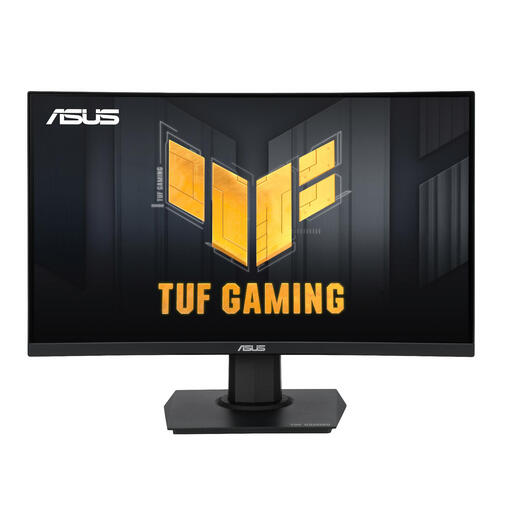
ASUS TUF Gaming VG24VQER curved 23.6-inch monitor

ASUS TUF Gaming VG24VQER

An option to compare if you play fast-paced games as well as visual novels; check that the curved screen suits your viewing position.

23.6 inches, Full HD (1920 × 1080), VA, up to 180 Hz and FreeSync. The screen has a fixed 1500R curvature. The product information lists HDMI, DisplayPort and VESA mounting.

Joybuy

TITAN ARMY C24A1H 23.6-inch gaming monitor

TITAN ARMY C24A1H

Compare this model if you want a reading mode alongside gaming features and its stated screen and stand dimensions fit your desk.

23.6 inches, Full HD (1920 × 1080), VA and 240 Hz. The product information lists a Reading mode, HDMI 2.0 and DisplayPort 1.2. Dimensions with stand: 537.9 × 196.9 × 409.2 mm; the screen has a fixed 1500R curvature.

Joybuy

Frequently asked questions

Do I absolutely need 180 Hz for visual novels?

No, 180 Hz isn’t a requirement for playing visual novels. A higher refresh rate is mainly worth considering if you also use the same monitor for fast-paced games. If so, check that your device and connection support the setting you want.

How can I stop the monitor taking up my small desk?

Measure the available width and depth, then compare them with the dimensions including the stand, not just the screen diagonal. For example, BenQ lists the EX240 as 540 mm wide and 252 mm deep including the stand. These are dimensions for that model, not a general guide.

How do I connect multiple devices?

Compare the outputs on your devices with the inputs on the exact monitor model. ASUS lists two HDMI 2.0 inputs and one DisplayPort 1.2 input for the TUF Gaming VG249Q3A. Also check which cables are included with the version on offer.

What can I do if my monitor is faulty after purchase?

For a consumer purchase in the Netherlands, the seller must provide a solution if the product is faulty, according to the Dutch government. The Netherlands doesn’t have a fixed statutory warranty period of two years, according to the Dutch government; what you can expect depends, among other things, on the product and the information provided at the time of sale.

Which product regulations and energy labels apply to a monitor?

Electrical equipment placed on the EU market must comply with the applicable product regulations, including requirements for CE marking. EU ecodesign rules and energy labels also apply to computer monitors. Check the information for the specific model and version on offer. A CE logo alone is not a performance test.
