First, choose a handheld that can actually run the visual novels you want to play. Then consider the screen, how you like to play and when you can recharge. The Switch Lite is designed for handheld play, the Switch OLED combines handheld play with the option to play on a TV, and the Steam Deck OLED is a good fit if the titles you want are in your Steam library. The stated battery-life figures are ranges, not a guarantee for the games you play.
Who is this guide for?
Playing with limited access to power sockets
You want to play on the built-in screen without constantly needing a television or a fixed power connection. So, look beyond the battery specifications and consider when you’ll be able to charge your handheld.
Using an existing game library
You want to choose a system that works with specific Switch or Steam titles. Check each game’s compatibility, play style and controls.
Reading text on screen
With visual novels, you’ll want to comfortably read the text on the built-in screen. Compare the screen size and how the games you want to play are displayed.
What should you consider when choosing?
Start with the games and controls you need, then decide whether screen space, battery life or the option to play on a TV matters most to you.
| What to consider |
What should you check? |
Who might prioritise this? |
| Playing without a fixed power connection |
Compare the battery-life range for the exact model and plan when you can recharge. The usage ranges quoted by Nintendo and Valve vary by model and use. |
I don’t want to be tied to a power socket while reading, and I can plan when to recharge. Around 31% of consumers prioritise playing without a fixed power connection above all else. |
| Games you want to play and controls |
Check the platform, language and supported play styles for each title. Nintendo notes that some Switch games have compatibility limitations on Switch 2; Valve assesses Steam Deck compatibility on a game-by-game basis. |
I want to know first whether my chosen visual novels will work on the system and whether the controls suit each game. Around 25% of consumers prioritise their preferred games and their compatibility above all else. |
| Text on the built-in screen |
Compare screen sizes and check how the text in your chosen game is displayed. Screen size alone doesn’t tell you how large the in-game text will be. |
I read a lot of text on the device itself and want to check in advance that it’s comfortable to read in my games. Around 25% of consumers prioritise on-screen text readability above all else. |
| Switching between play styles |
Decide whether you want to play in handheld, tabletop or TV mode, and check which accessories you’ll need for your preferred setup. Nintendo says the Switch Lite cannot be connected to a TV. |
I sometimes want to use a different setup as well as playing handheld, and I can make space for it and provide the necessary connections. Around 19% of consumers prioritise switching between play styles above all else. |
Common buying mistakes
-
Assuming every Switch visual novel works on the Switch Lite
The Switch Lite supports games that support handheld mode; some games or features may require a different play style or separate controllers.
Before buying, check the official information for the specific game and find out which controls it requires.
Some features may require extra controllers, so check what you’ll need for the game and your preferred play style.
-
Treating the highest battery-life figure as guaranteed reading time
Stated battery-life ranges depend on the model and how you use it. They don’t guarantee a set playing time for the visual novel you choose.
Plan when to recharge based on your own circumstances, and don’t treat a stated range as guaranteed playing time.
-
Assuming a regional version or bundle is the same as a standalone model
A different version or bundle may include different accessories or a different power supply, so it may not match the model you’re looking for.
Compare the full model name, version and bundle contents before you choose.
With a different bundle, you may need to source the accessories or power supply you want separately.
Relevant brands to consider
Nintendo
Nintendo offers handheld models and systems with different play styles. The right option depends on the games and setup you want to use.
- Nintendo says the Switch Lite supports Switch games that support handheld mode. The Switch OLED model has a 7-inch built-in screen.
- The Switch Lite cannot be connected to a TV. For Switch 2, check compatibility for each existing Switch game. Nintendo lists battery-life ranges of around 3–7 hours for the Switch Lite, around 4.5–9 hours for the OLED model and around 2–6.5 hours for Switch 2; playing time depends on use.
Valve
The Steam Deck OLED is an option if the visual novels you want are in your Steam library and you’d like to play them on the go.
- Valve lists a 7.4-inch OLED screen and a 50 Wh battery for the Steam Deck OLED.
- Valve quotes 3–12 hours of playing time, depending on the content. Compatibility is assessed for each game and can change, so check the titles you want to play.
ASUS
The ROG Ally X (2024) is a Windows handheld for anyone who values access to PC game stores.
- ASUS lists Windows 11 and an 80 Wh battery for the ROG Ally X (2024).
- Battery capacity doesn’t tell you how long visual novels will play for. Check how each game works and what controls it requires; don’t confuse this model with the separate ROG Xbox Ally X.
Lenovo
Lenovo describes the Legion Go S Powered by SteamOS as a portable PC handheld with a built-in screen.
- Lenovo lists an 8-inch screen and a 55.5 Wh battery for the configuration shown.
- Battery capacity doesn’t guarantee a set playing time. Check the exact version and whether the games you’ve chosen work well.
Joybuy products
Portable Nintendo and Lenovo handhelds for playing visual novels on the built-in screen, including models that may also offer other play styles. Check compatibility and controls for each game you choose.
 No image available
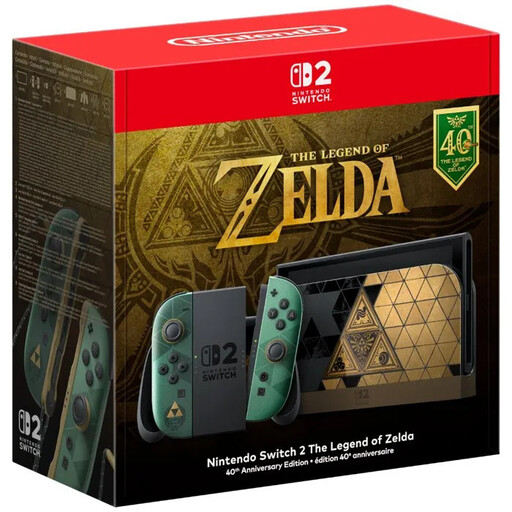
Nintendo Switch 2, The Legend of Zelda 40th Anniversary Edition, EU version
A handheld option if you want to play visual novels on the built-in screen and would also like to consider another play style.
Nintendo gives Switch 2 a battery-life range of around 2–6.5 hours, depending on the software and how you use it. Check compatibility for each existing Switch game.
Joybuy
 No image available
Lenovo Legion Go 8ASP2
A portable PC handheld to consider if you want to play visual novels on a built-in screen. First, check that your games and preferred controls work with it.
Joybuy
 No image available
Lenovo Legion Go S 8APU1, 83N6001TMH
A portable handheld to consider if you want to play visual novels on the built-in screen. Before buying, check that your chosen games work and support your preferred controls.
Joybuy
 No image available
Nintendo Switch Lite, 32 GB, turquoise, bundle with Tomodachi Life and a 30-day Nintendo Switch Online trial
Designed for handheld play on the built-in screen, with no TV setup. Check that your visual novels support handheld mode.
Nintendo says the Switch Lite cannot be connected to a TV. Some games or features may require additional controllers.
Joybuy
 No image available
Nintendo Switch 2 bundle, 256 GB, with Mario Kart World download and a 3-month Nintendo Switch Online subscription
A handheld option if you want to play visual novels on the built-in screen and would also like the option of playing on a TV.
Nintendo gives Switch 2 a battery-life range of around 2–6.5 hours, depending on the software and how you use it. Check whether each existing Switch game is compatible.
Joybuy
Frequently asked questions
Can you play every Switch visual novel on a Switch Lite?
No. Check whether each game supports handheld mode. Nintendo says some features require separate Joy-Con controllers and possibly a way to charge them.
Will existing Switch games always work on Switch 2?
Not always. Nintendo says some Switch games are unsupported or not fully compatible with Switch 2. Check the compatibility information for every title you want to play.
Will you always need a power socket while reading?
Not while you’re using a charged handheld, but you’ll need to plan when to recharge. Battery-life figures quoted by Nintendo and Valve vary by model and use, and don’t guarantee a set playing time for your specific game.
How can you tell whether the text on screen is comfortable to read?
Compare screen sizes and check how the visual novels you want to play are displayed. A larger screen doesn’t, by itself, tell you how large the text will appear in a particular game.
How does a Switch battery’s life change over time?
The battery gradually wears down. Nintendo says that after around 800 charge cycles, battery life may have fallen to around 80% of that of a new Switch system; this isn’t a guaranteed lifespan for every device.


