First, check whether the visual novel itself supports controller input and whether the connection is compatible with your PC or console. Valve describes Steam Input as a way to translate inputs into something a game can understand, but that doesn’t mean every visual novel works with a controller out of the box. Then choose between a wired setup, wireless play or a controller for your console, and check whether the game actually supports any extra features.
Who is a controller suitable for?
PC players who want to check the controls first
If you play visual novels on a PC, you can check before buying whether the specific game supports controller input and which input options are available. Valve explains how Steam Input can translate inputs, but support varies from game to game.
Students with a compact gaming space
A cable can be practical on a small desk, while playing from a bed or chair may call for a suitable wireless connection. Microsoft, 8BitDo and Sony describe different connection options for their controllers; check what your own device supports.
Console players who spend longer reading
If you play on Switch, Xbox or PS5, you can choose a controller made for your console and consider how it feels to use and how it’s powered during longer reading sessions. Nintendo quotes around 40 hours of battery life for a fully charged Switch Pro Controller, depending on the software and features used. This is Nintendo’s stated figure, not an independent measurement.
What should you look for when choosing?
The right choice depends mainly on whether your game supports a controller, your gaming device, the connections you need and where you’ll be sitting.
| What to consider |
What to look for |
Who is this most relevant to? |
| Game and device compatibility |
Check the input options for the specific game and which connection your PC or console supports. |
If I play on PC or console, I want to know whether my particular visual novel accepts controller input and whether my device works with it. Around 31% of consumers put compatibility first. |
| What you need to use it |
Check whether you need a cable, batteries or a suitable wireless connection, and what’s included with the controller. |
If I want to keep things simple, I want to know in advance what my gaming setup requires. Around 25% of consumers prioritise the equipment needed and how easy it is to use. |
| Comfort and controls |
Take a look at the button layout and check that the controller feels comfortable to hold. |
When I’m often skipping through dialogue and making choices, I want to be able to use the buttons without constantly adjusting my position. Around 25% of consumers put comfort and controls first. |
| Freedom to move |
Measure the distance between where you sit and your device, and check which connections it supports. |
If I want to play from my bed or chair, I may find a cable between me and the device inconvenient. Around 19% of consumers prioritise playing without one. |
Common buying pitfalls
-
Confusing device compatibility with game support
A controller may connect to your PC or console, while the visual novel itself doesn’t support controller input or needs its settings configuring first.
Check the input options for the specific game, then check that it connects to your device.
-
Assuming extra features are essential
Extra sticks, triggers or haptic features aren’t automatically useful for text-based controls. Sony, for example, says that haptic feedback on PC requires both game support and a USB connection.
Prioritise the controls your game actually supports, and check which extra features work with each game and device.
Brands to compare
Xbox
Worth considering if you play on Xbox or a compatible Windows PC.
- Microsoft lists Bluetooth and Xbox Wireless as connection options; check which one suits your device.
- A supported connection doesn’t guarantee that a particular visual novel accepts gamepad input.
8BitDo
The Ultimate 2C Wired is a wired option for a compatible Windows PC.
- 8BitDo lists a USB connection and Windows 10 (1903) or later in its manual.
- You’ll be playing with a cable, so also check whether the game supports controller input.
Nintendo
The Switch Pro Controller is designed for use with Nintendo Switch.
- Nintendo quotes around 40 hours of battery life after a full charge, depending on the software and features used.
- This figure doesn’t tell you whether an individual visual novel is supported on PC or another console.
PlayStation
The DualSense is an option for PS5 and for PC games that support the controller.
- Sony describes USB and Bluetooth connections for supported devices.
- According to Sony, haptic feedback on PC requires both game support and a USB connection.
Controllers at Joybuy
This selection includes controllers for PCs and consoles. Choose based on the specific visual novel, your gaming device and whether a cable will work with your room layout.
 No image available
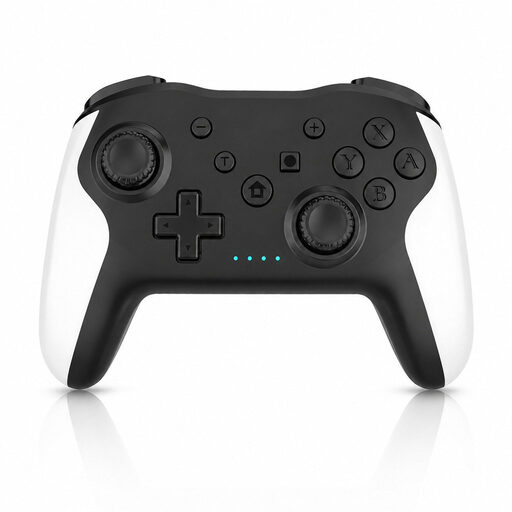
Game controller with dual vibration and gyro for Switch and PC
The product name lists Switch and PC; check whether your visual novel supports controller input on the device you choose.
Joybuy
 No image available
PS5 DualSense Wireless Controller V3 - Cosmic Red
An option for a PS5 setup; check separately whether the visual novel supports controller input.
Joybuy
 No image available
Xbox Wireless Controller Robot White
An option if you play on Xbox; check which connections your device and visual novel support.
The product information specifies AA batteries for wireless use.
Joybuy
 No image available
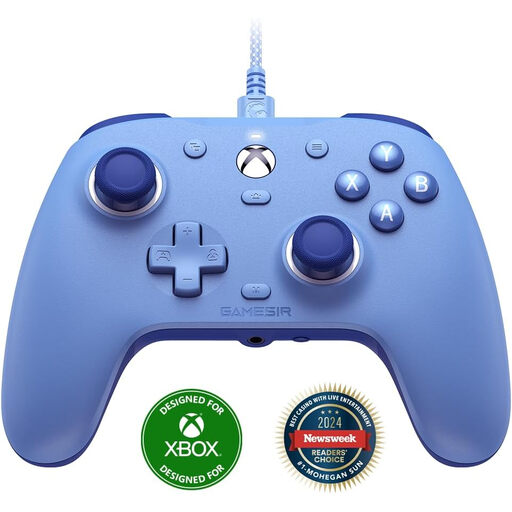
GameSir G7 SE Wired Xbox Game Controller, Dynamic Blue
The wired version suits a PC or Xbox setup where a cable is practical. The product name lists Xbox Series X/S, Xbox One and Win10/Win11.
Joybuy
 No image available
Nintendo Switch Pro Controller - Black
An option if you play on Nintendo Switch; check whether the visual novel in question supports controller input.
Joybuy
Frequently asked questions
Does every visual novel work with a controller?
No. Check support for the specific game. The game pages for Harmonia Full HD Edition and Tavern Talk list different input options. Valve also explains how Steam Input can translate inputs, but this doesn’t confirm that every game will work comfortably without changing the settings.
How do I connect a wired PC controller?
For the 8BitDo Ultimate 2C Wired, the manufacturer’s manual lists a USB connection and Windows 10 (1903) or later. Then check the input settings for the game you want to play.
Does DualSense always provide haptic feedback on PC via Bluetooth?
No. According to Sony, haptic feedback on PC depends on the game supporting it, and the feature requires a USB connection.
What does the legal guarantee mean for a controller in the Netherlands?
You’re entitled to a product that meets reasonable expectations, but the Netherlands has no fixed statutory guarantee period. The Dutch Government says that the solution to a fault depends on the circumstances; any manufacturer’s guarantee offered doesn’t replace your statutory rights.
Can I return a controller bought online if I don’t like its shape?
Online purchases generally come with a statutory cooling-off period; ACM ConsuWijzer says it ends 14 days after delivery. Check the applicable terms in advance, including how you’re allowed to try the product.


