First check whether your visual novel supports controller input. Then choose between wired and wireless, and decide whether controller lighting would be helpful or distracting in a dark room. Platform compatibility doesn’t automatically mean that choices, menus and any text entry will work, so check the specific actions you need. Also check the applicable CE marking for the exact version: requirements can depend on the version, including whether it has a wireless connection.
Who is this relevant to?
PC players who enjoy different games
If you play a range of visual novels, you’ll want to know whether choices, menus and any text entry work with a controller. Valve explains that gamepad input depends on support from the game; the Steam page for ASANA Visual Novel lists partial controller support.
Players in a dark room
If you want to find the buttons easily without light distracting you from the text, check which parts of the controller actually light up. GameSir lists RGB lighting for the Kaleid Flux, but that doesn’t mean the button labels are illuminated.
Players who enjoy long sessions
If you navigate frequently, consider the position of the directional pad and whether you’d prefer a wired or wireless connection. Manufacturers list different connection options for each model. Nintendo gives the Switch Pro Controller a directional pad and an estimated battery life of around 40 hours, depending on use.
What should you look for when choosing?
First check the input options for your specific game and system. Then compare the controls, lighting and distance from your screen.
| What to consider |
What should you check? |
Who is this important to? |
| Game and platform support |
Check the information for your game and test choices, menus and any text entry. |
When I play on PC, I want to know in advance whether the controls in my visual novel will work. Around 33% of consumers give game and platform support top priority. |
| Controls in the dark |
Check which parts of the exact model light up and whether that suits your preferences. |
In a dark room, I want to find the controls without the light distracting me from the text. Around 27% of consumers make suitable controller lighting their top priority. |
| Button feel and accessibility |
Consider the position of the directional pad and the buttons you use most often; try the grip if you can. |
When navigating frequently, I want the main buttons to be easy and comfortable to reach. Around 20% of consumers prioritise button feel and accessibility. |
| Wired or wireless |
Measure the cable route you’ll need or check the pairing method; look up battery information for the exact model. |
From where I sit, I want enough freedom to move without a cable getting in the way. Around 20% of consumers give freedom of movement top priority. |
Common mistakes
-
Confusing platform compatibility with full game support
A controller may work with a system even if a particular game only supports some of its controls. Valve distinguishes between gamepad commands and input assigned to keyboard or mouse controls.
Check the information for your visual novel and make sure the actions you need, such as using menus and entering any text, work with the controller.
-
Assuming RGB lighting means the button labels are illuminated
GameSir lists RGB lighting for the Kaleid Flux, but this doesn’t confirm that the action button labels light up.
Check which parts of the exact version light up and whether that suits you when playing in a dark room.
-
Treating similar 8BitDo models as the same version
The wired SN30 Pro USB and the separately listed SN30 Pro have different connection options.
Before choosing a version, compare the full model name, including ‘USB’, with the information from 8BitDo.
-
Expecting a fixed statutory guarantee period
According to the Dutch government, the Netherlands has no fixed statutory guarantee period. If a product is faulty, the retailer is your point of contact.
Distinguish between your statutory rights and any manufacturer’s guarantee or additional cover.
-
Treating a compatibility listing as proof of product compliance
A platform listing doesn’t tell you which product requirements apply to the specific version. The Dutch Authority for Digital Infrastructure explains that applicable requirements can depend on the version, for example whether it has a wireless connection.
Check the CE marking and product information for the exact version you’re considering.
Brands to consider
GameSir
The wired Kaleid Flux is worth considering for a compatible Windows or Xbox set-up if you want RGB lighting.
- GameSir lists RGB lighting, extra buttons and a detachable 3 m USB-C cable for the Kaleid Flux.
- The listed lighting doesn’t prove that the button labels light up; check the exact version and game support.
8BitDo
The wired SN30 Pro USB is worth considering if you want a directional pad and a wired connection for a compatible Windows or Switch set-up.
- 8BitDo lists a 1.8 m cable for the SN30 Pro USB.
- The SN30 Pro without ‘USB’ has different connection options; check the full model name.
Nintendo
The Switch Pro Controller is designed for a compatible Switch set-up.
- Nintendo lists a directional pad and estimated battery life of around 40 hours, depending on use.
- On 12 August 2026, Nintendo published an EU declaration of conformity for model HAC-013. This declaration applies to that model and doesn’t confirm compliance for other versions.
Xbox
The Xbox Wireless Controller is a wireless option worth considering for a compatible Windows set-up.
- Microsoft explains how to pair the controller with certain Windows devices.
- The pairing instructions don’t prove that every visual novel supports all controls; check the exact version too.
Joybuy product options
These options relate to questions about platform choice, wireless play and controller lighting. Before choosing, check that your game supports the controller and review the product information and CE marking for the exact version.
 No image available
Black wireless Dualshock game controller for PS4 and PC
The product name lists PS4 and PC; check that your visual novel and system support its controls.
Wireless; the product name also mentions dual vibration and gyro.
View at Joybuy
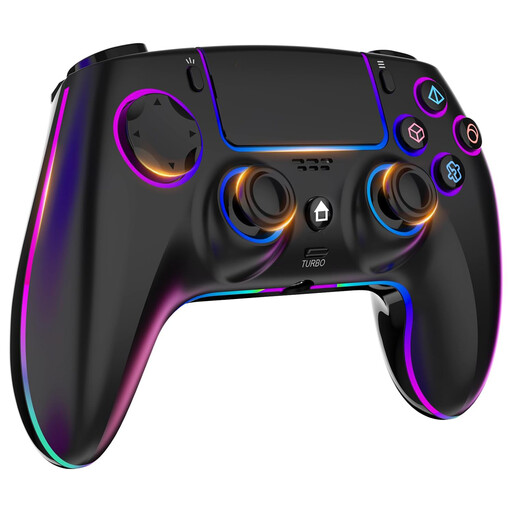 No image available
Wireless controller for PS4 and PC with 7-colour RGB lighting
The product name lists PS4, PC and RGB lighting; check which parts light up and whether the controller works with your game.
The product name also mentions dual vibration, turbo, a touchpad, a headphone jack and a 1000 mAh battery.
View at Joybuy
 No image available
Game controller with dual vibration and gyro for Switch and PC
The product name lists Switch and PC; check that your game supports the controller input you want on your system.
The product name mentions dual vibration and gyro.
View at Joybuy
 No image available
VIELLAN wireless game controller for PC with PS5-style layout
The product name mentions wireless use and RGB lighting; check game support and whether the lighting suits the way you play.
The product name lists Hall Effect joysticks, Hall triggers with 255 levels, programmable rear buttons, a 1000 mAh battery and USB-C. ‘PS5 layout’ describes the button layout; check compatibility separately.
View at Joybuy
 No image available
Xbox Wireless Controller Robot White
The product name lists a wireless Xbox controller; check that it pairs with your system and is supported by your visual novel.
Robot White is the listed colour option.
View at Joybuy
Frequently asked questions
Can you play every visual novel with a controller?
No, it depends on support in the specific game. Valve explains that gamepad commands only work in games that support this type of input; the Steam page for ASANA Visual Novel lists partial controller support. Check menus and any text entry too.
How do you connect a Switch Pro Controller?
Nintendo explains how to sync it with a Switch system using USB or the controller menu and SYNC button. These connection instructions don’t automatically mean that every game supports controller input.
What should you check if a wired Kaleid Flux isn’t responding?
GameSir recommends checking the USB connection and cable, and trying a different USB port if necessary. Follow any update instructions for the Kaleid Flux itself.
What should you check on a controller’s CE marking?
Check the marking and product information for the exact version. The Dutch Authority for Digital Infrastructure explains that applicable requirements can depend on the version, including whether the device is wireless.
What are your rights when buying online in the Netherlands?
For online distance purchases from a business, the Dutch government says you’ll often have a 14-day cooling-off period, with some exceptions. The Netherlands has no fixed statutory time limit for the legal guarantee; if a product is faulty, the retailer is your point of contact.


