Who are these options for?

Handheld readers playing in the dark

You want to read long stretches of dialogue on your own screen, with the option to adjust the brightness and how you play. Nintendo Netherlands describes brightness settings for handheld play, and both Nintendo Netherlands and Valve provide screen specifications for their handheld models.

Readers with an existing games library

Start by looking at the games you already own or want to play. Check the exact platform version and language. Valve rates Steam games individually for Steam Deck, while Nintendo Netherlands explains compatibility for Switch games on Switch 2.

Readers playing on a TV or monitor

You already have a screen where you can read text clearly from your seat, and are considering a home console. Sony Interactive Entertainment states that the PS5 Digital Edition has no built-in screen or disc drive.

What should you look for when choosing?

Nintendo Switch OLED

A good fit if: you want to play compatible Switch visual novels without a TV and having a built-in OLED screen matters to you. Nintendo Netherlands lists a screen size of 7 inches.

Trade-off: its screen is smaller than the 7.9-inch LCD screen on Switch 2. Check the language and compatibility for each game.

Nintendo Switch 2

A good fit if: you want a 7.9-inch handheld screen with a resolution of 1920 × 1080 and also want to play Switch 2 games. These specifications come from Nintendo Netherlands.

Trade-off: the screen is LCD, not OLED. Check whether each older Switch game is compatible.

Steam Deck OLED

A good fit if: you want to play visual novels from your Steam library on the go. Valve specifies a 7.4-inch screen with a resolution of 1280 × 800 for the OLED model.

Trade-off: Valve rates compatibility game by game. Having access to Steam doesn’t guarantee that a specific visual novel will be comfortable to play without adjustments.

Nintendo Switch Lite

A good fit if: you only want to play in handheld mode and the Switch games you want to play support it.

Trade-off: Nintendo describes the Lite as a handheld model; it doesn’t support tabletop or TV mode.

PS5 Digital Edition

A good fit if: you already have a compatible TV or monitor and the visual novels you want are available as digital PlayStation games.

Trade-off: the console has no built-in screen or disc drive. According to the PlayStation Store, a playable PS4 title may not support certain PS4 features.

What to consider What should you check? Who does this matter to?
Comfortable-to-read text View dialogue on the screen you plan to use and check whether the game has text display options. If you read long stretches of dialogue on a handheld, you’ll want to be able to follow the text easily on your chosen screen. Around 31% of consumers prioritise readability.
Games and languages you want Check the platform version, available screen languages and any compatibility information for each title. If you’re looking for a specific visual novel or language, you’ll want to know whether that particular title is available. Around 31% of consumers prioritise their preferred game and language.
Brightness in a dark room Check the built-in screen settings. For TV play, adjust the brightness on your TV or monitor. When you play in a dark room, you’ll want to adjust the picture to suit your surroundings. Around 19% of consumers prioritise brightness control.
Playing position and portability Check whether your chosen model supports handheld, tabletop or TV mode. Nintendo states that the Switch Lite only supports handheld play. If you mainly read in bed or also want to play at a table, the play mode should suit how you like to sit. Around 13% of consumers prioritise playing position.
Existing screen and purchase format Check whether you’ll need a separate TV or monitor and whether the console can play discs. If you already have a TV or monitor, you’ll want to know whether it suits your setup and whether you’ll need to buy games digitally. Around 6% of consumers prioritise their existing screen setup and purchase format.

Common buying mistakes

  • Assuming a larger or OLED screen guarantees readable dialogue

    Screen specifications don’t tell you how large the text or interface will appear in each individual game.

    Try a few titles you want to play at the screen size you’re considering and from your usual reading distance.

  • Assuming all older Switch games or Steam games will work automatically

    Nintendo lists Switch games as compatible with Switch 2 only when this applies to the specific game. Valve rates Steam games individually for Steam Deck.

    Before buying, check the exact title and version, the screen language and the compatibility information for your chosen platform.

  • Forgetting about your screen setup and digital purchases

    The PS5 Digital Edition has no built-in screen or disc drive, while the Nintendo Switch Lite only supports handheld play.

    Decide whether you want to read in bed, at a table or on a TV screen, and check whether the game you want is available digitally.

Brands to compare

Nintendo

The Switch family includes handheld options and models with different play modes. Nintendo Netherlands lists a 7-inch OLED screen for Switch OLED and a 7.9-inch LCD screen for Switch 2.

  • Nintendo describes Switch OLED as suitable for handheld, tabletop and TV modes; the Switch Lite is for handheld play only.
  • Compatibility between Switch games and Switch 2 varies by title. Also check the screen language for the visual novel you want.

Valve

Steam Deck OLED is a portable option for visual novels you want to play on Steam. Valve specifies a 7.4-inch OLED screen with a resolution of 1280 × 800.

  • You can check the Steam Deck rating for each game you’re interested in.
  • A Steam listing alone doesn’t confirm that the game’s text and controls will work well without adjustments.

Sony

The PS5 Digital Edition is an option for digital PlayStation games if you already have a TV or monitor. Sony Interactive Entertainment states that this model has no disc drive.

  • The console suits an existing screen setup and games that are available digitally.
  • You’ll need a separate screen. The PlayStation Store warns that certain PS4 features may be unavailable on PS5 in Phoenix Wright: Ace Attorney Trilogy.

Joybuy products

This Joybuy selection includes handheld consoles and an HDMI option for use with a TV. For each device, check whether the visual novel, platform version and language you want are available. A product listing as a games console doesn’t automatically confirm this.
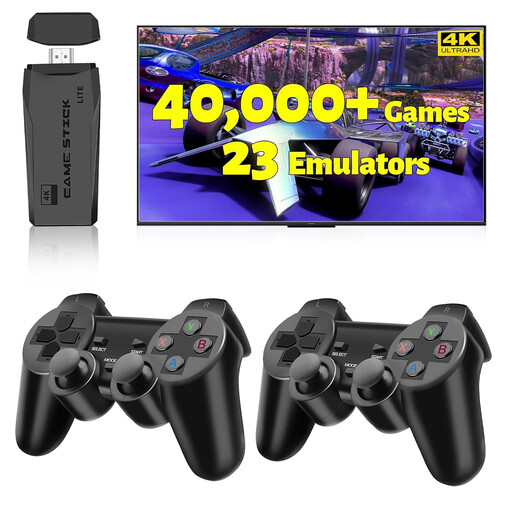
2027 Retro Gaming Console Pro 4K HDMI Game Stick

2027 Retro Gaming Console Pro 4K HDMI Game Stick

The product name describes this HDMI game stick as intended for TV use. Check whether the visual novel you want is actually available on the device.

The product name lists 4K HDMI, 20,000+ games, support for 23 emulators and two wireless controllers.

Joybuy

ASUS ROG Xbox Ally Portable Gaming Console, 16GB RAM, 512GB SSD, White

ASUS ROG Xbox Ally, 16GB RAM, 512GB SSD, White

This portable games console is an option if the visual novel you want is available on the device and in the language you need. Also check how the game’s text is displayed.

The product name lists 16 GB RAM, a 512 GB SSD and the colour White. According to the product information, the charger must be purchased separately.

Joybuy

Nintendo Switch OLED Neon-Red/Blue

Nintendo Switch OLED Neon-Red/Blue

For reading without a TV, this model has a built-in OLED screen. Nintendo Netherlands lists a screen size of 7 inches and brightness settings for handheld and tabletop modes.

Check compatibility and available screen languages for each Switch game you want.

Joybuy

Nintendo Switch 2 Console (EU)

Nintendo Switch 2 Console (EU)

This model has a built-in screen for handheld play. Nintendo Netherlands lists a 7.9-inch LCD screen with a resolution of 1920 × 1080.

For every Switch game you want, check whether it’s compatible with Switch 2 and see which screen languages are available.

Joybuy

MSI Claw A8 BZ2EM-047NL, 8-inch touchscreen, 1 TB, white

MSI Claw A8 BZ2EM-047NL, 1 TB, white

According to the product name, this portable games console has a touchscreen. Check whether the visual novel you want is available on the device and displays clearly enough to read comfortably.

The product name lists a screen size of 20,3 cm (8 inches), 1 TB, Wi-Fi and the colour white. According to the product information, the charger must be purchased separately.

Joybuy

Frequently asked questions

Does a visual novel have to be in Dutch because the shop page is in Dutch?

No. Check the screen languages for the individual game. Nintendo Netherlands lists English, French, German, Japanese, Korean, Traditional Chinese and Simplified Chinese for Apollo Justice: Ace Attorney Trilogy; Dutch isn’t included in that list.

How do you adjust Switch brightness for a dark room?

Nintendo describes adjustable brightness for the built-in screen in handheld or tabletop mode. On Switch, you can adjust brightness from the Quick Settings menu; Switch 2 has automatic and manual brightness settings. For TV play, use your TV or monitor settings.

How can you check whether a visual novel works on Steam Deck?

Check the compatibility rating for the specific game. Valve says its review process is ongoing, and that ratings may change as new games and updates are assessed. Also check that the text is comfortable for you to read on the screen.

What rights do you have in the Netherlands when buying a console or digital game online?

According to ACM ConsuWijzer, when you buy a product online, you generally have 14 days from delivery to change your mind. For digital content, the seller may agree, subject to certain conditions, that you lose this right once you start downloading or streaming. The Netherlands Authority for Consumers and Markets also states that products and digital content are covered by the statutory guarantee; there is no single fixed general guarantee period.

What should you consider if a child will be playing the visual novel?

Check the age rating and content of the individual game. PEGI explains that its ratings indicate age suitability, not difficulty; visual novels don’t all have the same rating.
