
Cyclists with a compact setup
You want to position a screen without blocking space for your bike, ventilation or getting on and off safely.


First, measure the space for your bike, getting on and off, and the screen. Then choose a size you can read from the saddle. An adjustable monitor of around 24 inches is a compact option, while a 27-inch QHD screen offers more room for your image if your space and computer can accommodate it. The monitor displays your climbing data, but it does not control your turbo trainer’s resistance.
You want to position a screen without blocking space for your bike, ventilation or getting on and off safely.
You want to see details such as the gradient and route from the saddle while you ride. Zwift Support describes these details in the Heads Up Display.
You want to choose a monitor that works with the computer or media player you already use, and suits its graphics capabilities.
Start by checking the space available and your viewing distance. Then decide whether a compact Full HD screen or a larger QHD screen is a practical fit.
| What to consider | What to look for | Who should consider this? |
|---|---|---|
| Space and setup | Measure the available width and depth, including the monitor stand, and leave enough room to get on and off safely. For a Zwift Hub setup, Zwift Support recommends a minimum of 120 cm wide and 180 cm long; this measurement applies to that specific setup. | If my bike and screen have to share a small space, I also want room to get on and off. Around 33% of consumers put the suitability of the setup first. |
| Readability | Assess the screen size from your usual riding position and viewing distance. Also check that the app displays the information you want to follow. | I want to read route and climbing data from the saddle without constantly changing my position. Around 27% of consumers prioritise readability. |
| Connections and performance | Check that your computer or media player’s video output is compatible with the monitor, and that the source can run your chosen app at the resolution you want. Zwift Support points out that graphics performance and frame rate depend heavily on the GPU. | If you want to keep using your existing computer and cycling equipment, you’ll want to check in advance that they work together with the monitor and app. Around 27% of consumers prioritise compatibility. |
| Overall costs | Check which cables and mounting options you’ll need, and whether features such as built-in speakers add anything to your setup. | I don’t want to pay for screen features or accessories I won’t use. Around 13% of consumers put the overall cost of buying and using a product first. |
The monitor stand and the space you need to get on and off matter too. A screen may look like it fits on paper but still get in the way of your cycling routine.
Measure the entire setup before choosing, including the dimensions of the specific model with its stand.
If the stand supplied doesn’t fit, you may need a different stand or a suitable mount.
A monitor’s refresh rate doesn’t determine how many frames the app can display on your computer. Zwift Support says graphics performance depends heavily on the GPU.
First check your computer and the settings supported by your chosen app and video source.
A higher refresh rate could mean extra expense without your video source making use of it.
A manufacturer’s warranty is not the same as your statutory right to receive a product that conforms to the contract. According to the Dutch government, there is no fixed statutory warranty period in the Netherlands.
Read the terms of any additional warranty and contact the seller if the product is faulty.
Dell describes the S2425HSM as a 23.8-inch Full HD monitor with height adjustment and built-in speakers.
AOC lists a 27-inch QHD screen, Fast IPS panel, 180 Hz refresh rate and height-adjustable stand for the Q27G4XF.
LG lists a 27-inch QHD screen with a 200 Hz refresh rate for the UltraGear 27G610A-B.
This selection from Joybuy includes compact Full HD monitors and larger 27-inch QHD models for following virtual cycling climbs. Measure your space and check that your video source supports your chosen resolution.
 No image available
A compact screen to consider if you want to keep your setup small; check how clearly you can see the data from your usual riding position.
24 inches; Full HD.
Check that the connections and adjustment options on this version suit your video source and setup.
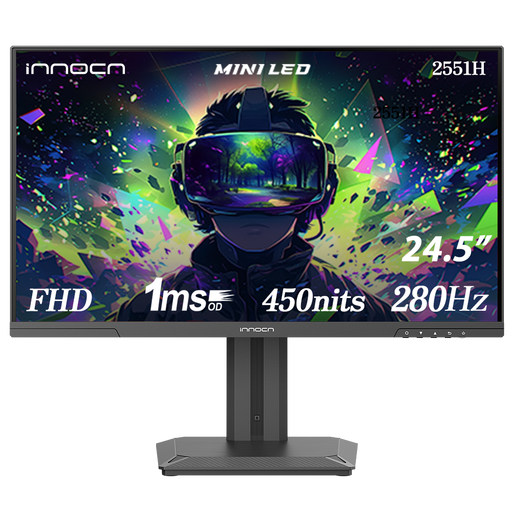 No image available
Its screen size could suit a compact setup; check from your bike that your preferred ride data is easy to read.
24.5 inches; Mini LED; Full HD 1080P; IPS; 280 Hz; 180 zones.
Check that your video source supports the settings you want.
 No image available
A 24-inch option to consider if you have limited screen space; check that it’s easy to read from your bike.
24 inches; Full HD 1080P; IPS; 144 Hz.
The product name lists HDMI and DisplayPort; check which connection works with your video source.
 No image available
A larger screen to consider if your setup can accommodate 27 inches and your computer can run your chosen app at QHD resolution.
27 inches; 2K WQHD; Rapid IPS; 200 Hz.
Zwift Support notes that graphics performance depends on the GPU, so check what your own video source can handle.
 No image available
A 27-inch model to consider if you have enough space and your video source can handle QHD for your chosen app.
27 inches; Quad HD 2560 × 1440; 180 Hz; 1 ms; HDR10.
The product name lists two HDMI 2.0 connections and one DisplayPort 1.4 connection. Check that these work with your video source.
No. The monitor displays the image; your cycling equipment and chosen app determine which ride data and interactive features are available. Check your trainer’s compatibility separately.
Measure your setup from your riding position, and leave room to get on and off and for ventilation. For a Zwift Hub setup, Zwift Support recommends a minimum of 120 cm wide and 180 cm long; this isn’t a general measurement for every bike setup.
Based on the specifications mentioned here, a 200 Hz monitor is not in itself a requirement for Zwift. LG lists 200 Hz for the 27G610A-B, while Zwift Support says graphics performance depends heavily on the GPU. Check your video source first, then choose a screen size and resolution to suit it.
According to the Dutch government, online purchases from a business generally come with a 14-day cooling-off period. You’re also entitled to a product that conforms to the contract; there is no fixed statutory warranty period in the Netherlands. A manufacturer’s warranty is in addition to these rights.