A headset alone doesn’t mean you need a special gaming keyboard. Choose a model that suits your computer, preferred layout and other everyday tasks. If the sound of typing matters to other people, compare membrane keyboards with dampened mechanical models. A manufacturer’s claim that a keyboard is ‘quiet’ isn’t a like-for-like noise measurement. Before choosing a TKL model, also check which keys and shortcuts your aquarium software uses.
Who is this for?
Users with a relaxing desktop aquarium
If you use an aquarium alongside other windows, you may want a keyboard that’s also comfortable for everyday computer tasks. Overlay Games describes Virtual Aquarium - Overlay Desktop Game as an overlay, but that example doesn’t tell you how other aquarium programmes work.
Users sharing a desk
If you switch between an aquarium, other computer tasks and using a mouse, consider the desk space available alongside the need for a number pad and your preferred key height. The SteelSeries Apex 3 TKL has no number pad.
Fans of a mechanical typing feel
If you want tactile feedback but aren’t specifically looking for clicky keys, compare dampened mechanical models with membrane keyboards. MSI describes the STRIKE 600 as having Silent Tactile switches and sound dampening.
What should you look for?
Full-size membrane
Choose this option if: you want a membrane keyboard and a number pad or dedicated media controls are important to you.
Trade-off: key feel, size and controls vary by model; manufacturers’ noise claims aren’t based on a shared measurement.
Low-profile or TKL membrane
Choose this option if: lower keys or extra room for mouse movement are your main priorities.
Trade-off: low profile and TKL are different features; TKL means there’s no number pad.
Dampened mechanical
Choose this option if: you specifically want a tactile mechanical keystroke.
Trade-off: MSI’s description doesn’t prove that this model is quieter than membrane keyboards.
These points will help you weigh up the layout and key feel against the controls you actually use.
| What to consider |
What to look for |
Who is this important for? |
| Typing noise |
Compare the key feel you want and, if possible, try the keyboard in your own surroundings. |
If I want to type quietly while using the aquarium, I also need to consider other people in the room. Around 40% of consumers say low typing noise is their main buying concern. |
| Layout and controls |
Check whether your aquarium programme uses keys or shortcuts that are accessible on your chosen layout. |
When I use the aquarium alongside other computer tasks, I want keys and media controls close to hand. Around 30% of consumers prioritise layout and controls. |
| Key feel |
Decide whether you want a membrane keystroke, a low profile or tactile mechanical feedback. |
If key feel is my main concern, I want to know whether I’d prefer soft, low-profile or tactile keys. Around 15% of consumers put key feel first. |
| Connectivity and extras |
Check the connection, layout and system requirements; weigh up extra features against what you’ll actually use. |
When I use a keyboard for other computer tasks too, I want suitable connectivity and useful features. Around 15% of consumers prioritise compatibility and value for money. |
Common buying mistakes
-
Treating ‘quiet’ as a comparable test result
Manufacturers describe different models’ keystrokes as quiet or dampened, but these descriptions aren’t noise measurements taken under the same conditions.
First, compare the key feel you want and, if possible, try the keyboard in a similar setting to the one you’ll use it in.
-
Assuming similar model names mean the same version
The Ornata V3 X isn’t necessarily the same model as the Ornata V3. The name K55 alone doesn’t make it clear which Corsair version you’re looking at either.
Check the full model name, version and layout before applying specifications or a ranking to a product.
-
Choosing TKL without checking which keys you need
A TKL keyboard doesn’t have a number pad. Whether the remaining keys are enough depends on the programme and controls you use.
Check your aquarium programme’s shortcuts before prioritising desk space over keys you need.
Brands to compare
Logitech G
The G213 is a full-size gaming keyboard with Mech-Dome membrane keys, an integrated wrist rest and media controls.
- Logitech describes the keys as whisper-quiet and the model as spill-resistant up to 60 ml.
- These are manufacturer specifications, not an independent comparison. Check the keyboard layout on offer.
SteelSeries
The Apex 3 is a full-size model, while the Apex 3 TKL has no number pad.
- The models offer media control options; SteelSeries describes the keystrokes as quiet.
- The TKL version has no number pad and isn’t the same as the full-size Apex 3.
Razer
The Ornata V3 X combines a low profile with membrane keys and a wrist rest.
- Razer describes the keystrokes as dampened.
- This isn’t an independent noise measurement; the Ornata V3 X isn’t necessarily the same version as the Ornata V3.
Corsair
According to Corsair, the K55 RGB PRO has media controls and dedicated macro keys.
- Corsair describes the keys as quiet.
- Extra controls are most useful if you’ll use them. The name K55 alone doesn’t confirm that it’s the K55 RGB PRO.
MSI
The STRIKE 600 is an option for anyone looking for tactile mechanical keys.
- MSI describes the model as having Silent Tactile switches and sound-dampening layers.
- MSI’s description isn’t an independent comparison with membrane models.
Keyboards on Joybuy
These models include compact membrane options, mechanical keyboards and a low-profile membrane model for use alongside a virtual aquarium.
 No image available
Corsair K55 CORE TKL, US QWERTY
A TKL option for anyone looking to save desk space; it has no number pad.
- Gaming keyboard
- TKL layout
- US QWERTY
Joybuy
 No image available
RK ROYAL KLUDGE R75, 75%, Blackberry Mousse Color
A compact mechanical option for anyone looking for a 75% layout and a volume knob.
- Wired mechanical gaming keyboard
- 75% layout
- Volume knob
- Hot-swappable K Silver Switch
- Cherry Profile PBT keycaps
Joybuy
 No image available
AJAZZ AK980 V2, 98% QWERTY
A mechanical option with a volume knob for anyone who also wants direct volume control alongside their aquarium.
- 98% QWERTY layout
- Wired, Bluetooth and 2.4G
- Volume knob
- 10000mAh battery
Joybuy
 No image available
AJAZZ AK820, 75%, Grey White
A wired mechanical option for anyone looking for a 75% layout and a volume knob.
- US QWERTY
- Wired mechanical keyboard
- 75% layout, 83 keys
- Hot-swappable linear switches
- White backlighting
Joybuy
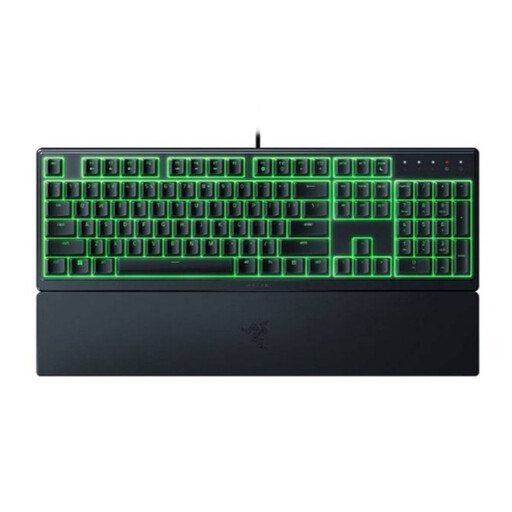 No image available
Razer Ornata V3 X, Low Profile, US Layout
A low-profile membrane option for anyone who cares about key height; Razer describes the keystrokes as quiet.
- Gaming keyboard
- Low profile
- US layout
Joybuy
Frequently asked questions
Do I need a special aquarium keyboard because I use a headset?
No. Choose a keyboard based on the controls in your aquarium programme and your other computer tasks. One desktop aquarium reviewed works as an overlay, but that doesn’t necessarily apply to other programmes. A headset doesn’t tell you how much noise other people will hear from your keyboard.
How can I check that my aquarium programme’s shortcuts will still work?
Check the shortcuts for the version you use and make sure the necessary keys and combinations are available on your chosen layout. The developer of one desktop aquarium reviewed also described controls via an icon and menu; don’t assume other programmes work the same way.
Is a quiet membrane keyboard quieter than a dampened mechanical model?
You can’t tell from product descriptions alone. Manufacturers describe different models’ keystrokes as quiet or dampened, but these claims aren’t based on measurements taken under the same conditions. Compare the key feel you want and, if possible, try the models in a similar setting.
Can I customise the lighting and controls?
It varies by model and software. Logitech describes G HUB for the G213’s RGB settings; Corsair describes iCUE and dedicated macro keys for the K55 RGB PRO. Check that the required software works on your computer and that you’ll actually use the extra features.
What are my rights if a keyboard I bought online isn’t suitable or breaks?
For a standard online purchase, the statutory cooling-off period usually ends 14 days after the product is delivered, according to ACM ConsuWijzer. The Netherlands also has a statutory guarantee with no fixed general time limit: with normal use, a product must meet what you can reasonably expect. If a product is faulty, contact the seller; check the relevant exceptions and returns policy.


