For active editing or regularly moving video files, a directly connected SSD is a good fit. An HDD may be more suitable for storing large amounts of source footage and archiving, if speed during editing is less important. If editors work simultaneously from different computers, first establish what shared storage and software workflow you need: a USB drive connected to one workstation does not automatically provide shared network storage. Make your choice based on the size of the project, available connections and a separate backup.
Which type of storage is right for you?
Editor working directly from the drive
You want to access source footage and project files quickly while editing on a shared workstation. The drive, cable and host port all affect whether a fast SSD connection is suitable. Samsung and Kingston describe different USB interfaces and the performance requirements for each.
Creator with a growing video archive
You store a lot of footage and exports and want to work out how much space the project will need. Western Digital describes a portable HDD model, while Seagate describes a desktop model with a separate power adapter.
Team switching between computers
You want to establish whether colleagues take turns using one workstation or work simultaneously from multiple computers. Adobe describes shared storage for collaboration with Premiere Productions; this workflow does not automatically apply to other editing software.
What should you consider when choosing?
Start by considering how the project will be used: editing and transferring files, archiving, collaborating at the same time or keeping a recoverable copy. The right connection and storage setup depend on that priority.
Directly connected SSD
Choose this when: one editor is working on the workstation or project files are moved regularly.
Bear in mind: the host port and cable need to match the interface of the specific SSD model; quoted speeds are not guaranteed project speeds.
Directly connected HDD
Choose this when: space for source footage, exports or archive files matters more than editing speed.
Bear in mind: a desktop model may need a separate power supply; a portable drive has different connection and system requirements.
Shared network storage
Choose this when: editors need simultaneous access to the project from different computers.
Bear in mind: network connections, file paths and project locking all matter; Adobe’s recommendations for Premiere Productions do not automatically apply to every video editor.
| Consideration |
What should you check? |
Which consumers does this matter to? |
| Editing and transferring |
Check whether the workstation’s port and cable support the USB mode of the SSD model you’ve chosen. |
If I often move large files while editing, I want the drive and workstation to work well together. Around 36% of consumers prioritise editing speed. |
| Space for project files |
Add up your existing project folders and planned exports, then work out which files need to be on the drive at the same time. |
If I want to keep lots of footage and exports, I need enough space without making speed my first priority. Around 29% of consumers prioritise storage capacity. |
| Access across workstations |
Establish how many computers and editors need simultaneous access, and which editing software will be used. |
If several editors need to work from different computers, I want to know in advance whether the storage and software support this setup. Around 21% of consumers prioritise access across workstations. |
| Recoverable project copy |
Decide where the separate copy will be stored, how often it will be updated and whether files can be restored from it. |
If I want to be able to recover my project after it’s lost or damaged, I need a separate copy and to know how to restore it. Around 14% of consumers prioritise recoverability. |
Common buying mistakes
-
Expecting a quoted SSD speed on every workstation
The host interface you need may determine whether you can achieve the stated transfer speed. Kingston says the XS2000 reaches its optimum speed with USB 3.2 Gen 2x2 and notes that the advertised performance is not achieved on a Mac.
First check the host port and cable, then compare them with the interface required by the exact SSD model.
-
Confusing a USB drive with a collaboration solution
A drive connected to one workstation does not automatically provide simultaneous access from multiple computers. For Premiere Productions, Adobe describes shared storage and the need to consider factors such as file paths and project locking.
First establish whether editors take turns using one computer or work simultaneously from different computers. Then check how your editing software handles this workflow.
-
Keeping the only copy of a project on one drive
Project storage is not the same as a separate recovery copy. Microsoft describes backups as copies that can help you recover data after it has been lost or damaged.
Set up a separate backup and check that you can restore a project folder from it.
-
Assuming every version in a product range is identical
USB-A and USB-C versions may differ in their connection and formatting. For the My Passport USB-A version reviewed, Western Digital mentions a downloadable NTFS driver for reading and writing on macOS 11+; according to Western Digital, a separate USB-C version comes preformatted in exFAT.
Before buying or reformatting the drive, check the full model number, connection and formatting of the version you’ve chosen.
Brands to consider
Samsung
The T7 Shield range offers a portable SSD option; the version reviewed is the 2 TB black MU-PE2T0S/EU.
- For this version, Samsung lists USB 3.2 Gen 2, sequential read and write speeds of up to 1.050/1.000 MB/s, and IP65.
- These are manufacturer specifications, not an independent performance test or a guarantee against data loss.
Kingston
The XS2000 range is a compact SSD option for use with a suitable host port.
- Kingston quotes speeds of up to 2.000 MB/s for the XS2000 via USB 3.2 Gen 2x2.
- Kingston notes that the advertised performance is not achieved on a Mac because this USB mode is not available there, so check the workstation port.
Western Digital
The My Passport range includes portable HDDs; the version reviewed is the 5 TB black WDBPKJ0050BBK-WESN.
- Western Digital lists password protection and hardware encryption for this range.
- For the USB-A version reviewed, Western Digital mentions a downloadable NTFS driver for macOS 11+; check the system and formatting requirements when using the drive between computers.
Seagate
The Expansion Desktop range offers a desktop HDD option; the model reviewed is the 8 TB STKP8000400.
- For this model, Seagate lists USB 3.0 and a separate 18 W power adapter.
- A USB connection does not automatically make an HDD suitable as a fast working drive for active editing; also consider the power supply and where you’ll position it by the workstation.
LaCie
The Rugged USB-C range offers a portable HDD option if you’re considering a drive for recording on location.
- LaCie lists resistance to drops and rain as product features and offers capacities of up to 5 TB.
- These are manufacturer claims, not the results of an independent endurance test. The page reviewed shows the 1 TB STFR1000800 version by default; check the specifications for each variant.
Joybuy products for direct storage
These products include directly connected external SSDs and HDDs for project files, transfers or archiving; on their own, they do not provide shared network storage.
 Image unavailable
SanDisk Extreme Pro Portable SSD 1 TB
A portable SSD to consider for project files you want to transfer regularly. The product name lists 1 TB and 2.000 MB/s; achieving the stated speed requires a compatible USB 3.2 Gen 2x2 host.
View at Joybuy
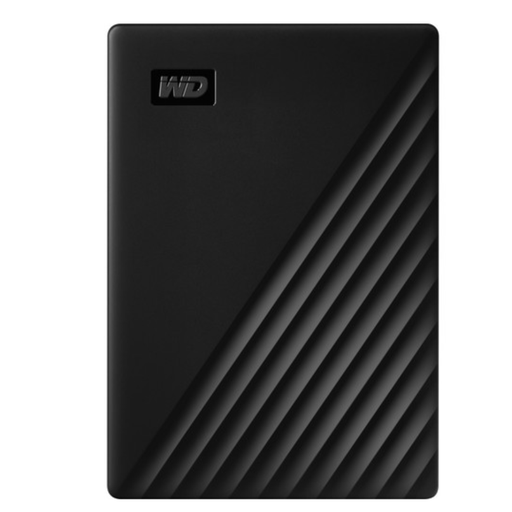 Image unavailable
WD My Passport Portable External Storage 5 TB
A portable HDD to consider when archive or project space matters more than an SSD workflow. The product name lists 5 TB and USB 3.0; check the formatting and system requirements if you’ll use it with different computers.
View at Joybuy
 Image unavailable
Samsung MU-PG2T0B 2 TB
A directly connected SSD to consider if you’re looking for a USB Type-C storage option for project files. The product name lists 2 TB and USB Type-C 3.2 Gen 2x2; check that the workstation’s host port is compatible.
View at Joybuy
 Image unavailable
Samsung MU-PE2T0R 2 TB, blue
A portable SSD to consider for directly connected project storage. The product name lists 2 TB and USB Type-C 3.2 Gen 2; check that the connection is compatible with your workstation.
View at Joybuy
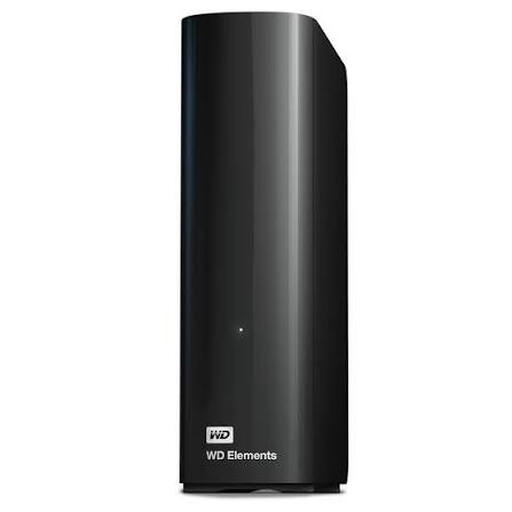 Image unavailable
WD Elements Desktop Storage 8 TB
A desktop HDD to consider when space for footage and exports is a priority. The product name lists 8 TB; check that the connections and setup suit your workstation.
View at Joybuy
Frequently asked questions
Can one external USB drive serve as a shared project drive for several editors at the same time?
Not simply because the drive is connected to a shared workstation. For Premiere Productions, Adobe describes shared storage, consistent file paths and project locking when editors work from different computers. Check whether your editing software supports this type of collaboration.
Does the media cache need to be on the same shared drive as the project?
According to Adobe’s guidance for Premiere Productions, keep media cache files and the database on the system drive or a fast, directly connected SSD for each workstation. This advice applies to that workflow and is not a general rule for all editing software.
Can you switch a drive between Windows and Mac without making any changes?
Check the exact version and its formatting. For the My Passport USB-A version reviewed, Western Digital mentions a downloadable NTFS driver for reading and writing on macOS 11+; according to Western Digital, a separate USB-C version comes preformatted in exFAT. Don’t assume that different variants are identical.
Is storing files on an external drive the same as making a backup?
No. Microsoft describes a backup as copies that can be used to recover data after it has been lost or damaged. Plan a separate copy and check that you can restore the project from it.


