
Teacher with a permanent folding table
Wants the whole sheet and both hands to remain clearly visible, and can position a light beside the work surface.


Start by considering where to position the light and camera. An adjustable light with diffusion can be a good starting point if it fits outside the area where your hands need to move. A larger panel needs more room for mounting, while a compact battery-powered light calls for checks on coverage and battery life. A COB light needs a suitable modifier and a sturdy mount. Film a test using your own paper and camera to check for shadows, white balance and any bands of light.
Wants the whole sheet and both hands to remain clearly visible, and can position a light beside the work surface.
Sets up and packs away their recording equipment each time, and wants a light that can sit outside the folding area using a suitable arm or clamp.
Wants paper colours to look true to life, so pays attention to both the light colour and the camera’s white balance.
Choose this if: you have a permanent spot beside the table or a suitable arm, and want to light the folding area from a chosen angle.
Trade-off: the panel and mount need more space, and their position will affect where hand shadows fall.
Choose this if: you often clear the table or have little room for a light stand, and can mount the light outside the work area.
Trade-off: a compact housing doesn’t guarantee that the whole sheet will be lit well enough from your setup.
Choose this if: you have a sturdy lighting setup and want to control the spread using a suitable Bowens modifier.
Trade-off: for broad, soft lighting across the table, consider the modifier, available space and mounting options together.
| What to consider | What to look for when buying | Who is this important for? |
|---|---|---|
| Fold lines and hand shadows | Check the diffusion, adjustability and space needed for the mount; film a test while moving your hands. | When I’m folding with both hands, I want the fold line to stay visible without my hands casting too much shadow on the paper; around 28% of consumers are said to consider this their main concern. |
| Paper colours | Compare the colour temperature range and test the white balance with the paper you use. Canon Europe notes that ambient light can affect how white paper is perceived. | When using coloured paper, I want the shades to look true to life and white paper not to take on an unintended colour cast; around 22% of consumers are said to prioritise paper colour. |
| Space and mounting | Measure the available space and check the connection, load capacity and which mounting parts are included with the version you choose. | When I need to position my hands, camera and light around a small table, I want the mount to fit outside the folding area; around 22% of consumers are said to prioritise keeping the table clear. |
| Stable video footage | Test the light at the dimming level you plan to use, with your chosen camera settings. Sony explains that flicker combined with camera settings can cause visible bands. | For a lesson video, I don’t want moving bands in the picture; around 17% of consumers are said to consider stable video footage most important. |
| Power and what’s included | Check the contents of the exact version and see what power supply, cable, holder or battery you’ll need. If battery life is stated, check the corresponding brightness setting. | If I want to finish recording without missing parts or an unexpected change of power supply, I want to know in advance what’s included; around 11% of consumers are said to prioritise power and included accessories. |
The Elgato Key Light Mini has a ¼″-20 connection, but Elgato states that mounting accessories aren’t included. So a light on its own won’t automatically fit outside your work area.
Before buying, check the mount, reach and load capacity of the arm or clamp you plan to use.
You may need a suitable arm, clamp or adapter for your setup.
NEEWER offers versions with and without a stand; NP-F batteries aren’t included.
Compare the contents of the exact version with the power supply and mounting equipment you need for your table setup.
Depending on the version, you may need a stand or NP-F battery.
The lux rating for the amaran COB 60x S is measured with a focused reflector; it isn’t automatically a measurement of a broad, diffused table setup.
Consider the light, chosen modifier, distance and available space as a complete setup.
You may need a suitable modifier and mount to achieve a different spread of light.
The NL660 is an adjustable, bi-colour panel for a setup with space beside the table.
The Key Light Mini is a compact panel for a small setup, with a suitable separate holder.
The LEDP260C is a larger bi-colour panel for a permanent setup with enough room for its dimensions.
The COB 60x S is a Bowens point light for anyone who wants to choose a modifier and suitable mount themselves.
This selection includes lights and bundles for filming at a small table. For each product, check that the mount suits your table and camera, especially if a clamp or stand is designed for a specific device.
 No image available
Could suit a setup where you want to use a ring light with the supplied stand.
The title lists three colour modes and ten brightness levels.
 No image available
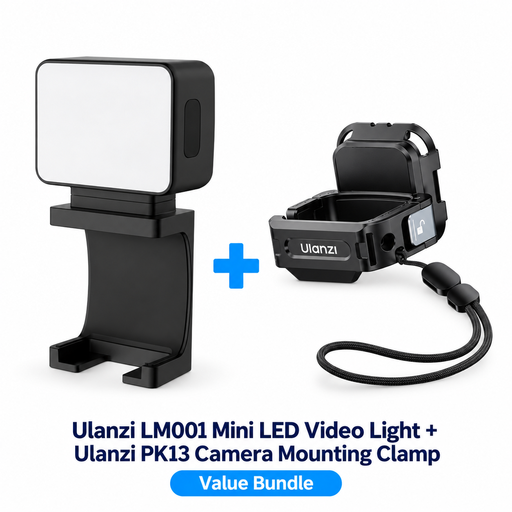
This bundle is designed for use with a DJI Osmo Pocket 3; check that this camera suits your recording needs.
The product description lists a magnetic design, a 500 mAh battery and several mounting interfaces for the clamp.
 No image available
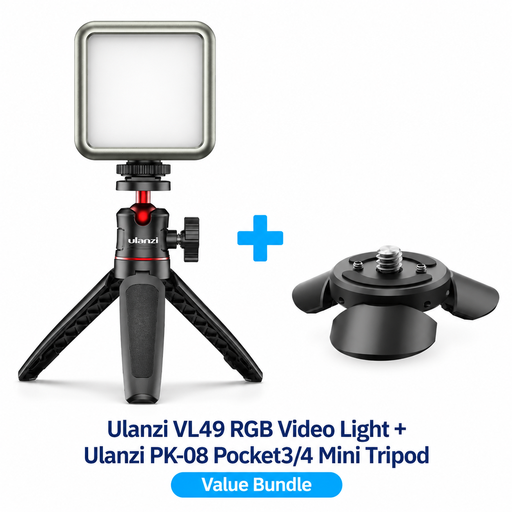
This bundle could work for tabletop video if the supplied mount suits your camera setup.
The product information lists RGB lighting and a mini tripod for tabletop filming; the bundle is designed for the DJI Osmo Pocket 3/4.
 No image available
Could suit you if you’re looking for a small light for video and want to mount it on a smartphone.
The title lists three colour temperatures from 3000–7000 K and five brightness levels. The product description says the light attaches by clipping onto a smartphone.
 No image available
Could be useful if you want to position a light outside the work area and have a suitable magnetic or tripod mount.
The product description lists a 500 mAh battery, magnetic mounting, ¼-inch thread and up to 1.5 hours of use per charge.
Place the light outside the work area and angle it towards the paper; try different positions while moving your hands. Diffusion can soften direct light, but it won’t prevent shadows in every situation.
No. Check the white balance too, and film a test with your own white and coloured paper. Canon Europe explains that white paper can look different under different ambient lighting.
Test the light at the dimming level you plan to use, with the camera settings you’ll use for recording. Sony explains that LED flicker combined with camera settings can cause visible bands; a light’s specifications alone can’t rule this out.
Check what’s included with the exact version and compare it with your planned mounting setup and power supply. Elgato states that mounting accessories aren’t included with the Key Light Mini. NP-F batteries aren’t included with the NEEWER NL660 mentioned here, and whether a stand is included depends on the version.
The rules that apply depend on the light and the power supply you use; assess any supplied mains adapter separately too. The Netherlands Food and Consumer Product Safety Authority sets out the voltage range covered by the Low Voltage Directive as 50–1000 V AC or 75–1500 V DC, so the directive doesn’t automatically apply to every low-voltage light.