For a shared workshop, your choice depends on what you need to film and how much floor and cable space is available. Choose a desk clamp if you have a suitable table edge, movable panels if you want to control the light from several directions, or a COB light with a suitable modifier for a fixed setup. Canon Europe describes key and fill lighting as ways to illuminate your subject and reduce shadows. Also check colour matching, fan noise, what’s included and safe positioning: a lux figure measured with a reflector won’t automatically tell you how the demonstration table will be lit.
Who are these lighting setups for?
Teachers demonstrating techniques
If you’re filming both your explanation and work on the table, the light’s position may need to change when your hands obscure details. Canon Europe explains how key and fill lights from different directions can affect your subject and the shadows.
Filming in a shared workshop
If tripods or cables could get in the way of workstations and walkways, a suitable desk clamp is one setup to consider. Elgato describes a desk clamp for the Key Light Air MK.2, while Arboportaal stresses that artificial lighting should be positioned so it doesn’t create a risk of accidents.
Teachers showing materials in colour
If you’re showing prints or other teaching materials, you’ll want to match the lamp’s colour to the camera’s white balance. Adobe explains that white balance affects every colour in the image.
Which buying concerns should you consider?
A compact light with a desk clamp
A good fit if: you mainly film the teacher or a smaller table, and have a suitable, sturdy table edge. Elgato says the Key Light Air MK.2 clamp fits most desks up to 6 cm thick.
Keep in mind: check the clamp’s thickness range, the angle of the light and the power supply. Elgato says the adapter isn’t included and maximum brightness depends on the available USB-C power.
One or two movable LED panels
A good fit if: you want to position the light from different directions for the teacher and demonstration, and have room for the necessary stands. Canon Europe describes fill light on the opposite side to the key light as a way to reduce shadows.
Keep in mind: extra stands and cables need a safe place. The NEEWER NL660 twin-panel kit reviewed here includes two diffusers and two stands, but no NP-F batteries.
A COB light with a suitable modifier
A good fit if: you can set up a permanent filming area and want to use a separate key light. The amaran 100x S, Nanlite FS-150B and Godox SL60IIBi are all described as having a Bowens mount.
Keep in mind: a lux figure measured with a reflector won’t necessarily show how the light will look with a softbox or across the whole demonstration table. Check what’s included and test the fan noise with your microphone.
Your chosen light needs to illuminate more than just the teacher. Make a test recording with hands and work surface in frame, and consider workspace, colour and sound too.
| What to consider |
What should you check? |
Who should pay particular attention? |
| Visibility of the explanation and demonstration |
Make a test clip using your actual camera framing and movements. Check that the light direction, brightness and available diffusion keep the work surface and hands visible. |
When I demonstrate techniques, I want my face, hands and work surface to be clearly visible at the same time. Around 31% of consumers prioritise being able to see the explanation and demonstration. |
| Space taken up and safe positioning |
Measure the table edge, setup area and walkway. Check the clamp’s range or the space needed for stands, and route cables away from walkways. |
In a shared workshop, I don’t want stands or cables getting in the way. This is the main priority for around 25% of consumers who particularly need clear workspace. |
| Colours in the lesson recording |
Check the adjustable colour temperature range of the exact model and match the light to the camera’s white balance. Assess the materials in a test recording. |
When showing prints, I want to be able to assess their colours on camera. Around 25% of consumers give controllable material colours top priority. |
| Quiet, uninterrupted recording |
Test fan noise from the microphone position. Check whether the required adapter or battery is included with the exact version, and test your chosen power supply at the brightness and recording duration you intend to use. |
When I record spoken explanations, I don’t want noise or power issues to interrupt the lesson. Quiet, continuous recording is the top priority for around 19% of consumers. |
Common mistakes when choosing video lighting
-
Assuming the highest lux figure guarantees the right lighting for a lesson
The figures quoted for the Nanlite FS-150B and Godox SL60IIBi apply to specific measuring conditions with a reflector. They don’t automatically show how evenly a softbox will light the teacher and demonstration table.
Only compare measurements taken at the same distance and with the same light modifier. Make a test recording with your final setup and desired framing.
-
Assuming every version is a complete filming kit
The NEEWER NL660 twin kit reviewed here includes stands but no NP-F batteries. The Elgato Key Light Air MK.2 is described as coming with a desk clamp, but the adapter isn’t included. A Nanlite FS-150B Dual Kit contains different items from the standalone light.
Before choosing, compare the contents of the exact version with your planned setup and power supply.
-
Adding extra lights without rethinking the shared space
Two panels can give you more options for adjusting the direction of the light, but stands and power cables also take up space. Arboportaal stresses that artificial lighting should be installed so it doesn’t create a risk of accidents.
Measure the setup area and walkways in advance. If floor space is limited, check whether a suitable desk clamp will work in your workspace.
-
Not testing fan noise during spoken explanations
The manufacturer specifies active cooling for the amaran 100x S; NEEWER describes the NL660 kit reviewed here as having no cooling fan. The actual noise in your recording will also depend on the microphone’s position.
Make a sound test with the final light, microphone and setup before filming the lesson.
Brands to consider
NEEWER
LED panels for movable lighting; the NL660 twin-panel kit is one example of a two-light setup.
- NEEWER says the panels are dimmable, adjustable from 3200–5600 K and have no cooling fan.
- The kit includes two stands, which take up space. NP-F batteries aren’t included; a standalone NL660 and a version with a stand have different contents.
Elgato
A clamp-mounted desk light for a compact, permanent filming area; the Key Light Air MK.2 is one example with a desk clamp.
- Elgato specifies a colour temperature of 2900–7000 K and a clamp that fits most desks up to 6 cm thick.
- Check that your table is suitable and what power supply you’ll need. The adapter isn’t included; maximum brightness depends on the available USB-C power.
amaran
A COB key light for a permanent setup where you can attach a suitable modifier; the amaran 100x S is one example.
- The manufacturer specifies 2700–6500 K and a Bowens mount.
- The light has active cooling. A figure measured with a reflector won’t necessarily show how a separate softbox will light the demonstration table; check microphone noise too.
Nanlite
COB lighting for a permanent lesson setup; the FS-150B is described as having mains power, adjustable white light and a Bowens mount.
- The manufacturer lists a colour temperature range of 2700–6500 K.
- The FS-150B is listed as having a built-in fan. The Dual Kit, with two softboxes and stands, differs from the standalone light; test the sound while recording spoken explanations.
Godox
A COB key light with a Bowens mount; the SL60IIBi is one example for use with a suitable modifier.
- Godox specifies 2800–6500 K and a lux figure at 1 m with the standard reflector.
- The listed contents include a reflector and power cable, but no stand or softbox. Check the contents of the exact version.
Joybuy products for lesson videos and demonstrations
This selection includes COB lights for a permanent setup and compact video lights for camera or tabletop filming. For each version, check that the light modifier, mounting option and power supply suit both the teacher and the demonstration work surface.
 No image available
COLBOR 200 W COB LED video light with Bowens mount
An option for a permanent filming area where you want to use a separate light modifier.
According to the product name: 200 W, bi-colour 2700 K–7000 K and a Bowens mount.
View at Joybuy
 No image available
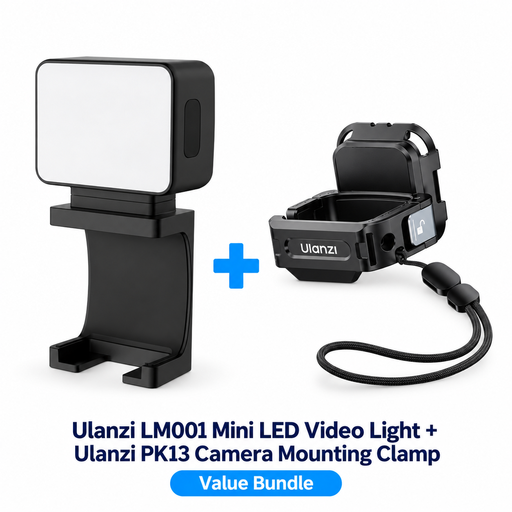
ULANZI LM001 Mini LED video light with PK13 clamp for DJI Osmo Pocket 3
Could be used as compact supplementary lighting when filming with the DJI Osmo Pocket 3 named in the product title.
The bundle name lists an LM001 Mini LED video light and a PK13 camera clamp for DJI Osmo Pocket 3. The clamp is designed for that camera model.
View at Joybuy
 No image available
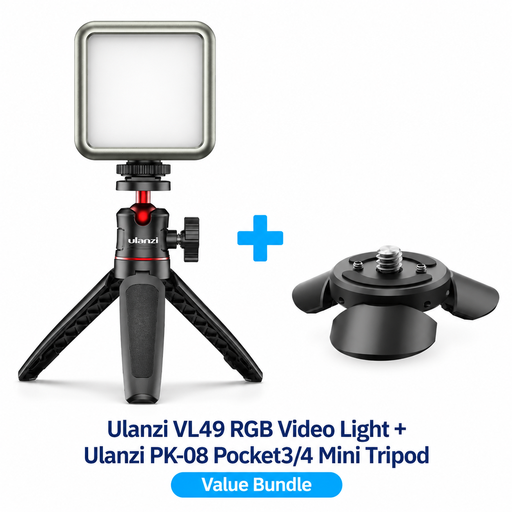
Ulanzi VL49 RGB LED video light with PK-08 mini tripod kit for DJI Osmo Pocket 3/4
An option for tabletop filming with the camera models named in the bundle title.
The product name lists RGB lighting and a PK-08 mini tripod kit for DJI Osmo Pocket 3/4.
View at Joybuy
 No image available
COLBOR 60 W COB video light with built-in 59 Wh battery
An option for a movable setup if a built-in battery and adjustable light colour are important to you.
The product name lists 60 W, RGBCW, bi-colour 2700 K–6500 K and a built-in 59 Wh battery. According to the product information, activating the battery requires a 60 W PD charger with 20 V/3 A; a USB-C cable is listed.
View at Joybuy
 No image available
Ulanzi VL81 rechargeable LED video light, black
An option if you’re looking for a rechargeable LED video light for a movable camera setup.
The product name lists a rechargeable LED video light in black.
View at Joybuy
Frequently asked questions
How should you position the light for both the teacher and the demonstration?
Start by making a test recording using your actual camera framing and movements. Use a key light for the main subject, then assess whether light from the other side is needed to reduce shadows on hands or the work surface. Keep lights and cables out of walkways.
Do you need to choose a specific Kelvin value to show prints or materials accurately?
No. A Kelvin setting alone doesn’t guarantee accurate colour reproduction. Match the light colour and camera white balance to the ambient light, then assess the materials in a test recording. Adobe explains that white balance affects every colour in the image.
What safety checks are useful when filming in a shared workshop?
Before filming, check that any clamp or stand is secure and that no cables cross a walkway. Arboportaal stresses that artificial lighting in a workplace should be installed to prevent the risk of accidents.
Is CE marking required for every video light in the Netherlands?
That depends on the product rules that apply to the specific light and power supply. Dutch government information explains that the manufacturer must apply CE marking and draw up an EU declaration of conformity when these are required for the product group in question. This general information doesn’t confirm that a specific model complies.
What can you do if a light breaks too soon during normal use?
For a consumer purchase in the Netherlands, a product must meet what you could reasonably expect from it. According to ACM ConsuWijzer, the seller must resolve issues with a faulty product, for example by repairing or replacing it. Your consumer rights may differ if the purchase was mainly for business use.


