
Weaver filming their work from above
Wants their hands, shuttle and threads to remain visible. Canon Europe describes using a main light and a weaker fill light on the opposite side as a way to reduce shadows.


For a weaving demonstration at a small table, a dimmable light that can sit out of shot is a practical starting point. Record a test while moving your hands to check that the threads remain visible. A desk panel keeps the floor clear, while a COB light with a modifier gives you more control over the direction of the light but needs more space. Also match the white balance to the lighting and test for flicker using the camera settings you actually plan to use.
Wants their hands, shuttle and threads to remain visible. Canon Europe describes using a main light and a weaker fill light on the opposite side as a way to reduce shadows.
Wants to show differences in thread colour clearly, so pays attention to adjustable white light and the camera’s white balance. Nikon explains how white balance affects the way a scene is rendered.
Needs to arrange the light, mount and power supply around the table, and may want to pack everything away after filming. A table clamp, tripod or battery each calls for a different setup.
A good fit if: your table edge can support a clamp and you don’t want a floor stand beside the table.
Bear in mind: the clamp, panel height and power supply; a desk panel won’t automatically be well positioned to light a horizontal weaving project.
A good fit if: you want to control the direction and spread of the main light yourself and have room for a sturdy mount.
Bear in mind: the light, modifier and stand take up more room together; also check the power option and what’s included in the kit.
A good fit if: you use the table temporarily or don’t want a power cable running across your workspace.
Bear in mind: how evenly the light covers the whole weaving project and how long the battery lasts at your chosen brightness.
| What to consider | What to look for when buying | Who should pay particular attention? |
|---|---|---|
| Seeing the threads clearly | Check the direction of the main light and whether it can be dimmed; assess shadows while trying out the movements you’ll make. | I want the shuttle and threads to remain visible as my hands move; around 31% of consumers put visibility of the task at the top of their list when buying. |
| Faithful yarn colours | Check the light settings and compare a test image with the yarn; set the camera’s white balance accordingly. | If viewers need to judge differences in thread colour, I want to check the footage using the actual yarn; around 25% of consumers prioritise colour accuracy. |
| Space around the table | Measure the usable table edge and available height; check which arm or stand will work with the mount. | I don’t want a light or stand in the way of my hands or camera; around 25% of consumers focus mainly on the workspace required. |
| Power and recording time | Compare the stated battery life at the power level you need with your recording time; for mains power, check the cable and supplied adapter. | For a long demonstration, I don’t want to have to stop unexpectedly to recharge the light; around 19% of consumers prioritise power during recording. |
Elgato says the maximum light output of the Elgato Key Light Air MK.2 depends on the available input power. That figure also doesn’t tell you where moving hands will cast shadows on your weaving.
Check the power supply and what’s included in the kit, then assess the whole work surface while trying out the movements you’ll make.
The white balance setting and any mixed ambient lighting affect how colours look in the footage.
Compare a test image with the yarn and adjust the camera’s white balance to match.
The CB60B version described by NEEWER has a US plug. A separate COB setup also needs space for a secure mount.
Check the exact version, plug and kit contents before choosing the light for your setup.
Ulanzi gives the VL49 RGB a colour temperature range of 2500–9000 K; the Joybuy product title states 2500–9500 K.
Check the specifications for the version on offer if the upper limit is important to your choice.
Elgato describes the Key Light Air MK.2 as a panel for desk setups, with a desk clamp and adjustable white light.
The amaran 60x S is a COB light for anyone looking to build a separate lighting setup.
SmallRig describes the RC 60B version 4376B as a portable light with a built-in battery and adjustable white light.
Ulanzi describes the VL49 RGB as a compact battery-powered light with a magnet, screw hole and cold shoe mount.
The NEEWER CB60B is a COB light with a Bowens mount for anyone wanting to use a light modifier.
This selection of Joybuy products includes portable lights and COB models for video recording. Check how the mount and lighting settings for each model will work around your weaving project.
 No image available
This portable model may suit a temporary table setup; assess how the light falls across the whole weaving project.
60 W; RGB; adjustable colour temperature 2700–6500 K; dimmable; stated CRI 97+; weight 345 g.
 No image available
An option for adjusting the spread of light with a compatible Bowens modifier; allow room for the light and mount.
200 W; adjustable colour temperature 2700–7000 K; Bowens mount; built-in power adapter design.
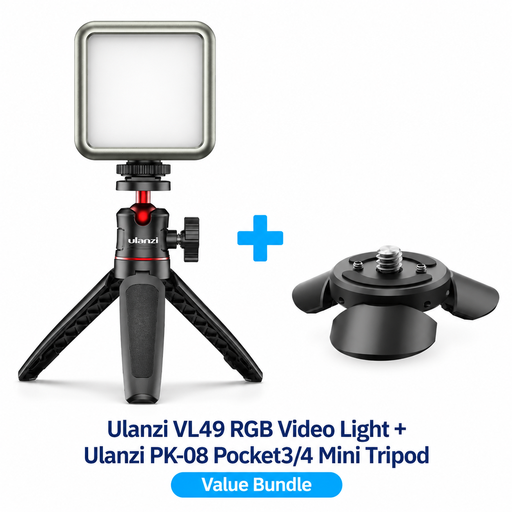 No image available
The compact light and mini tripod kit are designed for tabletop recording; check that the kit described suits your camera setup.
RGB lighting; adjustable light settings; PK-08 mini tripod kit described for compatible DJI Osmo Pocket camera setups.
 No image available
This rechargeable model may suit a temporary recording space; check that the mount works for the position you need.
Rechargeable via USB-C; cold shoe mount; steplessly adjustable brightness and colour temperature.
 No image available
The compact light with a magnet may suit a small or temporary workspace; record a test to check that your weaving project gets enough light.
RGB; 2000 mAh battery; dimmable; adjustable colour temperature. Check the specifications for the version on offer if the exact temperature range matters.
Move the main light and record a test while carrying out the movements you’ll be filming. If shadows hide details, a weaker fill light on the opposite side may help; keep both lights out of shot and clear of your workspace.
Check the lighting in your workspace and adjust the camera’s white balance to match. Nikon explains that automatic and manually set white balance can produce different results, particularly in mixed lighting.
Record a test video using the light and camera settings you plan to use. Sony explains that some light sources can cause banding and that adjusting the shutter speed may help, depending on the camera and situation; a product specification alone can’t rule out flicker.
If recognisable people appear in published or commercial footage, GDPR rules are relevant. The Dutch Data Protection Authority gives consent as one possible example of a lawful basis, not the only one. If you’re filming only your own hands and weaving, also check what else appears in shot.