
Teacher with limited table space
You want to leave room for your camera, objects and hand movements. NEEWER describes a mini tabletop stand, while Elgato describes a panel with a table clamp.


Start with one dimmable, adjustable light and check in a test recording that both small details and hand movements remain visible. A compact panel or a table clamp is a better choice if you want to keep your workspace clear; a larger panel or COB light with a light modifier gives you another way to control direction and spread, but requires extra space. Before buying, check the mounting, power supply and space needed for the complete setup.
You want to leave room for your camera, objects and hand movements. NEEWER describes a mini tabletop stand, while Elgato describes a panel with a table clamp.
You film small controls or objects and want to see how shadows and reflections affect the image. Godox describes a panel with a diffuser, while amaran describes a COB light with a mount for compatible light modifiers.
You film at different times or in different places and want to adjust your lighting and camera settings accordingly. Canon explains why the white balance needs to match the light in the scene.
A good fit if: you want to light a small demonstration area quickly.
Bear in mind: the stand takes up table space; NEEWER’s light output specification for the BP66 is measured at 0.5 m.
A good fit if: you want to keep the tabletop clear and the edge is suitable for the clamp.
Bear in mind: the edge thickness, mount reach, space behind the table and power supply.
A good fit if: you want to control the direction or spread of the light separately.
Bear in mind: the light modifier and mount need extra space; check which components are included with the light.
A good fit if: portability or supplementary lighting is important.
Bear in mind: test whether the light reaches the whole demonstration area and check whether a suitable mount is included.
Use the priorities below to guide your choice, then assess the finished setup with your table, camera and teaching materials.
| Consideration | What should you check? | Who will find this important? |
|---|---|---|
| Workspace and positioning | Measure the table edge and available space; check the reach and mounting of the holder. | I want to leave room for my camera, objects and hands without the light getting in the way; around 36% of consumers give clear workspace their top priority. |
| Details and shadows | Make a test recording of hand movements and small details; assess the direction, dimming and diffusion. | When I show small details, I want to see whether my hands obscure them and whether the light helps; around 29% of consumers prioritise visible details and shadow control. |
| Colour consistency | Check whether the colour temperature is adjustable and match the camera’s white balance to the light. | I want colours to remain as consistent as possible during demonstrations, and I want to be able to adjust the light and white balance to match. This is the main concern for around 21% of consumers. |
| Power and recording time | Check the required power source and cable; film a test clip using your camera settings. | If I’m filming for longer or moving the light, I want to know which power options are available and whether flicker will be visible; around 14% of consumers give power and recording time their top priority. |
You don’t automatically need more light sources: start with one well-positioned light and add a second only if your test recording reveals a specific problem.
Even a small light can take up space once you add the mount. Elgato says the Key Light Mini is supplied without mounting accessories.
Check what’s in the box and mark out where the light, mount, camera and your hands will go on the table before you buy.
NEEWER gives a lux figure for the BP66 at 0.5 m, while other lights are described using different measurements or testing conditions. That doesn’t provide a reliable ranking for your table.
Compare figures only under the same measurement conditions and assess the lighting in a test recording.
An extra light source is most useful when, after positioning the first light, you still want to fix a visible shadow or background problem.
Test one light source first and identify the specific problem that remains in the image.
A second light also needs a suitable power supply and mount.
Compact tabletop panels, with the BP66 as an example for a small setup.
Larger bi-colour panels, such as the P260C Pro, for anyone considering a panel with a diffuser and adjustable colour temperature.
COB lighting, with the COB 60x S as an example of a setup using a separate light modifier.
The Key Light Air MK.2 and Key Light Mini illustrate different needs around table space and power.
Compact, portable lights, including the VIJIM VL120 as an example of a bi-colour camera light.
This selection includes portable video lights and COB lighting for anyone who wants to adjust the lighting for a photography lesson at a table. Check whether the mount and space required for each model suit your setup.
 No image available
A portable video light to consider if you want flexibility when positioning the light around a camera setup.
RGB is stated in the product name.
 No image available
An option to compare if you want an RGB video light with the stated specifications for your recording.
The product name states 60 W and a weight of 345 g.
 No image available
Worth considering if you want to use a COB light with a mount for a compatible light modifier; allow space for the complete setup.
The product name states bi-colour 2700–7000 K and a Bowens mount.
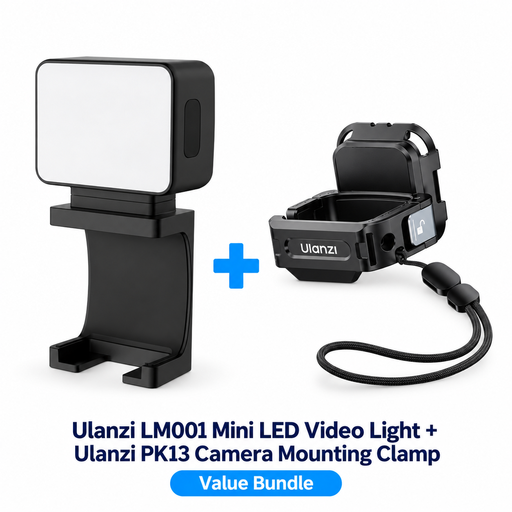 No image available
This bundle could suit you if you use the stated camera clamp with a DJI Osmo Pocket 3; check that the mount is right for your recording setup.
The product name states an LM001 mini light and a PK13 camera clamp for DJI Osmo Pocket 3.
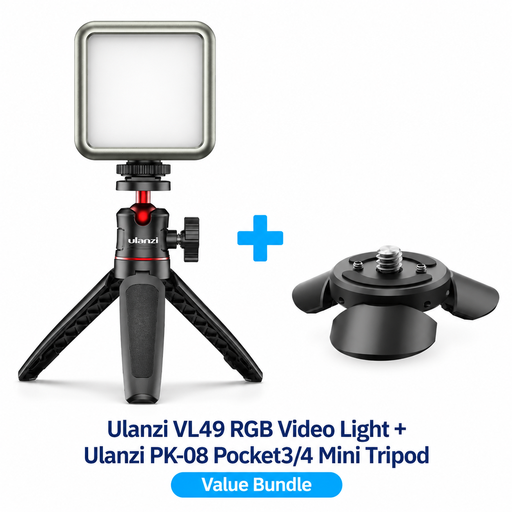 No image available
Worth considering for tabletop filming if the stated tripod kit is compatible with your camera.
The product name states an RGB video light and a PK-08 mini tripod kit for DJI Osmo Pocket 3/4.
Not necessarily: start with one focused light and assess a test recording. Add a fill light only if a shadow is hiding details or the subject isn’t standing out from the background enough; this is filming advice, not a guaranteed result.
Keep your lighting setup as consistent as possible and match your camera’s white balance to the light in the scene. A light with adjustable colour temperature can help you adjust the lighting, but it won’t set the camera’s white balance for you.
Make a test recording using your usual frame rate and shutter speed. Nikon explains that a mismatch between camera settings and the refresh rate of certain light sources can cause flicker; check which flicker-reduction settings your camera offers.
In the Netherlands, consumer purchases are covered by a statutory guarantee with no fixed statutory guarantee period; if a product is faulty, the seller is your point of contact, according to the Dutch government. Distance purchases generally come with a 14-day cooling-off period, subject to exceptions. Also check the terms of any manufacturer’s warranty.
Check the product’s safety information and any applicable markings. The Dutch government cites the CE marking for electrical equipment sold in the EU. The EU Low Voltage Directive applies to equipment within the range of 50–1000 V AC or 75–1500 V DC, so don’t assume without checking that the directive applies to every USB light.