Position the light so your hands block the cutting line as little as possible, then check the result in a test recording from the camera angle. A panel with a desk clamp keeps the floor clear, while a panel on a separate stand gives you more freedom to position the light. A COB light with a suitable modifier offers options for a permanent setup. Whatever you choose, check the power supply, included accessories and how it renders your paper colours: model specifications can’t predict exactly how your work surface will be lit.
Who is this choice relevant to?
Teacher demonstrating cutting techniques
If you film your hands, knife and paper from above, you’ll want to avoid a moving hand hiding the cutting line for too long. So consider the light’s angle and spread, not just its stated brightness. Canon Europe and Nikon explain how lighting setup and diffusion affect your footage.
Creator putting together a colour portfolio
If you want white and coloured paper to look consistent from one recording to the next, consider adjustable white light and the stated colour rendering. Set your camera’s white balance to match the lighting too: Adobe explains that this setting helps determine how colours appear on screen.
Maker with a small worktable
If you need to fit your camera, hands, paper and light around a small table, compare a desk clamp with a separate stand. Check that the mounting point is suitable and that your chosen version includes the required fittings and power supply.
What should you look for in video lighting for a paper-cutting lesson?
First, choose a setup that lets you position the light outside the unwanted part of the camera frame. Then compare colour rendering, desk space and power requirements using your own recording as a guide.
Desk panel with clamp
A good fit if: your desk edge is suitable for a clamp and you want to keep the floor clear. Point the panel at the cutting area and check from the camera angle that the setup and hand shadows look right.
Bear in mind: Elgato says the clamp on the Key Light Air MK.2 fits tabletops up to 6 cm thick. A power supply of at least 30 W is needed for the maximum stated light output; according to the manual, the adapter isn’t included.
Panel on a separate stand
A good fit if: you want to adjust the angle of the light independently of the table, or direct it across a larger area of paper.
Bear in mind: NEEWER sells the NL660 with or without a stand and says that an NP-F battery isn’t included. Godox describes the P260C Pro as having a diffuser; the manufacturer’s claim that it produces softer light can’t predict exactly what the shadows will look like on your table.
COB studio light with modifier
A good fit if: you have a permanent filming spot and want to shape the spread of the light yourself using a suitable diffuser or softbox.
Bear in mind: the amaran 100x S has active cooling. Check the noise while recording spoken instructions, and compare lux figures only when they’re measured using the same setup. A figure with a reflector doesn’t tell you directly how a softbox will light your work surface.
Compact light with built-in battery
A good fit if: you often move your filming setup or need extra lighting that’s easy to carry around.
Bear in mind: SmallRig states that the RC 60B Lite Edition runs for 45 minutes at maximum power and 75 minutes in ECO mode. These are manufacturer figures, not a guarantee that the battery will last for a full lesson; the softbox is optional.
| What to consider |
What should you check? |
Who should pay extra attention? |
| Visibility of the cutting line |
Use the camera you plan to film with to record a complete cutting movement. Check whether you can position or diffuse the light, and whether your hand blocks the cutting line. |
When filming from above, I want to keep the cutting line visible while my hand and knife move. Around 36% of consumers prioritise visibility of the cutting movement. |
| Paper colours |
Check the colour settings and colour rendering stated for the exact light. Film the same white and coloured paper with your planned lighting and camera settings. |
For my portfolio, I want white and coloured paper to look consistent from one recording to the next. Around 29% of consumers make consistent paper colours their top priority. |
| Positioning around the table |
Measure the available desk edge and the space beside the table. Check whether your chosen version includes the required clamp or stand. |
At a small worktable, I need to fit my camera, light and cutting materials without blocking my workspace. Around 21% of consumers prioritise having a suitable mounting point. |
| Uninterrupted recording |
Check the power supply and film a test clip using the camera, lighting and shutter settings you plan to use. |
I want to record the lesson without running short of power or getting distracting bands in the footage. Around 14% of consumers prioritise uninterrupted recording. |
Common purchasing mistakes
-
Assuming the highest lux figure means better lighting for paper
Light measurements can vary depending on the setup used. Aputure lists separate figures for the amaran 100x S on its own and when used with a reflector. Direction, distance and the light modifier also affect how the light falls on your work surface.
Only compare figures measured under the same conditions, and check how the whole sheet of paper looks in a test recording.
-
Assuming all the accessories are included
What’s in the box varies by model and version. For example, the NL660 is sold in packages with or without a stand; according to the Elgato manual, the Key Light Air MK.2 doesn’t include a mains adapter; and the softbox for the SmallRig RC 60B Lite Edition is optional.
Check whether the exact version you’ve chosen includes the light, mount, diffuser, adapter and any battery you need.
Depending on the version, you may need to buy a suitable stand, light modifier, NP-F battery or USB-C adapter separately.
-
Relying on colour temperature or CRI alone
A stated CRI value doesn’t guarantee that your camera’s white balance is correct or that paper will look the right colour under mixed lighting. Adobe explains that white balance affects the colours in your footage.
Keep the lighting as consistent as possible during the lesson, and test the white balance with the paper you’ll be using.
Brands to consider
NEEWER
The NL660 is an adjustable continuous-light panel designed for use with a separate stand.
- NEEWER lists a white diffuser, mains adapter and adjustable light from 3200–5600 K.
- An NP-F battery isn’t included. Check whether the stand comes with your chosen version; the product specifications aren’t an independent assessment of hand shadows.
Elgato
The Key Light Air MK.2 is an adjustable panel for a desk setup with a suitable clamp.
- Elgato lists a clamp for tabletops up to 6 cm thick and adjustable light from 2900–7000 K.
- The manual says that a mains adapter isn’t included. A power supply of at least 30 W is needed for the maximum stated light output; check whether the chosen version includes the clamp.
Godox
The P260C Pro is a slim, adjustable panel with a diffuser, designed to be set up as a separate light source. It’s a different model from the similarly named LEDP260C.
- Godox specifies 2800–6500 K and an average CRI/TLCI of at least 98.
- The manufacturer attributes softer shadows to the design and diffuser; this isn’t an independent result for a paper-cutting table. Check the mount and power supply included with the set on offer.
amaran
The 100x S is a bi-colour COB studio light for a permanent setup where you choose a suitable modifier yourself.
- Aputure specifies 2700–6500 K and CRI 95.
- The light has active cooling. Check the noise while recording spoken instructions, and compare lux figures only when using the same setup and modifier.
SmallRig
The RC 60B Lite Edition is a compact COB light with a built-in battery for a mobile setup or as extra lighting.
- SmallRig states that it runs for 45 minutes at maximum power and 75 minutes in ECO mode.
- Battery life depends on the mode used and isn’t guaranteed to last for a full lesson. The softbox is optional; don’t confuse the Lite Edition with other RC 60B versions.
Joybuy products for a worktable or video setup
This selection includes clamp lights and compact lights for a small workspace, as well as portable video lights and a bundle. Check that each product’s mount, lighting settings and power supply suit your table and the length of your recording.
 No image available
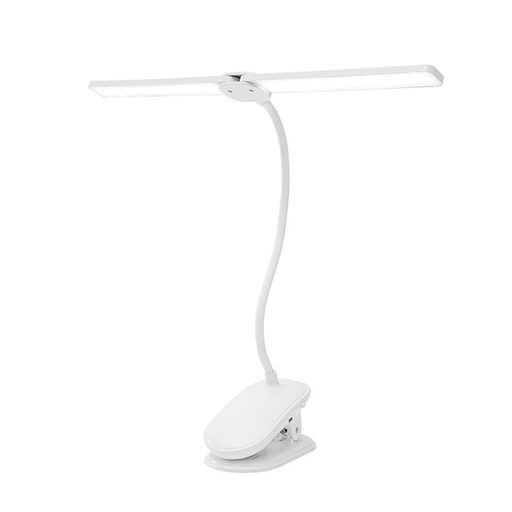
Rechargeable dual LED clamp light, dimmable, 3 light modes
The clamp and independently adjustable light heads could suit focused lighting in a small workspace; use a test recording to see whether it’s well positioned for filming.
The description lists three colour modes, dimmable brightness and a runtime of up to 30 hours. The clamp fits surfaces up to 5 cm thick.
Joybuy
 No image available
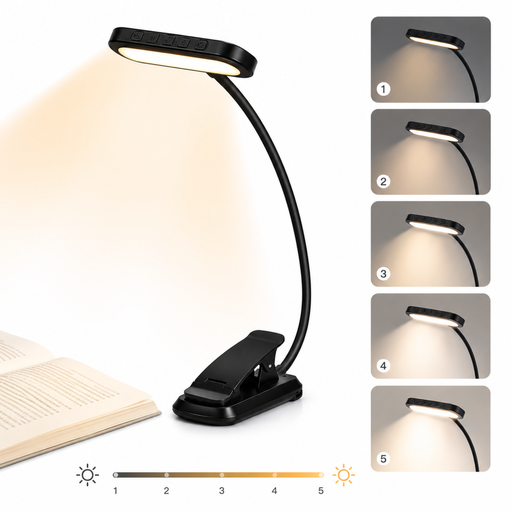
LED reading lamp with clamp, 24 LEDs
The clamp and adjustable neck give you options for positioning the lamp at a small table; use a test recording to check that the light reaches your hands and paper effectively.
The product title lists 24 LEDs, five dimming levels and a 1000 mAh battery. The description mentions three colour temperatures, CRI >90 and USB-C charging.
Joybuy
 No image available
DJI Osmo Pocket 4 Standard Combo with Ulanzi VL81 LED video light
This bundle combines a camera with a rechargeable LED video light for indoor recording; check that the complete bundle suits the camera setup you plan to use.
The product description lists an adjustable colour temperature range of 3200–5500 K for the VL81.
Joybuy
 No image available
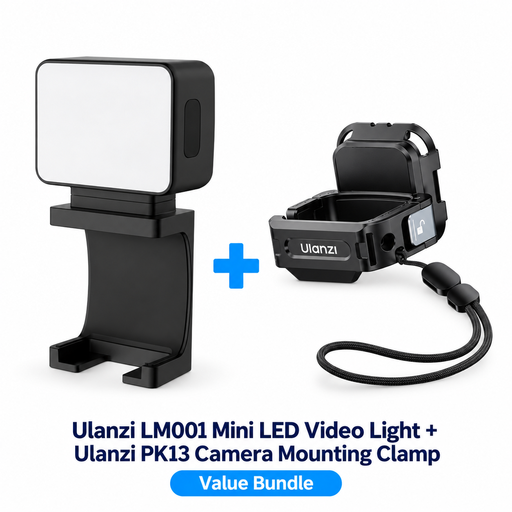
ULANZI LM001 mini LED video light with PK13 clamp for DJI Osmo Pocket 3
This compact light with a built-in battery is designed as portable fill lighting. Check that the included mounting clamp suits your camera setup.
The product description lists a 500 mAh battery and magnetic mounting for the LM001. The PK13 clamp is designed for the DJI Osmo Pocket 3.
Joybuy
 No image available
COLBOR 60W RGBCW COB LED video light, 59 Wh
This portable COB light could suit a mobile video setup; check that the available mount and power supply are suitable for where you’ll be filming.
The product description lists 60 W, a built-in 59 Wh battery, adjustable light from 2700–6500 K and CRI 96+. To activate the battery, the description specifies a 60 W PD charger rated at 20 V/3 A and the supplied USB-C cable.
Joybuy
Frequently asked questions
Is a higher CRI enough to show paper colours accurately on video?
No, a higher CRI alone isn’t enough. The CRI figures quoted are manufacturer specifications for specific lights; Adobe also explains the importance of setting the white balance to suit your lighting. Film your paper and coloured materials in the conditions you plan to use for recording.
How can I check whether my lesson video has distracting bands?
Film a short test using the camera and lighting settings you plan to use, then check the footage for bands or flickering. Sony explains that flickering light sources can cause bands; the right shutter setting depends on the conditions and your camera’s features.
Are a stand, softbox and adapter always included?
It varies by model and version. NEEWER lists NL660 packages with and without a stand, the Elgato manual says the Key Light Air MK.2 doesn’t include a mains adapter, and SmallRig lists the softbox for the RC 60B Lite Edition as optional. Check the contents of the exact version you’re buying.
What rights do I have as a Dutch consumer when I buy a light online?
For an online consumer purchase, you generally have a statutory cancellation period of up to 14 days after delivery, subject to exceptions. ACM ConsuWijzer explains that statutory guarantees in the Netherlands depend on what you can reasonably expect from the product; a manufacturer’s guarantee doesn’t automatically cover the full statutory guarantee.
Does a video light need CE marking in the Netherlands?
That depends on which regulations apply to the specific light and power supply. CE marking is required for products covered by EU rules that require it. The Netherlands Food and Consumer Product Safety Authority lists nominal voltage limits for the Low Voltage Directive of 50–1000 V AC and 75–1500 V DC. Check the applicable regulations and product information for the exact light and power supply.


