
Teachers with a fixed work table
You film the whole collage work surface and want hands and paper to remain visible as materials are moved around.


For a fixed work table, a diffused, adjustable LED panel is usually a sensible place to start. A COB light is a good fit if you want to choose your own softbox, while a compact light can be handy if you often move your setup. Match the colour temperature to the existing light, test colours and banding with your own camera, and check the mount, power supply and product information for the Dutch market before buying.
You film the whole collage work surface and want hands and paper to remain visible as materials are moved around.
You want to film the differences between paper, paint or fabric colours clearly under the existing artificial light.
You want to take the light with you and adapt the power supply and mounting to the table available.
Choose this if: you want to light a fixed work table from an adjustable angle.
Bear in mind: whether the panel covers the whole work surface and whether the version you choose includes a suitable stand.
Choose this if: you want to control the light distribution yourself with a separate modifier and have room for the setup.
Bear in mind: whether the softbox and stand are included in the set you choose and are suitable for your needs.
Choose this if: saving space and moving the light quickly matter more than lighting a large work surface.
Bear in mind: whether the light will illuminate the whole sheet of paper from your filming distance.
| What to consider | What should you look for? | Who is this important for? |
|---|---|---|
| Lighting the work surface | Assess how evenly the light covers the whole table, and check for shadows from hands and raised elements. | If I film the whole collage work surface, I want the paper and moving hands to remain visible. Around 33% of consumers prioritise even lighting. |
| Accurate material colours | Match the colour temperature to the existing light and record a test using the actual materials. | If I demonstrate paper, paint or fabric colours, I want differences in shade to remain clear on camera. Around 27% of consumers give colour accuracy top priority. |
| Flicker and banding | Test the light alongside your other lighting and with the camera settings you use for the lesson. | If I film under artificial light, I want to avoid flicker or banding disrupting my demonstration. Around 27% of consumers say this is their main concern when buying. |
| Moving and setting up | Check the power supply, mounting and any softbox or battery for the exact version. | If I film in different places, I want to know which parts I need to bring and connect. Around 13% of consumers prioritise portability and a complete setup. |
The light output quoted by amaran for the COB 60x S is measured at 1 metre with a specific reflector. That is not the same setup as filming above paper with a softbox.
Compare the light distribution in the setup you plan to use, and check which parts are included in the set you choose.
The P260C Pro is a panel for a tabletop setup, with a built-in diffuser and adjustable colour temperature.
The NL660 is an adjustable bi-colour LED panel. Compare the light on its own with a version that includes a stand.
The COB 60x S is a point-source light for anyone who wants to shape the light using a compatible Bowens softbox.
The VIJIM VL120 Bi-Color is a compact option for a small, portable setup.
These product picks cover video lights and bundles with video lights for filming. Compare the light shape, power supply and included parts with your tabletop setup. Before buying, also check the product information about the light and power supply for the Dutch market.
 No image available
An option to consider if you’re looking for a portable light with adjustable colour temperature.
The product name lists 60W, RGB and a weight of 345g.
 No image available
An option if you’re considering a COB light with a separate modifier.
The product name lists 200W, bi-colour, 2700K–7000K, a Bowens mount and a built-in power adapter design.
 No image available
An option to compare if you’re looking for a ring-shaped light and a tripod for your tabletop setup.
The product name lists a 10-inch light, a remote control, three colours and ten brightness levels, with a 63-inch tripod.
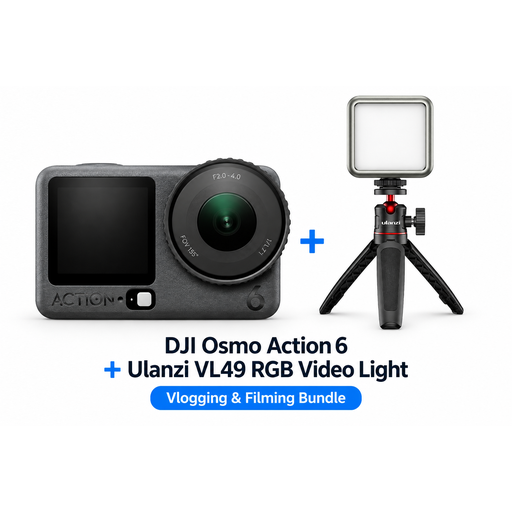 No image available
A bundle to consider if you’re looking at a compact filming setup with a video light.
The product name lists a Ulanzi VL49 RGB LED video light in the bundle.
 No image available
A bundle to compare if you’re looking for a portable filming setup with a video light.
The product name lists a rechargeable Ulanzi VL81 LED video light; the description mentions adjustable colour temperature.
Record a short clip of the entire work surface, moving your hands and laying out different colours of paper. Check for shadows, white balance, banding and changes in brightness. Sony explains that artificial light can cause flicker, colour shifts or banding in video.
No. A CRI figure alone doesn’t prove how your materials will look in the recording. The camera’s white balance and the existing light also play a part, so compare a test shot with the actual materials.
For the exact version, check whether a stand, mains adapter, battery and diffuser or softbox are included. NEEWER says NL660 packages vary and NP-F batteries are not included. For the amaran COB 60x S, check which modifier and stand come with the set you choose.
Check the product information for the exact light and power supply. The Dutch government sets out safety requirements for electrical equipment; CE marking is only required where the relevant EU rules say so. A CE mark is the manufacturer’s declaration, not an independently issued certificate.