For a clay modelling lesson filmed under artificial light, choose your lighting based on your workspace and how you want to position it. A desk panel may suit a small table, while a COB light with a compatible softbox gives you more freedom to shape the light. A larger, softer light source can help reduce harsh shadows, but it needs space and may require extra accessories. Match the colour temperature to your other lights, then check the colours and shadows in a test recording.
Who is this choice relevant to?
Teachers filming demonstrations from above
When fingers and tools move over the clay, it’s important that the lighting reaches the work surface and keeps every movement visible. Adobe explains how larger light sources or diffusion can soften harsh shadows.
Makers who want to show the colours of their clay
If you want to judge colours on camera, compare the adjustable colour temperature with your other artificial lights and set the white balance accordingly. Adobe explains that the right white balance depends on the colour temperature of the light.
Filmmakers with a small work table
On a compact table, you’ll need to consider where to position a clamp, the camera angle, the available height and the power supply. A desk panel and a light with a separate modifier each require a different set-up.
What should you look for when choosing?
Compact desk-mounted LED panel
A good fit if: you film at a small table and can position the clamp at a practical height, out of shot.
Bear in mind: according to Elgato, the Elgato Key Light Air MK.2 needs a suitable power supply of at least 30 W to reach full brightness; this is not included.
COB light with a softbox or other diffusion
A good fit if: you want to position the light further from the work surface or soften shadows with a modifier.
Bear in mind: check that the modifier is compatible and that you have room for the light and any stands. A lux figure measured with a reflector won’t necessarily predict the lighting you’ll get with a softbox.
| What to consider |
What should you check? |
Who is this important for? |
| Seeing your hands and the clay |
Check that the light source or diffusion covers the whole work surface; make a test recording with your hands moving. |
If I’m filming demonstrations over the clay, I want fingers, tools and shapes to stay visible. Around 38% of consumers prioritise being able to see what’s happening. |
| Colours under artificial light |
Compare the adjustable colour temperature with your other lights, then check the clay in a test recording with the white balance set appropriately. |
If I want to film the clay colours accurately, I want to be able to match the lighting to the artificial light already in the room. Around 25% of consumers say colour consistency is their top priority. |
| Space and mounting |
Measure the edge of the table and the available height; also check the clamp, power supply and what’s included in the set you choose. |
If my work table has little space, I want the light to fit without getting in the way of my camera or workspace. Around 25% of consumers put positioning and workspace at the top of their list. |
| Distractions while recording |
Test with your usual camera settings, existing lights and microphone in their normal positions. |
If I’m teaching while filming, I don’t want distracting bands in the picture or audible fan noise in the recording. Around 12% of consumers prioritise an uninterrupted recording. |
Common buying mistakes
-
Assuming a lux figure with a reflector tells you how bright the light will be on the clay table
The light level on the work surface also depends on the distance and the modifier. Manufacturers may provide measurements for different set-ups.
Only compare measurements taken on the same basis, and check that the modifier is compatible with the light.
A softbox or other modifier you want may need to be bought separately.
-
Judging a desk panel without taking its power supply into account
The maximum light output of the Elgato Key Light Air MK.2 depends on the available power supply.
Check which accessories are included and what power supply you need for the brightness you want to use.
A suitable power adapter may be needed for full brightness, but it isn’t included.
-
Comparing a two-light kit with a single light
A complete set-up and a single light may differ in the number of lights and accessories included.
Check how many lights, stands and modifiers are included with each version.
A separate COB light may need stands and softboxes to create the set-up you want.
Brands to consider
Elgato
The Key Light Air MK.2 is a desk-mounted LED panel designed for a set-up with the clamp out of shot.
- Elgato lists an adjustable range of 2900–7000 K and a CRI above 94.
- The stated maximum light output of 2100 lumens depends on the power supply. Full brightness requires a suitable power supply of at least 30 W, which is not included.
Godox
The SL60IIBi is an adjustable COB light with a Bowens mount for a compatible modifier.
- Godox specifies 2800–6500 K, CRI ≥96 and TLCI ≥97.
- The stated 25,100 lux at 1 metre is measured with the standard reflector; it doesn’t tell you how bright a softbox will be on your work table.
amaran
The 100x S is an adjustable COB light with a Bowens mount, for those who want to choose a separate modifier.
- amaran lists 2700–6500 K, CRI 95 and TLCI 99 for this model.
- The manufacturer gives photometric figures for the light without a reflector and with a hyper reflector. Don’t compare them as if they were measured in the same set-up.
Nanlite
The FS-150B and a dual-kit version are options for a larger set-up with more than one light.
- The dual-kit version is described as including lights, stands and softboxes.
- Check what’s included in the version you choose, and allow for the space a larger set-up needs.
SmallRig
The RC 100B is a compact COB option for those considering a portable set-up.
- SmallRig lists a range of 2700–6500 K for the RC 100B.
- Check the full specification and which mounting and power options come with the version you choose.
Joybuy products for video lighting
Here you’ll find Joybuy products described as video lights, camera lights or fill lights. Compare the type of light and mounting options with your workspace; not every version is the same type of main light for a clay modelling lesson.
 No image available
COLBOR 200W bi-colour COB video light
If you want to shape the light with a separate modifier, the product title lists a Bowens mount.
200W; bi-colour, 2700–7000 K; COB; built-in power supply design.
View at Joybuy
 No image available
Ulanzi VL49 RGB video light
If you’re looking for a compact camera light or fill light, the product title says it has a magnet on the back.
2000 mAh battery; dimmable; adjustable range of 2500–9500 K.
The product information warns against using chargers with a voltage higher than 5 V; check the adapter before charging.
View at Joybuy
 No image available
Ulanzi LM001 mini fill light
If you’re looking for a portable fill light for photos or videos, the product title mentions a magnetic mount.
LED light; 500 mAh battery.
View at Joybuy
 No image available
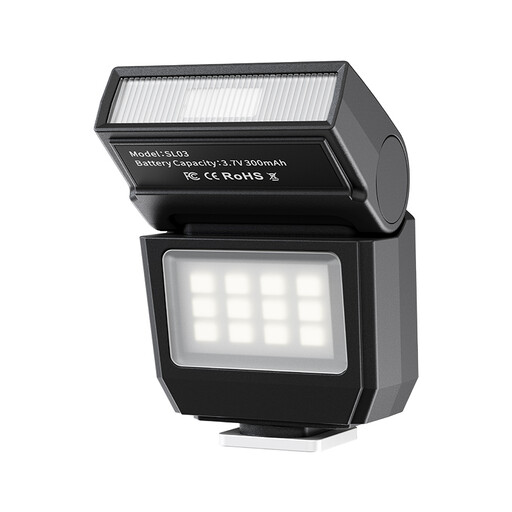
Ulanzi SL03 mini flash with video light
This version combines a flash with a video light; check that the single-contact hot shoe is compatible with your camera.
Fixed colour temperature of 6500 K; head tilts up to 90°; four power levels from 1/8–1/1. The title lists Sony, Canon and Fuji DSLR cameras.
The fixed colour temperature doesn’t offer an adjustable range for matching the light to other artificial lighting.
View at Joybuy
 No image available
Ulanzi 4-inch phone ring light
If you’re filming with a smartphone, the product description mentions a clip that attaches to the phone.
4-inch size; adjustable range of 3000–7000 K; three colour temperatures and five brightness levels.
This is a small ring light; check in a test recording whether the light reaches the whole clay work surface.
View at Joybuy
Frequently asked questions
Can a larger light or softbox soften harsh shadows from my hands?
A larger light source or compatible diffusion can create softer shadow edges. Position the light so your hands don’t keep blocking the demonstration, and check that the shape of the clay remains visible too.
How should I set up the light if there’s already artificial light in the room?
Match the colour temperature of the lights and your camera’s white balance to the lighting you’ve chosen, then check a recording of the clay. Adobe notes that the right white balance depends on the colour temperature of the light, so one setting won’t automatically suit every mixed-light set-up.
What can I do if bands appear in the picture or the light is audible?
Start by making a test video with all the lights and the microphone in their usual positions. For flickering lights on a 50Hz mains supply, Sony Support lists 1/50 or 1/100 second as possible shutter speeds, depending on the camera and situation; check the results with your own equipment.
What are my rights if a video light I bought online breaks too soon?
For a consumer purchase in the Netherlands, the seller remains legally responsible in addition to any manufacturer’s warranty. If the product doesn’t do what you could reasonably expect when used normally, the seller must offer an appropriate solution. For a standard product bought online, you’ll generally also have a 14-day cooling-off period after delivery; check whether any exceptions apply to your purchase.
Does a CE mark on its own prove that a video light meets all safety requirements?
No. The Dutch government’s Ondernemersplein describes the CE mark as a declaration made by the manufacturer for products covered by the relevant EU rules, and also refers to the EU declaration of conformity and safety requirements for electrical appliances. The mark on its own isn’t an independent test and doesn’t show that every individual item meets all applicable requirements.


