
Card maker with a small table
You film close to a window and want fill lighting that you can set up without adding floor stands around your workspace. A desk clamp or compact mount can free up space; check that it fits your table and filming angle.


If you have a small card-making table by a window, a compact, adjustable fill light that you can position on the shadow side is usually a good place to start. For a larger work surface or changing window light, a panel or COB light with a diffuser can offer more setup options, but bear in mind that it will need more space, mounting and power.
You film close to a window and want fill lighting that you can set up without adding floor stands around your workspace. A desk clamp or compact mount can free up space; check that it fits your table and filming angle.
You demonstrate paper, ink and each step of your process while the light from the window changes. Adjustable lighting can help you get the right balance, but check your camera’s white balance too. Canon Europe explains that natural light changes colour depending on the conditions.
You want to show the card, your hands and your tools all at once, with the option to position the light further away from the table. A panel or COB light with a suitable modifier will need room for the setup; Nikon explains how diffusion increases the apparent size of the light source.
Start by recording a short clip of your hands above the card. Then choose based on shadows, colour rendering and the space you have for the light and its mount.
| What to consider | What should you check? | Who is this most important for? |
|---|---|---|
| Hand shadows and visibility | Record a test clip with both hands above the card. Check the direction of the light, the diffuser and whether there is room for the light or stand to sit out of shot. | If my hands cast a shadow over the card, I want to be able to direct the light from the other side without filling up my workspace. Around 30% of consumers prioritise reducing hand shadows. |
| Paper and ink colours | Check the adjustment range of the exact model and film a test card with white and coloured areas. Make sure you also adjust your camera’s white balance. | When I show colours and paper to students, I want to see how they look on camera. Around 24% of consumers prioritise colour rendering. |
| Positioning around the table | Measure the edge of the table and the available clearance above it. Check that the clamp fits, whether a stand is included and whether you can direct the light from your camera angle. | If there’s little room for my camera, card and tools, I want a mount that keeps my work surface clear. Around 23% of consumers prioritise mounting options and free table space. |
| Consistent lighting while filming | Record a short video using the camera settings you plan to use. Check for flicker, and if you’re recording a lesson, consider the power supply and any fan noise too. | For a longer lesson, I don’t want to be caught out by a flat battery or visibly uneven lighting halfway through. Around 23% of consumers prioritise uninterrupted recording. |
A stated COB light measurement applies to the reflector and measuring distance specified. A softbox changes the setup and the light measurement, so the reflector figure won’t tell you how much light reaches the card when you use a softbox.
Compare the measurement conditions and check which light modifier is included with the model you’ve chosen.
A suitable softbox and a secure mounting setup may need extra space and accessories.
The NEEWER NL660 comes in different versions: the stand is included with the ‘with Stand’ version, while compatible batteries are sold separately.
Before buying, check the contents of the exact version you’ve selected and find out what power supply you’ll need.
You may need to buy a stand or compatible battery separately if you want to use one in your setup.
Elgato states that the maximum light output of the Key Light Air MK.2 depends on the available USB-C power supply.
Check the power requirements and what’s included with the version you’ve chosen.
A suitable USB-C power supply may be needed to achieve the stated maximum light output.
The Moman PC8 is a compact light with a stated run time of around 80 minutes at full brightness. On their own, these figures don’t tell you whether it will light the entire work surface evenly and softly enough.
Check the whole card and hand area in a test video, not just a close-up.
The Key Light Air MK.2 is a desktop panel with a clamp, designed for a compact filming space.
The NL660 is a bi-colour LED panel for a work surface where you want to adjust the light’s position and diffusion.
The SL60IIBi is a bi-colour COB light for a setup where you choose the light modifier separately.
The COB 60x S is a compact bi-colour point-source light with a Bowens mount, so you can add diffusion separately.
The PC8 is a small, rechargeable light for local fill or a temporary filming setup.
These Joybuy products are compact lights for targeted fill or mounting in a small workspace. Check in a test recording whether the light reaches the entire card.
 Image unavailable
Could work as a compact fill light for a small camera setup. Record a test clip to check whether the light reaches the whole card.
The description mentions a cold shoe mount, a built-in rechargeable battery, and adjustable brightness and colour temperature.
 Image unavailable
Could be a good fit if you’re looking for a small, portable fill light. Record a test clip to see whether it covers enough of the work surface.
The product name mentions RGB, dimming, an adjustable range of 2500–9500 K and a magnet on the back. The description states that it has a built-in battery.
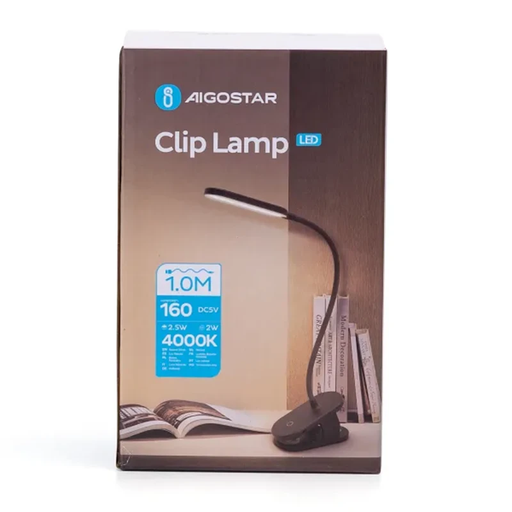 Image unavailable
The clamp and adjustable arm could work for targeted lighting on a small table. Check whether you can keep the lamp out of shot.
The product information lists 4000 K, 2,5 W, 160 lm and three light settings. The colour temperature is stated as 4000 K; no adjustable temperature range is given.
Use the window as your starting point and position the fill light on the side where your hand casts a shadow over the card. First, film a short overhead clip of yourself working. The best position will depend on your camera, window and table.
There’s no single fixed setting to use. Canon Europe explains that the colour of natural light changes depending on the conditions. Match the light and your camera’s white balance to the scene, then check how white paper and coloured ink look in the recording.
First, test the light and camera together. Nikon explains that flicker from certain light sources can be linked to frame rate, shutter speed and the light’s frequency. If needed, use your camera’s anti-flicker setting and check the recorded result.
Check whether the stand, softbox, battery and suitable power supply are included with the exact version you’re choosing. Electrical products sold in the Netherlands are subject to the relevant European product safety rules. According to Ondernemersplein, the Dutch government’s business information service, CE marking is mandatory for product groups where this requirement applies.
For online consumer purchases in the Netherlands, you generally have a statutory 14-day cancellation period after delivery, according to ACM ConsuWijzer. The statutory guarantee is separate from any guarantee offered by the seller or manufacturer.