
Creator filming a whole sketchbook
You film open pages and moving hands, and want to minimise shadows and distracting reflections.


Start with a light that can reach the whole open sketchbook, and position it so that your hands and reflections interfere as little as possible with the image. An adjustable desk panel can be practical on a small table. A separate COB light with suitable diffusion gives you more freedom to position the light and modifier, but requires space and careful attention to the connections. The Smithsonian Institution Archives describes diffusion as a way to reduce reflections in object photography; the result on sketchbook paper will depend on your own setup.
You film open pages and moving hands, and want to minimise shadows and distracting reflections.
You show colours or paper and want to keep the light colour and camera settings consistent between shots.
You have little space around the camera and book, so you need to choose between a desk clamp and a separate light setup.
First, check whether you can position the light so that both pages remain visible as you turn them. Then compare the colour temperature, mounting options and diffusion, as well as practical considerations such as noise and power.
| What to consider | What to look for | Who is this important for? |
|---|---|---|
| Even lighting | Check whether the light reaches the whole open book, and whether suitable diffusion is available and compatible. | If I’m filming the whole book while my hands move, I want to minimise shadows and reflections. Around 36% of consumers give even page lighting their top priority. |
| Colour consistency | Compare the adjustment range of the exact version, and test with a fixed white balance under the lighting you plan to use. | When I’m comparing paper and drawing colours, I want the lighting and camera settings to stay the same between shots. Around 29% of consumers prioritise colours that look accurate and consistent. |
| Space and mounting | Measure the desk thickness and the available space around your camera and book; check which accessories are included. | With a small worktable, I want to position a light without it getting in the way of my camera or book. Around 21% of consumers give space and mounting their top priority. |
| Noise and flicker | Check the cooling method and make a short test recording using your intended brightness, microphone and shutter speed. | If I’m talking while filming, I don’t want distracting noise from the light or visible bands in the image. Around 14% of consumers put clear audio and stable video at the top of their list. |
The stated output applies under specific measurement or power conditions. The position of the light and any diffusion will affect what the camera captures on both pages.
Compare the measurement conditions and take a test shot of the whole open book, not just one page.
Power supplies, modifiers and mounting options can vary between models and versions. Elgato lists a desk clamp for the Key Light Air MK.2, but a suitable power supply for full brightness is sold separately.
Check the contents of the exact version before buying, and make sure the power supply and connections suit your setup.
Depending on the model and package, you may need a separate power supply, light modifier or compatible mount.
Your camera, white balance and the other lighting in the room will also affect how paper and pigments look on screen.
Film a recognisable test page under your final lighting setup, and keep the camera settings the same between shots.
The Key Light Air MK.2 is a desk panel for a compact filming setup.
The SL60IIBi is a bi-colour COB light that can be positioned separately as part of a setup with light modifiers.
The 100x S is a bi-colour point-source light for a setup where you control the light and its position separately.
The RC 60B Lite Edition is a portable COB option if you film in different locations.
This selection includes clip-on and portable LED lights, a COB studio light and a camera bundle with an LED video light. Compare the mounting options and adjustments with your worktable; the listed features do not guarantee even lighting across the whole open book.
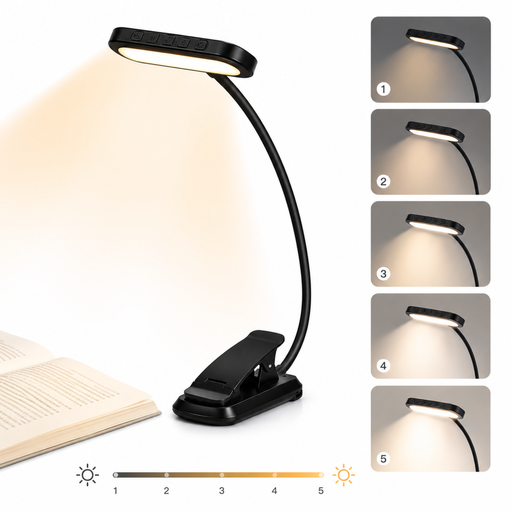 No image available
The clip and flexible neck give you positioning options on a small worktable; test whether the light reaches both pages.
Three light colours, five brightness settings, a 1000 mAh battery, USB-C charging and a 315° rotating clip.
 No image available
The Bowens mount gives you the option of a studio setup with a compatible light modifier; check that you have enough space around your camera and book.
Adjustable range of 2700–7000 K, Bowens mount, built-in power adapter and, according to the product information, CRI and TLCI of 96+.
 No image available
The product title lists a camera and an LED video light in one bundle; check whether the combination suits the way you film.
The product description gives an adjustable range of 3200–5500 K for the included Ulanzi VL81.
 No image available
This compact light offers different mounting options for a small or changing filming location; check how you can position it in relation to the book.
500 mAh battery, magnetic base and 1/4-inch thread; the product description states a maximum runtime of 1.5 hours per charge.
 No image available
The adjustable beam can help you direct the light around your workspace; test how well it covers both pages.
Adjustable range of 2000–5500 K, four brightness settings, 2000 mAh battery, weight of 187 g and USB-C charging. The beam adjusts from spot to flood.
It depends on the size of the book, the position of the light and how you move your hands. Make a test recording of both pages as you turn them. If one side looks dark, adjust the position and diffusion first.
Keep the lighting as consistent as possible and set your camera’s white balance to match the light actually falling on the book. Canon Europe explains that the colour temperature of the light affects how the camera perceives colours.
Make a test recording and, if your camera allows it, adjust the shutter speed while checking the result. For regions with a 50 Hz mains frequency, Sony lists 1/50 or 1/100 of a second as possible settings; the best result depends on the camera and light.
Check whether the power supply, clamp, stand or diffuser you need is included with the exact version. Elgato lists a clamp for the Key Light Air MK.2, but a suitable power supply for full brightness is sold separately.
Check which product documentation and CE marking apply to the exact version. Business.gov.nl explains that manufacturers must apply a CE marking when a product meets the relevant technical and administrative requirements.