
Puzzle enthusiast filming from above
You want puzzle pieces and moving hands to stay visible across the part of the table you’re filming. Test the light position and shadows from the camera angle you’ll use.


For a permanent worktable, a larger diffused panel is a sensible starting point. A compact light takes up less space, but you’ll need to check in a test recording that both the puzzle and your hands are clearly visible. Adobe Stock Contributor notes that a larger light source produces softer light. A COB light with a suitable diffuser needs space and may require extra accessories; check the power supply, mounting, package contents and applicable CE marking for each version.
You want puzzle pieces and moving hands to stay visible across the part of the table you’re filming. Test the light position and shadows from the camera angle you’ll use.
You need to be able to position the light and its mount alongside other people, then pack everything away after filming. Compare a desk clamp, tripod and battery power with the space available.
You want colours to look true to life without distracting hotspots. Compare adjustable white light and diffusion, then assess the image in a test recording of your own puzzle.
When demonstrating a puzzle, the light needs to do more than illuminate the work surface: your hands, the space available for setting up and the image captured by your camera all matter too.
Choose this if: you’re filming a larger area of the puzzle table from a fixed position and have room to place the panel out of shot.
Bear in mind: you’ll need space for the panel and its mount. Check coverage and hand shadows in a test recording.
Choose this if: space is limited or you mainly film a small section of the puzzle and its details.
Bear in mind: a small illuminated surface doesn’t guarantee even lighting across the whole puzzle. Check the mounting and recording time too.
Choose this if: you can position the light where you need it and have room for the mount and a suitable light modifier.
Bear in mind: the light and softbox aren’t necessarily included together. Check the power supply and how much space the setup takes up too.
| What to consider | What should you check? | Who is this most relevant to? |
|---|---|---|
| Shadows and glare | Film from the actual camera angle while moving puzzle pieces; check the whole area in use for shadows and bright spots. | If I want to see the pieces and my hands at the same time, I want to minimise distracting shadows and reflections. Around 29% of consumers say this is their top buying priority. |
| Colour accuracy | Make a test recording with a fixed white balance and assess the pieces on the screen you’ll use to watch the video. | If I want the colours of my puzzle to remain recognisable, I want to see how the light and my camera render them. Around 21% of consumers give colour accuracy their top priority. |
| Space and power | Measure the space available and, if you’re using a clamp, the thickness of the table. Check the mounting, power options and contents of the version you’re considering. | In a shared workshop, I want to be able to set up and pack away the light without getting in anyone’s way. This is the main concern for around 21% of consumers. |
| Flicker | Record a clip with the camera you plan to use and all the lights that will be on while filming. If necessary, check your camera settings for flicker reduction. | If I’m using the workshop lights alongside my own camera, I want a steady image. Around 15% of consumers prioritise avoiding visible flicker. |
| Complete setup | Check which mounting, power supply and diffuser are included with each version, and whether a separate modifier is compatible. | If I still need other components, I want to know in advance what I’ll need in addition to the light. Around 14% of consumers make completeness and the total cost their main concern. |
A stated lux rating applies to specific measuring conditions and a particular distance. It doesn’t prove that the entire puzzle will be evenly lit in your recording.
Compare the measuring conditions and, most importantly, make a test recording from the distance you’ll be filming at.
Versions may vary, and a diffuser or other modifier may be an optional accessory. Without a suitable mount or power supply, the light may not work for your setup.
Check the parts list for the exact version you’re considering, and make sure any accessories you need are compatible.
You may also need a suitable stand, diffuser, battery or power adapter.
Ulanzi lists a range of 2500–9000 K for the Ulanzi VL49 RGB, while the Joybuy product title states 2500–9500 K. This discrepancy makes it important to identify the exact version.
Before comparing it with the manufacturer’s model, confirm the full model identity and colour-temperature specification of the version on offer.
The Litemons LP400Bi is a bi-colour panel with diffusion, designed for those who want to use mains power or compatible NP-F batteries.
The NL-116AI is a compact bi-colour panel for a limited filming space.
The VL49 RGB is a compact, portable light for details or as an additional light source.
The P60x is a bi-colour panel for those who want to adjust the light position and use mains power or compatible NP-F batteries.
The RC 60B Lite Edition is a compact COB light with a built-in battery for a portable setup.
The Key Light Air MK.2 uses a desk clamp when a floor stand would be inconvenient.
This selection includes compact camera and video lights, as well as a portable COB light. Check in a test recording that your chosen light shows both the puzzle and your hands clearly enough.
 No image available
Suitable for a compact, portable video setup; the product information mentions RGB colour and adjustable brightness.
 No image available
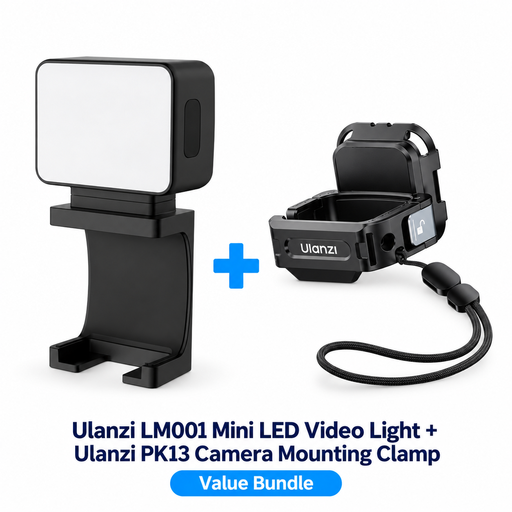
A compact light for additional indoor lighting; the product information mentions a built-in battery and magnetic positioning.
Battery: 500 mAh. The bundle includes a PK13 clamp designed for the DJI Osmo Pocket 3.
 No image available
A portable COB light for a mobile filming setup, with bi-colour adjustment and colour selection according to the product name.
The product name lists a built-in 59 Wh battery and 2700–6500 K. The description mentions USB-C PD or DC power.
 No image available
Suitable for a compact video setup where you want to adjust brightness and colour temperature.
The product information mentions a built-in battery, an array of 81 LEDs and a cold shoe mount that’s also compatible with tripods.
 No image available
A compact light for additional illumination; the product information mentions adjustable brightness and colour temperature.
The product title lists a 2000 mAh battery and a range of 2500–9500 K. Ulanzi lists 2500–9000 K for the VL49 RGB; confirm the version and specification of this product listing.
No. Continuous lighting is a suitable choice for a video recorded in one continuous take; a softbox on its own doesn’t produce light. Check that a modifier will fit the light you already have.
Record a test clip from the camera angle you’ll use while moving your hands across the area of the puzzle in shot. Move or soften the light if pieces become hard to see behind your hand.
Test all the lights with your own camera. Nikon explains that a combination of light source and camera settings can cause flicker, and mentions flicker reduction as a possible camera setting; the settings available vary by camera.
Not always. According to the Dutch government, distance purchases usually come with a 14-day cooling-off period, but there are exceptions. Before buying, check the terms that apply to the specific seller and purchase.
CE marking is mandatory for electrical products covered by the relevant rules. The Netherlands Enterprise Agency explains that CE is a conformity mark, not an independent safety guarantee; check the marking and product identity of the specific version.