
Maker dealing with shadows on folds
You film at a table by a window, but your hands or upright folds cast shadows over important steps. Canon Netherlands describes window light as soft light; a reflector can bounce it back towards the shadowed side.


For a paper-folding lesson, start with window light and a reflector. Only buy a light if your hands or fold lines still look dark in a test video, or the daylight changes while you’re filming. A dimmable LED panel is often easier to add to a small table setup, while a COB light with a softbox or other light modifier needs more space and accessories. Check how the light falls and how the paper looks using your own camera; an adjustable light colour doesn’t replace setting the white balance.
You film at a table by a window, but your hands or upright folds cast shadows over important steps. Canon Netherlands describes window light as soft light; a reflector can bounce it back towards the shadowed side.
You want consistent lighting across a series of folding steps when the daylight changes. Adjustable continuous lighting can give you more control than a reflector alone.
You want to add light without getting in the way of your paper, hands or camera. So consider the mounting options, the direction you want the light to come from and the power supply.
Choose this if: the window already lights the table well and you mainly want to brighten shadows cast by your hands or paper; Canon Netherlands recommends using a reflector to bounce light back.
Bear in mind: daylight changes with the weather and time of day, so the exposure may vary during a longer recording.
Choose this if: you want to adjust continuous lighting alongside the window and can position a panel to light the paper.
Bear in mind: a clamp or stand can take up space; check that the mount supplied with the version you choose suits your table and filming angle.
Choose this if: you want more control over the shape of the light and have room to set up the light and modifier.
Bear in mind: check which reflector, softbox, mount and power supply are included with the exact version; a COB light without a suitable modifier won’t automatically produce soft light on your work surface.
| What to consider | What should you look for? | Who should consider this? |
|---|---|---|
| Shadows on folds | First try a reflector opposite the window; then check whether you need directional, dimmable fill light that can stay out of shot. | If your hands or raised paper edges cast shadows over the folding steps, you’ll want to be able to see those details on camera. Around 33% of consumers give top priority to shadows on folds. |
| Changing window light | Review a test recording and check whether you can adjust the brightness of any additional light; match the power supply to the lesson length. | If the daylight changes during a longer lesson, you’ll want consistent lighting across successive steps. Around 27% of consumers prioritise even lighting. |
| Paper colours | Compare the adjustable colour temperature and stated colour rendering, set your camera’s white balance, and check how white and coloured paper look in the video. | If the paper’s colour needs to look true to life, check the result with the camera and lighting you’ll actually use. Around 20% of consumers say colour rendering is their main concern. |
| Positioning and power | Check that the clamp, stand and power supply are included with the exact version, and that you can shine the light from your preferred angle. | When filming at a small table, you’ll want to position the light without getting in the way of your workspace or filming angle. Around 20% of consumers give top priority to setup and power. |
The stated lux rating for the amaran 100x S is measured with a hyper reflector at 1 meter and 5600 K. The listed box contents don’t include a softbox, so this rating alone doesn’t tell you how soft the light will look on your work surface.
Compare the measurement distance and included accessories, then use a test recording to decide what kind of shadows you want.
You may need a separate light modifier and a suitable mount to achieve the lighting effect you want.
NEEWER offers the NL660 in versions both with and without a stand. The version you choose determines which mounting option you can use.
Check the exact version and make sure the mount suits your table and filming angle.
You may need a stand or another mount to position the light where you want it.
Elgato links the Key Light Air MK.2’s maximum brightness to the available USB-C power. SmallRig states that the RC 60B runs for 45 minutes at full power.
Compare the lesson length with the stated run time and check which power supply is included with the exact version.
Depending on the version, you may need a suitable adapter, charger or additional power supply.
The Key Light Air MK.2 is a desk panel with a clamp mount and adjustable continuous lighting.
The NL660 is a bi-colour panel available in different versions; check separately whether the version you choose includes a stand.
The LEDP260C is a panel alternative for a separate lighting setup.
The 100x S is a COB option with a Bowens mount, for anyone looking to use a separate light modifier.
The RC 60B is a portable COB option for a setup you can move around.
The products below are video lights for adding extra light around a table setup. For the exact version, check that it carries the applicable CE marking: the Dutch government’s Ondernemersplein and the Netherlands Food and Consumer Product Safety Authority describe the requirement for relevant electrical products placed on the market within the EEA.
 No image available
A rechargeable video light for adding extra light around your table.
Avoid prolonged direct exposure to the LED and use the light in a well-ventilated space.
 No image available
A good fit if you want to dim your fill light and have a suitable place to attach the magnet on the back.
The product title lists a 2000 mAh battery and an adjustable range of 2500–9500 K.
According to the product warning, use a standard adapter with a 5V output; don’t use a high-voltage fast charger.
 No image available
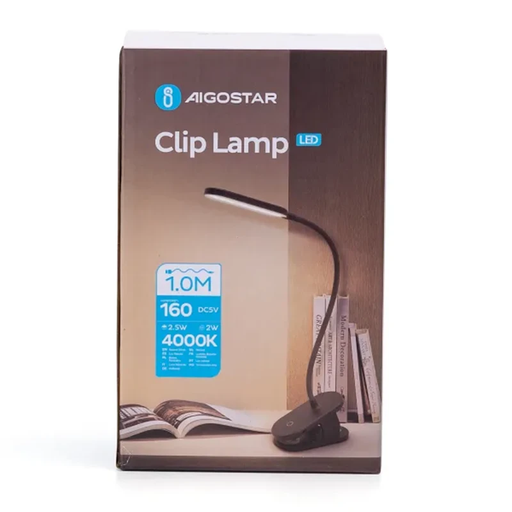
The clip and flexible neck can help you direct the light onto your folding table; check that the clip fits where you want to use it.
The product title lists three light modes, 4000 K, 160 lm and 2.5 W.
 No image available
A portable video light for adjusting your fill light while filming.
The product title lists a range of 2000–5500 K, four brightness settings, a 2000 mAh battery, a weight of 187 g and a zoom function.
The product warning advises against looking directly into the LED at close range.
No. First, try positioning the table in relation to the window and bouncing light back towards the shadowed side with a reflector. Check in a test video that your hands and fold lines are still visible; if the daylight changes during the lesson, extra lighting may still be useful.
Check the white balance using the lighting you’ll actually use. A light with adjustable colour temperature can help you make adjustments, but it doesn’t replace checking the white balance with your camera.
Make a test recording with your own camera and lighting settings. Sony says that flickering light sources can cause banding and that adjusting the shutter speed may help; the right setting also depends on your camera and filming conditions.
It depends on the exact version. The listed box contents of the amaran 100x S include a reflector but no softbox; NEEWER offers the NL660 both with and without a stand. Check the packaging for the version you choose.
CE marking is required for electrical products placed on the market within the EEA that fall under the applicable product rules. The Dutch government’s Ondernemersplein and the Netherlands Food and Consumer Product Safety Authority describe this requirement; check the marking on the exact version.