Start with what the camera needs to show: light your hands and workpiece from a useful angle, and keep the white balance consistent if material colours matter. A desk panel takes up little floor space, a panel on a stand gives you more freedom to direct the light, and a COB light gives you the option of using a suitable light modifier. Check the power supply, mounting and included accessories for the model you choose. Manufacturer specifications alone won’t tell you how the light will look on your workbench.
Who is this video light for?
Maker filming detailed tutorials
You want to keep your actions and small components visible as your hands move around your work. The direction of the light and whether you need to fill in shadows are both worth considering when setting up your shot, as Canon Europe explains.
Maker working with colour-sensitive materials
You want materials and finished results to look true to life on camera, so you need to set the light colour and camera white balance consistently. Adobe explains how white balance affects colours in video.
Maker with a small workspace
You film at a table where a stand could get in the way, and want to know whether a desk clamp will fit the edge. NEEWER and Elgato describe different mounting options for their models.
What should you look for when choosing?
First, decide how you can position the light by your workbench. Then check that it illuminates your hands and materials clearly, and that the power supply and included accessories suit your filming space.
| What to consider |
What to look for when buying |
Who is this important for? |
| Visible actions and details |
Check that you can point the light from a useful angle, whether it comes with a diffuser, and whether the version includes a stand. Record a test shot while moving your hands. |
When I film a tutorial, I don’t want my hands or their shadows to hide the workpiece. Around 36% of consumers put visible tutorial details first. |
| True-to-life material colours |
Compare the colour temperature range and stated colour rendering of the exact model. Then set your camera’s white balance and review footage of your own materials. |
When colour matters, I want to match the lighting to the white balance. Around 29% of consumers prioritise true-to-life material and portfolio colours. |
| Space and mounting |
Measure the edge of your table and the space available for stand legs. Check the clamp size and whether the version you’ve chosen includes a stand. |
If there’s little room left on my workbench, I want to know in advance where I can mount the light. Around 21% of consumers put positioning and mounting first. |
| Power supply and included accessories |
For the exact version, check which adapter, cable, battery, clamp, stand and light modifier are included, and which ones you’ll need. |
If my filming space doesn’t have an obvious power source, I want to know which power supply and accessories I’ll need. Around 14% of consumers prioritise a suitable power supply and a complete kit. |
Things to watch out for when buying
-
Comparing lux figures from different setups directly
A stated lux figure depends on the distance and light modifier used. amaran publishes different figures for the light without a reflector and with a hyper reflector.
Only compare lux figures at the same distance and with a similar light modifier. Also assess the result by recording a test shot of your own work surface.
-
Assuming a stand, battery or power adapter is always included
The NEEWER NL660 is available with or without a stand, and the stated NP-F battery is not included. Elgato does not list a power adapter for the Key Light Air MK.2.
Before planning your mounting and power setup, compare the contents of the exact version with what you already have.
Depending on the version, you may still need a stand, a suitable battery or a USB-C power supply.
-
Assuming a high CRI guarantees portfolio colours
The CRI specification alone doesn’t tell you how colours will look in the finished video; the white balance setting also affects the colours on screen.
Set the light and white balance consistently, then check a test shot of the materials you want to show.
Brands to consider
NEEWER
The NL660 is a bi-colour panel for a portable setup beside your workbench.
- According to NEEWER, the NL660 has a diffuser, a swivel bracket and adjustable white light from 3200–5600 K.
- Versions are available with or without a stand; the stated NP-F battery is not included. Check what comes in the kit.
Elgato
The Key Light Air MK.2 is a desk panel for a permanent setup, provided your desk edge is suitable.
- According to Elgato, it comes with a desk clamp that fits most desks up to 6 cm thick.
- Elgato says maximum brightness requires a USB-C power supply of at least 30 W; a power adapter is not listed among the stated box contents.
Godox
The SL60IIBi is an adjustable COB studio light for a setup with a Bowens light modifier.
- Godox specifies a colour temperature of 2800–6500 K, dimming and a Bowens mount.
- The stated 25,100 lux applies at 1 metre with the standard reflector; this figure doesn’t automatically apply at other distances or with a softbox.
amaran
The 100x S is an adjustable COB light for a permanent setup where you choose the light output and light shaping separately.
- The manufacturer specifies 2700–6500 K and CRI 95.
- Published lux figures differ between the bare light and one with a hyper reflector; don’t use them to predict the results with a different light modifier.
Nanlite
The FS-150B is a mains-powered bi-colour studio light for a larger, permanent setup.
- Nanlite lists a rated power of 175 W, AC 100–240 V and 2700–6500 K.
- The manual describes mounting it on a light stand; check which accessories are included in the kit on offer.
Video lights at Joybuy
The products below are selected for video recording, including portable lights, a ring light and a COB studio light.
 No image available
COLBOR W60R portable RGB video light, 60 W, 345 g
A portable video light to consider if you want continuous lighting and RGB colour control while filming.
The product name lists 60 W and a weight of 345 g.
View at Joybuy
 No image available
COLBOR 200 W COB studio light, 2700–7000 K, Bowens mount
This COB studio light is an option for a permanent video setup where you want to use a separate light modifier.
The product name lists 200 W, 2700–7000 K and a Bowens mount. Check which light modifier and mounting accessories are included with this version.
View at Joybuy
 No image available
10-inch ring light with 63-inch stand and remote control
A ring light with a stand to consider for video recording or online teaching if this type of setup suits your table.
The product name lists three colour modes and ten brightness levels. Check that the stand will fit in the space around your workspace.
View at Joybuy
 No image available
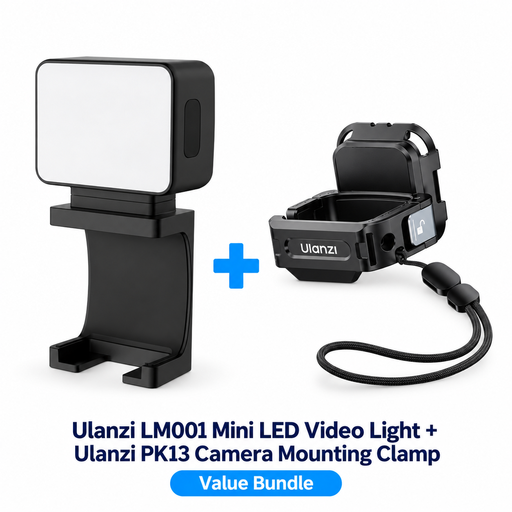
ULANZI LM001 mini video light with PK13 clamp for DJI Osmo Pocket 3
This compact light with a clamp is an option for a portable video setup with the camera and accessory combination listed.
The product name specifies a PK13 clamp for DJI Osmo Pocket 3. Before buying, check that this version suits your setup.
View at Joybuy
 No image available
COLBOR 60 W portable RGBCW COB light with built-in 59 Wh battery
A portable COB light to consider if you want to use lighting in different filming locations.
The product name lists 60 W, a built-in 59 Wh battery and 2700–6500 K. When used at 60 W with the built-in battery, the product information states a run time of one hour.
View at Joybuy
Frequently asked questions
Should you choose a flash or continuous lighting for a filmed lesson?
For video, choose a light that stays on continuously while you film, so you can assess the lighting on your actions. Record a test shot with your own camera and lighting direction; the right setup depends on your workbench and subject.
How can you keep paper and other materials looking true to colour?
Match your camera’s white balance to the lighting you’re using, then check a recording of the material itself. Adjustable colour temperature gives you more options, but a CRI specification alone doesn’t guarantee how the finished video will look. Adobe also explains how white balance affects the colours on screen.
What should you check before mounting a light or using it with a battery?
Check that the edge of your table or the space for a stand is suitable, that the mounting is compatible, and what comes with the exact version. NEEWER states that the NP-F battery for the NL660 is not included; Elgato says the Key Light Air MK.2 requires a USB-C power supply of at least 30 W for maximum brightness.
What rights do you have when you buy a video light online?
According to the Dutch government, consumers buying at a distance are often entitled to a 14-day cooling-off period, with some exceptions. Faulty products are also covered by statutory consumer protection. The Netherlands does not have one fixed statutory warranty period, and the retailer is your point of contact.
Is CE marking required for electric video lights in the Netherlands?
The NVWA states that CE marking is required for products covered by the Commodities Act Decree on Electrical Equipment. Check the product information and the applicable category for the light and any mains power supply. CE marking is the manufacturer’s declaration; it is not the same as a mandatory independent inspection.


