
Crocheter whose hands look too dark on camera
Films at a table by the window and wants soft fill light to keep their hands and stitches visible. Canon Europe explains how fill light can reduce shadows.


Start with the light from your window, and only add a lamp if a test recording shows that your hands or stitches are too dark. Canon Europe points out that natural light changes throughout the day. For a permanent table setup, a dimmable panel can provide fill light, while a COB light with a suitable diffuser gives you more control over the direction of the light, but also takes up space and may require extra equipment. To keep yarn colours looking consistent, use a fixed white balance and check the mount, power supply and product details for the version you choose.
Films at a table by the window and wants soft fill light to keep their hands and stitches visible. Canon Europe explains how fill light can reduce shadows.
Wants to compare yarn colours between recordings, so pays attention to changing daylight, a lamp’s colour temperature and the camera’s white balance. Canon Europe explains how the colour of daylight can change.
Has a fixed camera and working position, and wants a setup where the lamp, mount and cables don’t get in the way of their crochet space.
Start by recording a test from the camera angle you’ll actually use. This will show whether you mainly need to fill in shadows, keep yarn colours consistent, save space or record a tutorial without interruption.
| Key consideration | What should you check? | Who is this important for? |
|---|---|---|
| Seeing hands and stitches | Make a test recording; check that the fill light is dimmable and easy to direct. | If I want to see stitches and hands clearly without harsh shadows, soft fill light is my main concern. Around 36% of consumers prioritise being able to see stitches clearly. |
| Yarn colour | Compare the image with the actual yarn and check the colour temperature of the exact model; set the camera’s white balance to a fixed setting. | When I want to compare yarn colours between demonstrations, I pay attention to changing window light and the camera settings. Around 29% of consumers prioritise colour consistency. |
| Workspace and mounting | Check the table thickness, mount and reach; see whether a stand is included with the version you’re choosing. | If my camera, yarn and hands need the table space, I want to position the lamp without obstructing my workspace. Around 21% of consumers prioritise a clear, stable setup. |
| Power and recording | Compare the battery life or power requirements with the length of your tutorial, and test the light with your own camera settings to check for visible banding. | For a full tutorial, I don’t want to rely on a flat battery or be caught out by an unexpected image issue. Around 14% of consumers prioritise uninterrupted recording. |
Canon Europe explains that natural light changes and that fill light can reduce shadows. Manufacturers list different lighting, mounting and power specifications for each model, so check the exact version and assess the results with your own camera and yarn.
A quoted light output depends on the measurement setup. For a crochet tutorial, it also matters where the light falls and how it shows the stitches on camera.
Only compare light output figures if the measurement conditions are the same, and make a test recording from your own workspace.
What’s included varies by version. For example, the NEEWER NL660 is available with or without a stand; the maximum light output of the Elgato Key Light Air MK.2 depends on the power supply.
Check the contents of the pack you’ve chosen and its power requirements before ordering.
Window light and your camera’s white balance also affect how colours appear in the recording.
Film the actual yarn using the planned combination of window and lamp light, then check the image.
These brands and model features can help you compare different setups; their inclusion here does not mean these models are available from Joybuy.
The Key Light Air MK.2 is a panel with a desk clamp, designed for a permanent desk setup.
The NL660 is a bi-colour panel that can be set up beside a worktable as fill light.
The P260C Pro is a panel with adjustable colour temperature and a range of control and power options.
The 60x S is a compact COB light for directing light with a suitable modifier.
The RC 60B Lite Edition is a portable COB option if you need to film without a permanent mains socket.
The selection below includes portable LED video lights and a rechargeable clip-on lamp. For each model, check how you can mount it beside your workspace and whether its lighting controls suit your recording.
 No image available
This rechargeable LED video light is a portable option if you want to try adding extra light to your recording.
 No image available
This portable light could suit you if you want to take extra lighting with you to your filming location.
The product name lists a 2000 mAh battery, a light colour range of 2500K–9500K and a magnet on the back.
 No image available
This portable mini fill light is an option if you want to position a small light beside your workspace.
The product name lists a magnetic mount and a 500 mAh battery.
 No image available
This portable video light could suit you if you want to direct the light and take it with you.
The product name lists 2000 K–5500 K, four brightness levels, a 2000 mAh battery and a weight of 187 g.
 No image available
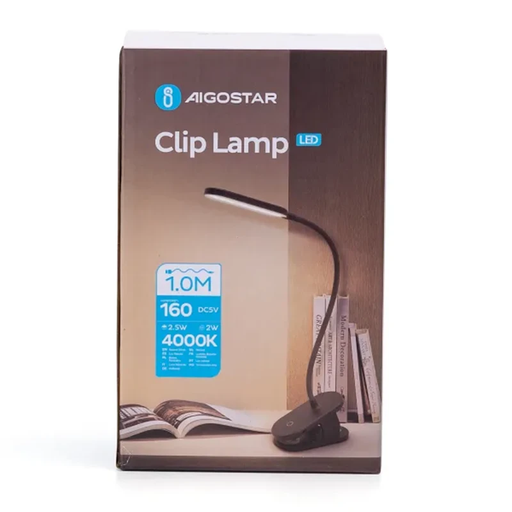
The clip and adjustable lamp base could suit you if you want to attach the lamp to a surface and direct the light.
The product name lists three light modes, 4000 K, 2.5 W and 160 lm. According to the product description, the three modes do not offer adjustable colour temperature; check whether a fixed 4000 K suits your window light.
No, start by making a test recording from the camera angle you plan to use. If your hands and stitches are still visible, window light may be enough; bear in mind that it changes with the time of day and the weather.
Check the white balance with the yarn in shot and, where possible, use a fixed setting for recordings you want to compare. Adjustable colour temperature can help you match light sources, but it does not guarantee identical colour reproduction on its own.
Check that the clamp or stand suits your table, that the pack you’ve chosen contains the parts you need, and that the power supply is suitable. Then make a test recording with your own camera and recording settings, including to check for visible banding.
Electrical appliances placed on the market in the Netherlands must comply with the applicable European rules. According to Ondernemersplein, the Dutch government, the manufacturer applies a CE marking after the required conformity assessment and draws up an EU declaration of conformity. The rules that apply also depend on the appliance and any features such as Wi-Fi or Bluetooth.
Not always: online purchases in the Netherlands come with a statutory cooling-off period, but there are exceptions. ACM ConsuWijzer states that the 14-day cooling-off period ends 14 days after delivery. The right to change your mind during the cooling-off period is separate from your rights if a product is faulty.