If you film at the same worktable each time, start with an adjustable LED panel that you can position at an angle beside your overhead camera. A compact light takes up less room to set up, while a COB light with a suitable modifier needs more space for both the light and its accessories. Make a test recording with your own yarn and camera to check shadows, white balance and any banding.
Which video light is right for you?
Creator of close-up crochet tutorials
You film your hands and stitches from above and want to reduce distracting hand shadows without losing the definition of the stitches. Claire Daly Creates describes the practical need for a simple, movable set-up; you’ll need to adjust the positioning to suit your own worktable.
Online shop owner showcasing yarn colours
Your tutorial also serves as a product showcase. You want to adjust the light colour and camera white balance, then assess the result with your own yarn. Canon Europe explains that white balance helps match colour reproduction to the light being used.
Creator with a small or changing workspace
You want to film without the light, tripod and cables getting in the way of your hands or camera set-up. A compact light may be easier to position in a small space, but check that it reaches the whole work area.
What should you look for in a video light for crochet tutorials?
Panels, compact lights, COB lights and ring lights mainly differ in how you position them, the area they cover and the space their set-up takes up.
Adjustable bi-colour LED panel
A good fit if: you want to light a fixed worktable from the side or at an angle from above, and have room for a stable mount.
Bear in mind: check the diffuser, tripod and power supply for each version; the manufacturer’s settings won’t automatically determine how it looks on camera.
Compact rechargeable light
A good fit if: you have limited room to set up or want to move the light regularly.
Bear in mind: test whether the small light covers your whole work area well enough, and how long the battery lasts at your chosen brightness.
COB light with a modifier
A good fit if: you have room for the light, tripod and a compatible modifier, and want to direct the light where you need it.
Bear in mind: check whether the right modifier and tripod are included with the version you choose; a COB light without a diffuser won’t automatically give you soft light.
Ring light
A good fit if: you mainly film yourself with the light positioned in front of you.
Bear in mind: for an overhead shot, check separately where the light, camera and your hands will be positioned.
| What matters |
What to look for |
Who it matters most to |
| Visible stitches |
Check the tilt adjustment, mounting and diffuser; film while moving your hands across your work. |
When I crochet from above, I want to see the stitches without my hands constantly casting shadows over them. Around 33% of consumers give top priority to visible stitches without distracting hand shadows. |
| True-to-life yarn colours |
Compare the light colour settings for the exact model and test the camera’s white balance with the same yarn. |
For product images, I want the yarn colour to be recognisable on camera. Around 27% of consumers prioritise true-to-life colour reproduction. |
| Space and positioning |
Measure the available space and check that the version you choose comes with the required mounting and power options. |
In a small or changing workspace, I want to position the light, camera and my hands without them getting in each other’s way. Around 20% of consumers care most about space and positioning. |
| Recording time and banding |
Check the power supply and make a test recording at your intended brightness and camera settings. |
For a longer tutorial, I want to keep filming without a flat battery or distracting banding interrupting the recording. Around 20% of consumers give uninterrupted recording top priority. |
Common buying mistakes
-
Assuming every VL49 light is the same version
Ulanzi describes both a VL49 RGB with adjustable white light and RGB, and a separate VL49 with fixed 5500 K. The model name alone may not be enough to tell you whether it has the light colour function you want.
Check the full model name and features of the version on offer.
-
Assuming a panel or COB light is a complete tabletop set-up
The NEEWER NL660 is available with or without a tripod, and the NP-F battery is not included. For a COB light, you’ll also need to check that the chosen modifier is compatible and included.
Compare what’s included with the exact version against your planned positioning and power requirements.
Depending on the version, you may still need a tripod, a suitable modifier or a battery.
-
Confusing CRI or wattage with the result on camera
A stated CRI or wattage rating alone won’t tell you how stitches, hand shadows and yarn colour will look in your recording.
Make a short test recording with your own yarn, workspace and camera settings before settling on your set-up.
Brands to compare
NEEWER
The NL660 is a bi-colour LED panel for a workspace where you can position the light at an angle beside the table.
- NEEWER lists 3200–5600 K, dimming and CRI 96+ for the NL660; these are manufacturer specifications, not the result of an independent recording test.
- Versions are available with or without a tripod. A suitable NP-F battery is not included.
Godox
The P260C Pro is an adjustable bi-colour panel for anyone who wants to control the light colour and settings.
- Godox lists 2800–6500 K, a diffuser, Bluetooth control and average CRI/TLCI ≥98 for this model. These are manufacturer specifications.
- Check what’s included and how the exact version can be positioned; the stated values alone can’t predict how your yarn will look on camera.
amaran
The COB 60x S is a COB light for creators who want to use a compatible Bowens modifier.
- amaran lists bi-colour light and a Bowens mount.
- You’ll need a suitable modifier for softer light. Brand claims about colour quality are not an independent measurement of how yarn looks in a recording.
Ulanzi
The VL49 RGB is a small battery-powered light for limited or changing set-up spaces.
- Ulanzi lists a 2000 mAh battery, magnetic mounting and a white-light setting.
- According to Ulanzi, battery life varies with brightness. Test whether the small light covers your whole work area, and don’t confuse the RGB version with the separate VL49 without RGB.
Video lights at Joybuy
This selection includes compact RGB lights and portable COB video lights for a movable filming set-up.
 No image available
MOMAN PC8 RGB camera light
This portable RGB camera light is an option for taking your lighting with you when your set-up changes.
The product name describes a portable LED video light.
View at Joybuy
 No image available
COLBOR W60R 60 W RGB video light
This portable RGB video light is designed for anyone looking for a movable lighting set-up.
The product name lists 60 W, RGB, a portable design and a weight of 345 g.
View at Joybuy
 No image available
COLBOR 200 W COB studio light with Bowens mount
This COB light may suit a set-up where you want to attach a compatible modifier.
The product name lists 200 W and bi-colour 2700–7000 K. Check whether a suitable modifier and tripod are included with the version you choose.
View at Joybuy
 No image available
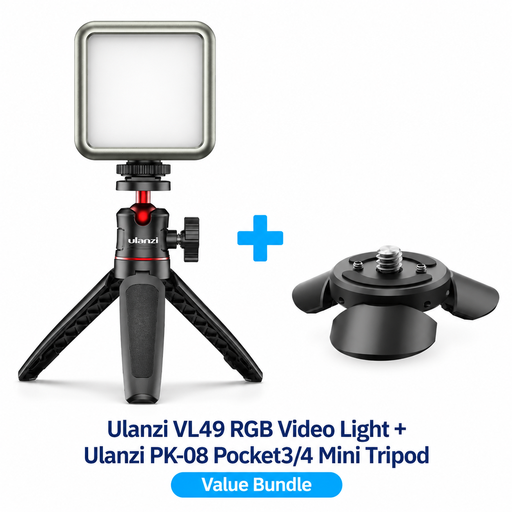
Ulanzi VL49 RGB with PK-08 mini tripod kit for DJI Osmo Pocket 3/4
This kit combines a compact video light with a mini tripod for the DJI Osmo Pocket models listed.
The product name lists a VL49 RGB light and a PK-08 mini tripod kit.
View at Joybuy
 No image available
COLBOR 60 W portable RGBCW COB video light with 59 Wh battery
This portable COB light is an option if you want to adjust the light colour in a movable filming set-up.
The product name lists a built-in 59 Wh battery, bi-colour 2700–6500 K and full-colour light.
View at Joybuy
Frequently asked questions
How should you position the light if your hands cast shadows over the stitches?
Position the light at an angle beside your work area and make a test recording while you crochet. Tilt the panel or adjust its distance if your hands obscure the stitches; at the same time, check that the diffuser still lets the stitch texture show through.
Is a high CRI enough to show yarn colour accurately?
No. A stated CRI value alone doesn’t guarantee how yarn will look on camera. The figures for the NEEWER NL660 and Godox P260C Pro are manufacturer specifications; you should also set your camera’s white balance to match the light you’re using and review a recording of your own yarn.
Should you check whether your set-up needs any extra parts?
Yes, check what’s included with the exact version. The NEEWER NL660 is available without a tripod, and an NP-F battery is not included. For a COB set-up, check that the tripod and suitable modifier are included and compatible.
What can you do if horizontal bands appear in your video?
Start by making a test recording with your own light and camera. For an environment with a 50 Hz mains frequency, Sony Support suggests a shutter speed of 1/50 or 1/100 second as a possible way to reduce flicker; check your camera settings.
Does the 14-day statutory cooling-off period also apply to business purchases?
Not automatically. The Dutch government’s Ondernemersplein states that the statutory 14-day cooling-off period applies to consumers and does not automatically apply to business purchases between businesses. For a business order, check the agreed returns policy.


