What should you look for when choosing?
Start with how the light is mounted and how it illuminates the whole work surface. Then choose the colour temperature and power supply to suit your lesson.
Diffused panel clamped to the table edge
A good fit if: you want to keep the tabletop clear and have a suitable edge. Check that the arm can reach the whole card and stay out of shot.
Bear in mind: a clamp doesn’t guarantee that hand shadows will disappear; make a test recording from your overhead camera position.
Larger panel on a separate stand
A good fit if: you have space beside the table and want to adjust the direction of the light independently. Godox lists diffusion and adjustable colour temperature for the P260C Pro.
Bear in mind: the stand takes up space. Check the mount, power supply and what’s included with the version you choose; Godox’s claim about softer shadows isn’t a measurement of your set-up.
Small battery-powered light for fill lighting
A good fit if: you’re looking for a compact light source for a detail or as fill light, and have a suitable mount.
Bear in mind: the compact design and battery specifications don’t prove that one light will illuminate the whole table evenly. For accurate paper colours, choose a suitable white-light setting and test your recording.
| Consideration |
What to look for when buying |
Who is this more important for? |
| Workspace and positioning |
Measure the table edge, space beside the table, arm reach and position of the overhead camera. |
I want to film the card and my hands without a separate lamp base among my materials. Around 33% of consumers give a clear workspace top priority. |
| Visible actions |
Make a test recording with both hands in different working positions and check the card right to the edges. |
If my hands block the light while I’m crafting, I want to be able to see what I’m doing without distracting shadows. Around 33% of consumers prioritise visible actions and fewer distracting shadows. |
| Paper and ink colours |
Compare white paper and the colours you use in a test clip; check the light settings and any changes in ambient light. |
I want viewers to be able to distinguish the shades of my paper and ink clearly. Around 20% of consumers prioritise recognisable paper and ink colours. |
| Power during the lesson |
Compare your planned recording time with the stated usage conditions, and check which adapter, cable and stand are included. |
For a longer tutorial, I want to avoid the light switching off or dimming halfway through. Around 14% of consumers give a power supply suited to the recording time top priority. |
Joybuy products for a small worktable
This selection includes compact clamp lights and battery-powered lights for attaching to a table edge or providing targeted fill light. Check that each light’s positioning and spread suit your entire work surface.
 No image available
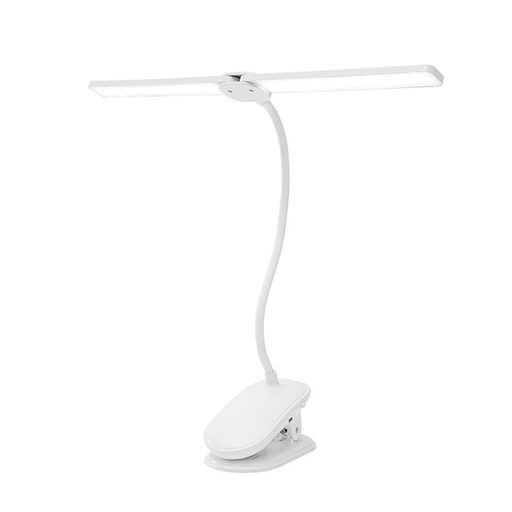
Dimmable LED clip-on light with two lamp heads
A clamp and two adjustable lamp heads give you different ways to direct light across a small workspace.
Three colour modes, dimmable and rechargeable; the lamp heads rotate independently through 360°. According to the product information, the clamp fits surfaces up to 5 cm thick.
View at Joybuy
 No image available
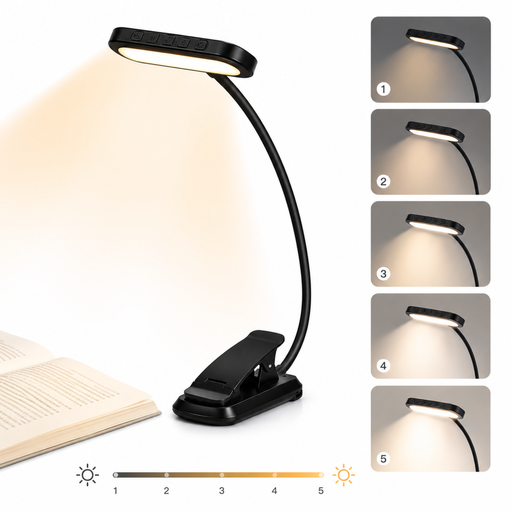
LED reading lamp with clamp, 24 LEDs
The clamp and flexible, rotating gooseneck let you position it on a suitable table edge.
Three light colours, five brightness levels, a 1000 mAh battery and USB-C charging. According to the product information, the lamp rotates through 315°.
View at Joybuy
 No image available
Ulanzi VL49 RGB video light
Its compact design, battery and magnet make this light an option for targeted fill lighting.
The product name specifies a 2000 mAh battery, dimming and a range of 2500–9500 K. Use a standard 5V adapter, according to the product information; the light isn’t waterproof, and you shouldn’t look directly at the LED from close range.
View at Joybuy
 No image available
Ulanzi VL119 10W RGB Light Wand
The 1/4-inch mount is useful if you want to attach the light to a tripod or light stand.
10 W, RGB and a weight of 202 g, according to the product information. The stated battery life is at least 60 minutes at maximum brightness; let the light cool down before putting it away.
View at Joybuy
 No image available
Ulanzi LM07 zoom LED video light
The zoom setting lets you direct the beam at a detail; check whether that suits the way you want to light your card.
Bi-colour from 2000–5500 K, four brightness levels and a 2000 mAh battery; the stated weight is 187 g. Don’t point the LED directly into anyone’s eyes and, according to the product information, only use certified USB-C charging cables.
View at Joybuy
Frequently asked questions
Do I need a ring light to film cards?
No, a ring light isn’t essential. Check whether the chosen light reaches the card and your hands from a useful angle; make a test clip with your camera set-up before deciding.
How can I stop white paper looking like a different colour on camera?
Keep the lighting as consistent as possible, adjust your camera’s white balance to suit the light you’re using, and check the result in a test recording. Adobe Stock Contributor notes that daylight can change throughout the day; Canon Europe explains why a camera may show white paper differently from the way your eye sees it.
Can I use any USB-C power supply for maximum brightness?
Check the requirements for the exact model and power supply. Elgato says the Key Light Air MK.2’s maximum light output depends on the available power, and that full brightness requires a suitable power supply of 30 W or higher; it isn’t included.
What if the light I bought online doesn’t suit my table or breaks too soon?
For a standard online consumer purchase in the Netherlands, you generally have a 14-day cooling-off period after delivery, subject to exceptions. You also have statutory rights if a product doesn’t meet what you’re entitled to expect. ACM ConsuWijzer says the seller is your point of contact if a product breaks too soon during normal use.
What product safety requirements apply to a video light sold in the Netherlands?
Electrical and electronic equipment sold in the Netherlands must meet the applicable European requirements. According to Dutch government information on Business.gov.nl, when CE requirements apply, the manufacturer must affix the required CE marking and draw up and sign an EU declaration of conformity. Ask for the documentation for the exact version when you buy.


