What should you consider when choosing?
First, decide what you need to record from the camera’s intended position: hand details, accurate colours, a long explanation or frequent changes of viewpoint.
Mirrorless camera with interchangeable lens
Choose this option: if you need a specific framing from a fixed position, or want to film close-up details as well as a wider view.
Bear in mind: the lens and working distance both affect what appears in focus and at a large enough size. Check that they work together before you buy.
Camcorder with built-in zoom
Choose this option: if you want to switch between a view of the loom and hand details from one spot, without changing lenses.
Bear in mind: Panasonic specifies 24× optical zoom for the HC-VX3. Check whether the zoom and focusing distance suit the task from where you’ll be filming.
Compact gimbal camera
Choose this option: if you change your viewpoint during the demonstration and want a compact camera set-up.
Bear in mind: DJI specifies a fixed 20 mm-equivalent lens for the Osmo Pocket 3. A fixed angle of view offers less flexibility than an interchangeable lens or optical zoom.
| What to consider |
What should you check? |
Who is this important for? |
| Capturing hands and fine threads |
Check the angle of view and lens or optical zoom. Also look at the focusing distance from your planned camera position. |
If you want to show how a thread passes through the weave without losing the wider view of the loom, prioritise close-ups of your hands. Around 33% of consumers mainly need close-ups of hand details. |
| Colour and exposure in window light |
Check whether you can adjust white balance and exposure. Make a test recording with the yarns in the intended position. |
If changing daylight could affect how colours appear, you’ll want to check that the yarn colours remain recognisable from one recording to the next. Around 27% of consumers prioritise colour consistency above all else. |
| Long recording with spoken explanations |
Compare recording times at your chosen settings and check the power supply, storage and microphone connection or compatibility. |
If you want to record a whole working session with clear explanations, consider audio and possible recording interruptions too. Around 20% of consumers prioritise uninterrupted explanations. |
| Changing your viewpoint |
Check the weight and angle of view, and consider how you’ll secure the camera while using both hands. |
If you want to choose a different viewpoint while weaving without the camera getting in the way of your hands, size and set-up both matter. Around 20% of consumers prioritise ease of moving the camera. |
Joybuy products
This selection includes compact gimbal cameras, a digital camera with optical zoom and a mirrorless camera with a zoom lens.
 No image available
DJI Osmo Pocket 4 Standard Combo
A compact gimbal camera option if you change your viewpoint while filming.
The product name lists a 1″ CMOS sensor, 2× zoom, 3-axis stabilisation and 107 GB of built-in storage. According to the product description, 4K/240fps is available only in slow-motion mode.
Joybuy
 No image available
Komery W6 digital camera
A digital camera option if you want to try different framings from one position using optical zoom.
The product name lists 12× optical zoom, 4K video and 64 MP.
Joybuy
 No image available
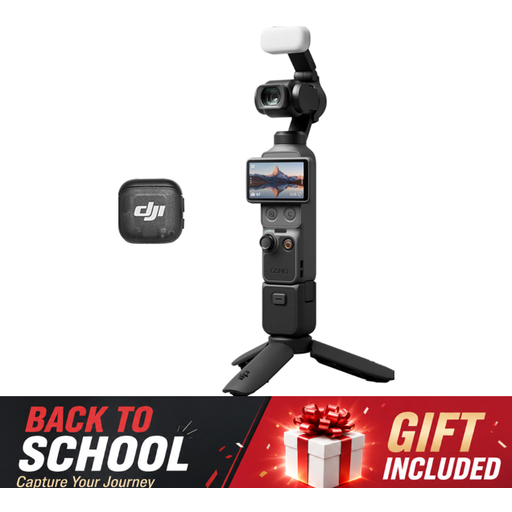
DJI Osmo Pocket 3 Creator Combo
A compact gimbal camera option if you want to move around during the demonstration and record spoken explanations.
The product name lists 4K/120fps video, 3-axis stabilisation and an included microphone.
Joybuy
 No image available
Sony ZV-E10 with 16–50mm zoom lens, black
A mirrorless camera option if you want to create different framings from a fixed position using the included zoom lens.
The product name lists a 16–50mm zoom lens.
Joybuy
Frequently asked questions
How can I stop yarn colours changing while I film by the window?
Check the white balance where your loom is set up, and check it again when the daylight changes. Canon describes white balance as a setting to adjust in difficult lighting conditions. Also watch the exposure on your work if a bright window is in shot, and test your settings with a few recordings.
Do I need a tripod or a gimbal for a weaving demonstration?
If you’re using both hands, the camera needs to stay pointed at the angle you want without you holding it. A gimbal such as the one on the DJI Osmo Pocket 3 stabilises movement, but it doesn’t automatically replace a secure mount for a fixed recording. Check that there’s enough space around the loom too.
What are my rights if a camera bought online is faulty?
For an online consumer purchase in the Netherlands, you generally have a 14-day cooling-off period after delivery, subject to statutory exceptions. ACM ConsuWijzer explains the conditions. Your statutory rights if a product does not meet what you could reasonably expect with normal use are separate from any manufacturer’s guarantee and apply against the seller.
Can I film identifiable participants and publish the weaving demonstration?
It depends on who is filming and how the footage is used. According to the Autoriteit Persoonsgegevens, the exception for personal or household use does not apply when footage is shared more widely. For wider publication or professional use, you need a lawful basis under the GDPR. Consent can be one such basis, but it isn’t the only option in every situation.


