For a fixed teaching set-up where you want to choose the framing with a suitable lens, a mirrorless camera is an obvious choice. If you would rather switch between a wide shot and a demonstration using a built-in zoom during the lesson, a camcorder may suit the way you work. Test the combination of shutter speed, frame rate and your own lights, and check that the lens, microphone and recording set-up are right for the lesson.
Who is this buying guide for?
Teacher using fixed artificial lighting
You film lessons under the same lights each time and want to check whether the combination of shutter speed and light source causes banding. Sony Netherlands Support recommends 1/50 or 1/100 of a second as a starting point in areas with a 50Hz power supply.
Teacher demonstrating camera details
You switch between explaining and showing how things are done. The distance to the camera and the choice between an interchangeable lens and a zoom affect your framing, as the product information from Sony, Canon and Panasonic shows.
Solo lesson creator
You operate the camera yourself and want to check in advance that the picture looks right and your voice is being recorded clearly. Canon lists a vari-angle screen, microphone input and headphone output for the EOS R50 V.
What should you look for when choosing?
Mirrorless camera with interchangeable lens
Best for: a fixed set-up where you want to match the angle of view to the distance and the details you are demonstrating.
Bear in mind: choosing the right lens is a separate decision. Also check the video features of the exact model for recording under your lights.
Camcorder with fixed zoom lens
Best for: lessons where you want to switch between a wide shot and a demonstration further away without changing lenses.
Bear in mind: the fixed lens determines which angles of view and close-ups are possible. A zoom ratio alone does not tell you whether small details will be clear from your recording position.
The percentages below relate to consumers choosing a video camera for this teaching set-up; each row represents a separate top purchasing priority.
| Point to consider |
What to look for when buying |
Who is this important for? |
| Flicker from artificial lighting |
Check which shutter speeds and frame rates the exact model offers. Sony Netherlands Support recommends 1/50 or 1/100 of a second as a starting point with a 50Hz power supply; make a test recording with your own lights. |
If banding under your fixed teaching lights is your main concern, test the settings in your own space first. Around 33% of consumers prioritise reducing flicker. |
| Teacher and demonstration details |
From the planned distance, test whether both hands and the smallest important detail are clearly visible. Compare a suitable lens choice with the zoom options of a fixed lens. |
If learners need to follow both the explanation and small camera-related actions, making the demonstration easy to see is key. Around 27% of consumers give this framing top priority. |
| Clear, intelligible speech |
Check whether the exact model has a microphone input or headphone output, and test the sound from the actual speaking distance. |
If your voice needs to be easy to follow during the lesson, include the audio set-up in your decision. Around 20% of consumers prioritise clear spoken explanations. |
| Operating the camera yourself and recording for longer |
Test the screen, power supply, storage and settings during a recording of the intended lesson length; do not assume a guaranteed recording time. |
If you film alone and want to check the framing and recording yourself, it helps to test the controls in advance. Around 20% of consumers prioritise being able to record a lesson on their own. |
Common points to consider
-
Assuming an anti-flicker function for photos guarantees flicker-free video
Photo and video features can differ. A photography setting does not prove that a camera will prevent banding when recording video under your lights.
Check the video features of the exact model and test the lighting before recording a full lesson. Sony Netherlands Support lists various anti-flicker functions and points out that their effectiveness varies by situation.
If flicker makes a recording unusable, you may need to record it again.
-
Assuming a high zoom ratio means details will be visible
A zoom ratio does not tell you whether the smallest relevant detail will appear large enough in the frame from your recording position.
Test the most important detail from the planned camera position, and also record a shot showing both the teacher and their hands.
You may need to reposition the camera or change the camera and lens combination.
-
Considering only the camera when planning your audio set-up
A microphone input gives you a way to connect a microphone, but it does not automatically mean that your voice will be recorded clearly from a distance.
Check which connections the specific version has, what is included with the product and how your voice sounds from the actual speaking distance.
A separate microphone and mount may need to be part of your chosen set-up.
Camera brands to consider
Sony
According to Sony, the Sony ZV-E10 II has an interchangeable E-mount lens. This may be relevant if you want to choose your own lens for a fixed teaching set-up.
- An interchangeable lens lets you choose the framing for your demonstration set-up.
- General advice about flicker does not confirm that this model has a specific variable shutter function for video. Check the features of the exact version.
Canon
Canon describes the EOS R50 V as a mirrorless camera with an interchangeable lens, and lists connections and screen features that may be useful if you film yourself.
- Canon lists a microphone input, headphone output and vari-angle screen for the EOS R50 V.
- These features are not an independent measure of picture or sound quality under your lights.
Panasonic
The Panasonic HC-X1500 is a camcorder with a fixed zoom lens for anyone who would rather not change lenses during a lesson.
- Panasonic specifies 24× optical zoom and a 50,00Hz mode with shutter speeds including 1/50 and 1/100 of a second.
- Test whether the fixed lens makes small demonstration details large enough in the frame from your recording distance.
Cameras and video equipment at Joybuy
This selection includes cameras for video recording, a webcam and compact cameras. Compare each model’s form and controls with the distance, framing and audio set-up for your lesson.
 Image unavailable
Osmo Pocket 4P Standard Combo, Black
Before choosing this camera for a teaching set-up, compare it with the framing you need and the distance to the demonstration.
Version: Standard Combo, Black.
View at Joybuy
 Image unavailable
Mini Action Camera 4K with clip
The product name mentions vlogging and travel as uses; check that the clip mount suits the position you want to film the lesson from.
The product name lists 4K, a 1.54-inch display, a 140° wide-angle lens and app control.
View at Joybuy
 Image unavailable
DJI Osmo Pocket 4 Standard Combo with Ulanzi VL81 LED video light
Consider this bundle if you are looking at a camera supplied with a separately named video light; check whether the lighting works with the lights in your teaching space.
The product name lists the Ulanzi VL81 Rechargeable LED Video Light as part of the bundle.
View at Joybuy
 Image unavailable
Philips 4000 Series 4K UHD Webcam, EU Version, Black, SPL6408BT/00
This webcam is worth comparing if your teaching set-up is built around a computer; check first that the USB-A connection is compatible with your equipment.
The product name lists 4K UHD, 8MP, autofocus and built-in dual microphones.
The product name mentions a privacy cover.
View at Joybuy
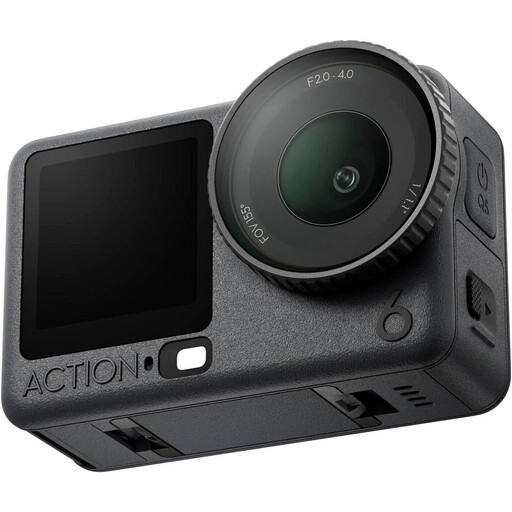 Image unavailable
DJI Osmo Action 6 Adventure Combo
Compare this action camera with the position and framing you need for the demonstration, and check how you want to record the spoken explanation.
Version: Adventure Combo.
View at Joybuy
Frequently asked questions
What should I do if my lights cause banding in the lesson footage?
Make a test recording under the lights you actually use. In a 50Hz environment, Sony Netherlands Support recommends 1/50 or 1/100 of a second as a starting point, if the model offers that shutter speed at the selected frame rate. The result depends on the light source and settings; do not assume that an anti-flicker function for photos will also work for video.
How can I check my camera set-up before the lesson starts?
Set up the camera at the planned distance and briefly film both the teacher and the smallest action learners need to see. Test your voice at the actual speaking distance too. Canon lists a headphone output on the EOS R50 V, so you can monitor audio while recording.
Do I automatically get only a two-year guarantee in the Netherlands?
No. According to ACM ConsuWijzer, your statutory rights sit alongside any seller’s or manufacturer’s guarantee, and there is no fixed two-year period: what you can reasonably expect depends on the product and normal use. If a consumer product is faulty, the seller is responsible for providing an appropriate remedy free of charge.
Can I film recognisable participants in a photography lesson and publish the recording?
That depends on the context and how the recording will be used. The Dutch Data Protection Authority states that professional or organisational recordings featuring recognisable people need a lawful basis under the GDPR; the exception for personal or household use does not apply to wider distribution. For recognisable pupils filmed and published by a school, the regulator sets out specific requirements around consent and security. Before filming and publishing, decide who will be recognisable and which rules apply to your teaching organisation.


