
Teachers who demonstrate techniques up close
You want students to be able to follow both the whole arrangement and the cutting and positioning of individual stems. Framing, your choice of lens and the minimum focusing distance all play a part.


Start by deciding whether you want to film both the whole worktable and small details, or whether you’ll often be changing your viewpoint. A mirrorless camera with the right interchangeable lens gives you more choice over the framing; a compact gimbal camera is designed for moving between viewpoints. Also check the microphone connections, colour settings and conditions for long recordings separately.
You want students to be able to follow both the whole arrangement and the cutting and positioning of individual stems. Framing, your choice of lens and the minimum focusing distance all play a part.
As the natural light from the window changes, you’ll want to keep an eye on exposure and white balance, especially when pale flowers are placed next to a bright window.
You want clear audio for your explanations and as little risk as possible of an unwanted interruption. So remember to consider audio connections, power and storage as part of your recording set-up.
First decide whether you mainly need a fixed overview, close-ups or shots you can move around with. Then consider separately how you’ll manage window light, spoken instructions and the planned lesson duration.
| What to consider | What should you check? | Who should prioritise this? |
|---|---|---|
| Techniques and flower details | Check the angle of view, minimum focusing distance and supplied lens. Test both an overview and a close-up from where you plan to position the camera. | I want students to see small details without losing sight of the whole arrangement. Around 31% of consumers make detail and framing their top priority. |
| Exposure and flower colours | See which exposure and white balance settings are available, then take a test shot in the actual spot by the window. | I film in changing daylight and want the flowers and hands to remain visible. Around 25% of consumers give colour reproduction in window light top priority. |
| Clear spoken instructions | Check whether you can connect the microphone you plan to use and monitor the audio while recording. | I talk while demonstrating and want students to be able to follow my instructions. Around 25% of consumers put speech audio first. |
| Recording a full lesson | Check the requirements for your chosen recording mode, and plan for power, storage and the lesson duration you need. | I want to record a long demonstration without the recording stopping unexpectedly. Around 19% of consumers say uninterrupted lessons are their top priority. |
Resolution doesn’t tell you whether small details will appear large and sharp enough from your filming distance.
Before settling on your set-up, test both a shot of the table and a close-up using the exact lens or fixed-lens camera.
A suitable lens and possibly additional audio equipment may be part of the set-up.
The EOS R50 V is a mirrorless camera with interchangeable RF lenses, for a set-up where you want to choose the angle of view and audio connections yourself.
The ZV-E10 II is an APS-C mirrorless camera with an E-mount, for those weighing up interchangeable lenses and video settings.
The Osmo Pocket 4 is a compact gimbal camera for those who change their viewpoint while filming.
The LUMIX GH7 is a mirrorless camera for those considering longer video recordings in certain recording formats.
The Z 30 is a mirrorless camera with interchangeable Z lenses, for a video set-up where you choose the lens yourself.
These Joybuy products offer different ways to film a flower-arranging lesson, from compact cameras to a webcam for a computer-based set-up. Check for each product whether the included accessories and listed features suit your filming location and lesson.
 No image available
A compact camera option for a fixed filming position at the table. Before buying, check that the angle of view works for both the work surface and the techniques you want to show.
 No image available
The listed rotating screen feature could be useful if you want to adjust the framing during a demonstration. Test whether the fixed angle of view works for your table set-up.
The product title lists 3-axis stabilisation, 2× lossless zoom, 107GB of built-in storage and a handle with a 1/4-inch thread.
 No image available
A compact option for a filming position where you want to check the framing as you record. Take a test shot to see whether the details you want are clear from the available distance.
The product title lists a 1-inch CMOS sensor, 4K/120fps video, 3-axis stabilisation and a 2-inch rotating touchscreen.
 No image available
A webcam option for running a lesson through a computer. Check that this approach suits the way you want to record or share your demonstration.
The product title lists 4K, compatibility with PC and Mac, HDR and a microphone with AI noise reduction.
 No image available
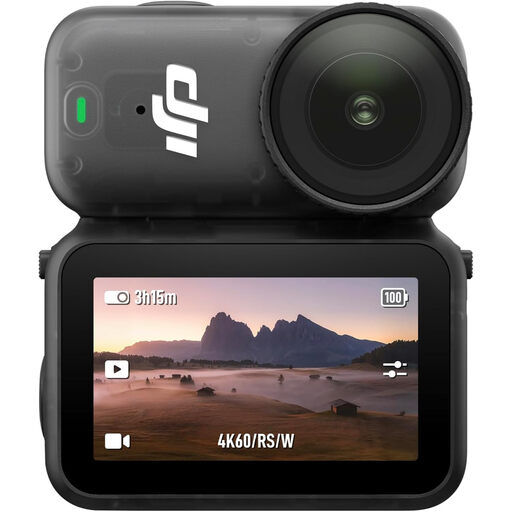
An action camera option for those considering a compact camera set-up. Test whether the wide angle of view works for the table overview and flower details you want.
The product title lists 4K/60-fps video, 128GB of storage and a 143° angle of view.
Make a test recording with the lamps you’ll have on during the lesson. Sony recommends a shutter speed of 1/50 or 1/100 second when the mains frequency is 50 Hz to reduce flicker; the result depends on the camera and light source.
Compare your planned lesson duration with the recording conditions for the exact model and resolution you’ve chosen. DJI’s stated 240 minutes for the Osmo Pocket 4 was measured at 1080p/24fps, 25 °C, with Wi-Fi and the screen switched off; it isn’t a guarantee for a lesson recording in 4K.
For a consumer purchase in the Netherlands, the Dutch government says you’re entitled to a product that works properly; if it develops a fault, the seller must provide a solution. Many distance purchases also come with a 14-day cooling-off period. Check which terms apply to your specific purchase.
According to the Dutch Data Protection Authority, the GDPR applies when identifiable people are filmed and the footage is published for professional or commercial purposes, and you need a valid legal basis for processing. Consent is one possible legal basis, but it isn’t automatically the only one. If you haven’t arranged this yet, you could limit your recording to your own hands and the worktable.