
Teacher with a fixed worktable
You want the vase, your hands and your explanations to stay within a predictable frame. So check the framing and sound from the spot where the camera will be placed during the class.


If you usually film from one spot, choose a set-up that lets you frame both the worktable and small movements with your chosen lens or zoom. If you move around during the class, a compact gimbal camera may suit the way you work better. Test the focus, flower colours and audio clarity at the actual working distance, with the workshop’s usual background noise. The Consumentenbond notes that an external microphone can improve sound quality. Also position the camera so that other people are not inadvertently identifiable in shot.
You want the vase, your hands and your explanations to stay within a predictable frame. So check the framing and sound from the spot where the camera will be placed during the class.
You switch between the whole arrangement and individual actions with separate stems. The lens you choose, the zoom and the focus at working distance all affect how clearly those details appear on screen.
You move the camera during the class and want to capture different angles. A suitable close-up frame and clear audio for your explanations matter too.
A good fit if: you usually film from one spot and want to choose a lens that works for both the overall shot and close-up details.
Bear in mind: the camera body and lens need to work well together. An autofocus feature is no guarantee that fine flower stems will stay in focus at your working distance. The Canon EOS R50 V uses RF and RF-S lenses; the Sony ZV-E10 II uses E-mount lenses.
A good fit if: you want to switch between an overall shot and larger details from one position, without changing lenses. Panasonic lists 24× optical zoom for the HC-VX3.
Bear in mind: the lens is fixed. Panasonic’s Dutch product page lists the HC-VX3 and HC-VX3E-K as unavailable, so check current availability before choosing this option.
A good fit if: you change position during the demonstration and want to film while moving.
Bear in mind: a fixed angle of view doesn’t offer the same choice of lenses as a mirrorless camera. DJI lists a minimum subject distance of 20 cm for the DJI Osmo Pocket 3. Also check that the detail appears large enough in shot from where you’ll be filming.
| What to consider | What should you check? | Who might prioritise this? |
|---|---|---|
| Framing the worktable and movements | From the planned camera position, test whether your chosen lens or zoom keeps both the arrangement and the key movement in shot. | I want to show both the vase and small movements from one spot, so I check the framing with my chosen lens or zoom. Around 28% of consumers prioritise framing. |
| Clear explanations | Record a test clip while the workshop is being used as usual, then listen back. Check which microphone connection or wireless option works with the camera. | If I want students to follow spoken instructions despite background noise, I test the sound in the workshop itself. Around 22% of consumers prioritise clear audio. |
| Flower colours and small details | Film with the actual flowers and lighting, then assess the colour, exposure and focus on your hands and stems at the required distance. | I want flower colours to look true to life and small movements to be visible, even if that matters more than being able to move the camera quickly. Around 22% of consumers prioritise colour and detail. |
| Recording without interruption | Compare the expected class length with the recording mode, available storage and power options for the exact model. Test a recording of a similar length beforehand. | For a longer demonstration, I don’t want to have to stop halfway through an explanation to check the recording. Around 17% of consumers prioritise uninterrupted recording. |
| Moving the camera | Compare a handheld test clip with a static recording, and check whether the detail is in focus and large enough from the distance you’ll actually be filming. | If I’m filming around the table, I want to change position easily without losing sight of the close-up frame. Around 11% of consumers prioritise filming on the move. |
A video mode won’t tell you whether the whole table will fit in shot, small flower details will stay sharp or your explanations will be easy to hear in a shared space.
Test the complete camera, lens and audio set-up at the distance you’ll use during the class.
Depending on the set-up you choose, you may also need a suitable lens or microphone.
The Sony ZV-E10 II version described comes with the body only, while the Canon EOS R50 V kit mentioned includes an RF-S 14-30mm lens.
Check what’s included with the exact version before deciding whether the camera is ready for your filming plans.
If you buy the body only, you may need to purchase a suitable lens separately.
A gimbal helps with camera movement, but it doesn’t determine whether a small action will appear large and sharp enough from your distance.
If you’re filming while moving, check both the focusing distance and the framing in a test clip.
If other people are identifiable in footage used for business purposes or publication, you need to consider the relevant privacy rules and lawful basis.
Where possible, position the camera so other users aren’t recorded recognisably. If they need to be in shot, arrange the appropriate lawful basis and provide the necessary information in advance.
You may need to change the camera angle or re-record to keep identifiable bystanders out of shot.
The EOS R50 V is a mirrorless camera designed for video. It uses RF and RF-S lenses, so your chosen lens will partly determine the angle of view.
The ZV-E10 II uses E-mount lenses and may suit a static set-up where you choose a lens to meet your needs.
The HC-VX3 is a camcorder with a fixed lens and 24× optical zoom, designed for different shot sizes from one position.
The Osmo Pocket 3 is a compact gimbal camera for classes where you change position while filming.
These product options are intended for filming a flower-arranging class, from fixed PC set-ups to compact cameras you can move around with.
 Image unavailable
A compact camera option to consider for a wide shot of the worktable.
The product details list a 1-inch sensor, 4K video and a 20mm wide-angle lens. 4K/240fps applies to slow motion only.
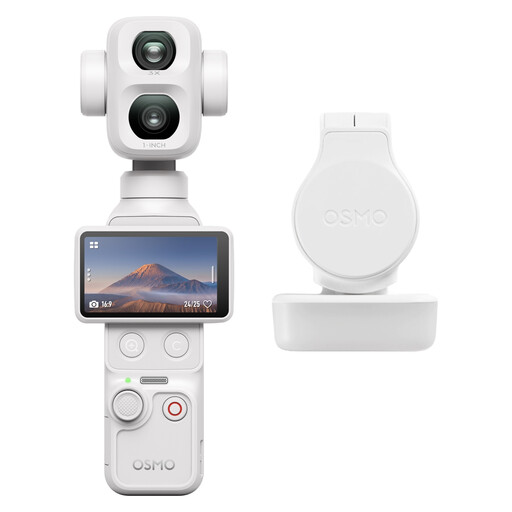 Image unavailable
The listed gimbal stabilisation suits filming while changing position during the class.
The product details list a 1-inch CMOS sensor, 4K video, 107 GB of built-in storage, 3-axis stabilisation and 2× lossless zoom.
 Image unavailable
An option to consider for a fixed recording set-up at a PC.
The listed features include 4K video, PDAF autofocus, a 75° angle of view, dual microphones and a supplied desktop tripod. The title mentions USB-A and USB-C connections.
 Image unavailable
A fixed webcam set-up may suit you if you want to record the class on a PC. Check beforehand that your computer and recording app work with the webcam.
The title lists 4K video, a 99° angle of view and a built-in microphone with noise reduction. The product details mention automatic light correction and an adjustable mount.
 Image unavailable
The zoom may be useful if you want to switch between the arrangement and close-up details from one spot.
The product details list 12× optical zoom, 4K video, Wi-Fi and 64 MP.
Record a test clip from the planned position while moving your hands and with the workshop sounding as it normally does. Then check the overall shot, the smallest important detail and whether your explanations are clear.
No. 24× zoom doesn’t guarantee that every detail will be in focus and well framed at your recording distance. Panasonic lists 24× optical zoom for the HC-VX3; with a mirrorless camera, your chosen lens will partly determine the angle of view. Check how much of the action remains visible in a test clip.
For a consumer purchase in the Netherlands, the seller is responsible for the statutory guarantee if the product doesn’t meet what you’re entitled to expect under normal use. The Netherlands Authority for Consumers and Markets lists repair, replacement and, in some cases, a refund as possible solutions. Online consumer purchases are generally also covered by a statutory 14-day cooling-off period from delivery, subject to exceptions.
First check which privacy rules apply to the recording and publication. According to the Dutch Data Protection Authority, identifiable people in footage count as personal data; business recordings and publication require a lawful basis under the GDPR. Consent is one possible lawful basis, but not the only one. Make it clear what you’re recording and publishing, and where possible position the camera so other workshop users aren’t identifiable in shot.