
Vandaag of morgen in huis

Kwaliteit gegarandeerd

Welkomstaanbiedingen ontgrendelen: GRATIS bezorging | Tot 80% korting | Gratis 30 dagen JoyPlus-proefperiode
Download de app
A baby monitor needs to be practical, especially when your hands are full and your child is asleep. Yet many buyers look at screen resolution or smart alerts first, while other features make more difference day to day. A large screen, for example, is of little use if the battery runs out quickly. And a Wi-Fi baby monitor lets you check in remotely, but calls for extra care with network security and privacy.
In this buying guide, you’ll find out what to look for, which marketing claims to treat with caution and what type of video baby monitor is right for you.
A range of hundreds of metres, for example, sounds generous. In a home, concrete walls, floors and other wireless devices can reduce that range. So check whether the range is listed separately for indoors and outdoors. A baby monitor without Wi-Fi, using a direct connection, can be useful if you mainly want to keep an eye on things at home, but it isn’t designed for checking in from another location.
Motion detection, sound alerts and baby-cry detection can help you notice more quickly when something is happening. However, their accuracy depends on placement, settings and surroundings. Motion detection, for example, may trigger alerts when pets move, shadows shift or the light changes. So use a baby monitor as an aid, and remember that you remain responsible for supervising your child.
Some Wi-Fi cameras offer local and cloud storage. A microSD card is often not included, and according to the product information, cloud storage may be paid for. Also check whether you need an app, an account or a subscription. If you don’t want to store footage online, consider a baby monitor without Wi-Fi or a model with local storage.
A video baby monitor with its own parent unit means you don’t have to unlock your smartphone every time you want to check in. A 4.3- or 5-inch screen generally gives you more room to see details than a compact display. Also look out for:
A baby monitor with night vision is particularly useful when the room is dark. Check that the infrared LEDs aren’t aimed directly at your child’s sleeping area, and position the camera securely out of your child’s reach.
A baby monitor without Wi-Fi usually uses a direct wireless connection between the camera and parent unit. That means less reliance on your router and no app account for basic use. A Wi-Fi baby monitor, on the other hand, often offers remote access, alerts on your phone and, sometimes, support for multiple users.
If you’re considering a Wi-Fi model, check that you:
A direct connection isn’t automatically the better choice in every situation. The right option depends on whether you want to check in only at home or when you’re out as well.
A baby monitor with a talk-back function can be handy for speaking calmly to your child from another room. Some models also offer lullabies or a night light. A baby monitor with a temperature sensor displays the temperature near the camera. Treat this as a guide: the sensor isn’t a medical measuring device and doesn’t replace your own assessment of the room.
Always keep the camera and cables out of reach. Product information for various models recommends placing the monitor at least around one metre from a cot, playpen or play area; always follow the specific instructions. Keep cords out of the way to prevent entanglement. A monitor doesn’t replace responsible supervision.
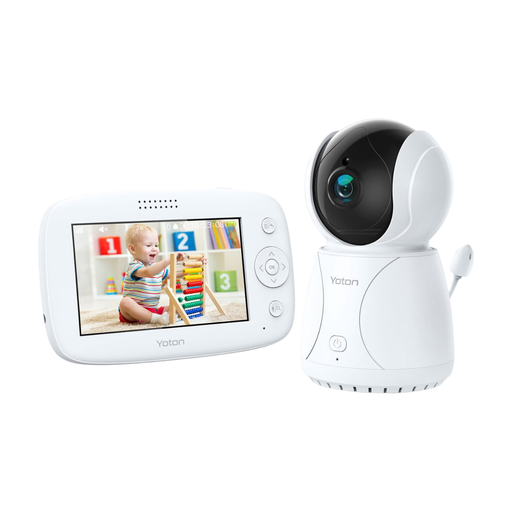
Why it suits this profile: This baby monitor has a 4.3-inch LCD screen and combines essential features, with no app or cloud account mentioned in the product information.
The camera offers night vision, a talk-back function and a rotating viewing angle. The temperature sensor is intended as a guide only, according to the warning.
4.3-inch screen, temperature sensor, rotation function, night vision and two-way audio.
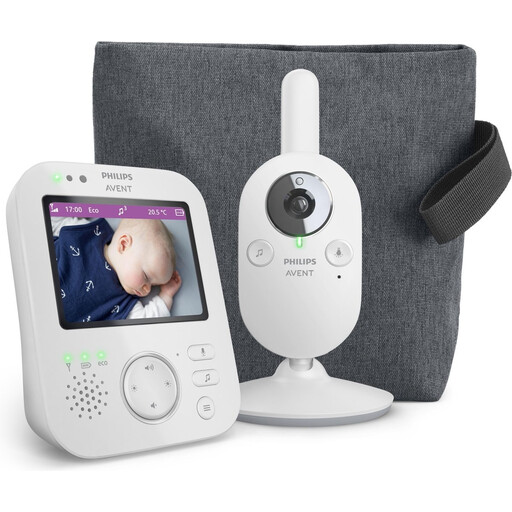
Why it suits this profile: This model is designed for parents who want a dedicated parent unit, a private connection and extra features such as eco mode and zoom.
The stated wireless connection doesn’t rely on a Wi-Fi app. The specified range is up to 50 metres indoors and up to 300 metres outdoors; walls can affect the range.
3.5-inch screen, infrared night vision, zoom, VOX mode, eco mode and talk-back function.
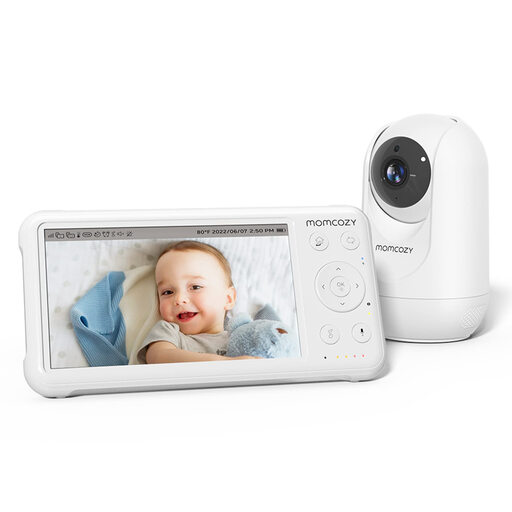
Why it suits this profile: Parents with several rooms or a need for remote access get a 5-inch screen, pan-tilt-zoom and support for up to four cameras.
The specifications list a parent unit with a 1080p screen, temperature monitoring and night vision. The stated range of up to 960 feet applies in open spaces, not necessarily indoors.
5-inch 1080p screen, 5000mAh battery in the parent unit, PTZ controls, temperature sensor and support for four cameras.
We’ve put together a complete, up-to-date list of products that meet these strict selection criteria and current European safety requirements.
Yes. A baby monitor without Wi-Fi uses a direct connection between the camera and parent unit. You usually don’t need the internet, an account or an app for a live view. Do check the stated indoor range, and make sure the camera is positioned safely.
Place the camera on a stable surface or attach it according to the instructions. Keep cables out of reach and don’t put the camera in the cot or right next to bedding. Once it’s set up, check the viewing angle, night vision and volume.
Alongside the purchase price, you may also need to factor in power use, a memory card and any cloud storage. If you’re buying a Wi-Fi baby monitor, check in advance whether storage or certain app features come at an extra cost. A model with its own parent unit and a local connection often needs fewer ongoing services, depending on the version you choose.
