Which buying priorities matter?
First decide whether you mainly need an archive in one place, support for recoverable copies, team access or storage that travels frequently between workstations.
Desktop HDD via USB
Suitable when: completed projects are mainly stored at a fixed studio location and capacity is the priority.
Bear in mind: you may need a host computer and a mains adaptor; the drive does not automatically provide managed team access.
Portable HDD
Suitable when: specific project files are transferred between devices and the chosen capacity is sufficient.
Bear in mind: exchanging files is not the same as simultaneous access to a shared network archive.
Portable SSD
Suitable when: active project files travel frequently and transferring them between workstations matters.
Bear in mind: stated maximum speeds depend on factors including the host, cable and working environment; they are not guaranteed copy times.
NAS for shared storage
Suitable when: staff need shared folders with separate access permissions from multiple computers.
Bear in mind: setup and management are required, and network storage is no substitute for a separate, recoverable backup.
| Consideration |
What to look for when buying |
Who is this important for? |
| Capacity for a growing archive |
Work out the size of your existing projects and expected additions, then compare the capacity of the exact model. |
I want to know whether completed projects and new files will fit on the drive; around 33% of consumers prioritise capacity for a growing archive. |
| Recoverability |
Plan a separate storage destination and check that files can be restored from it. The National Cyber Security Centre advises keeping multiple versions on different media, with one copy stored elsewhere. |
If I want to be able to recover project files after loss or damage, I’ll arrange a copy and a recovery test as well as the archive drive; around 27% of consumers put recoverability first. |
| Team access |
Decide whether colleagues will connect the drive one at a time or need access from their own computers; for network storage, check the shared folders and user permissions. |
When colleagues need to open projects from their own workstations, I want to be able to manage access by user; around 20% of consumers prioritise shared access. |
| Transfers between workstations |
Check the connections, cables and file format of the exact model and your studio devices. Treat advertised SSD speeds as maximums under the stated test conditions. |
If I regularly move project files between workstations, connections and transfer speeds matter to me; around 20% of consumers prioritise fast transfers and file sharing. |
Joybuy products for video storage
These product picks are aimed at portable project storage or an archive drive for a fixed workstation. A standalone USB drive does not automatically provide simultaneous network access for a studio team.
 No image available
SanDisk Portable SSD 1TB
This portable model suits project storage that travels between workstations.
1 TB storage; portable SSD.
Don’t use the drive as your only recovery copy; arrange a separate backup.
View at Joybuy
 No image available
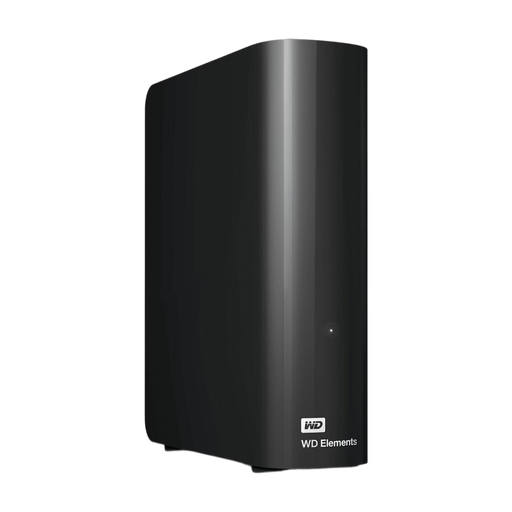
WD Elements Desktop 12TB
This desktop HDD suits an archive kept mainly at a fixed workstation.
12 TB storage; USB 3.0.
This model is formatted for Windows; check the format if you use a Mac. A USB drive does not automatically provide team permissions or network access, and should not be your only recovery copy.
View at Joybuy
 No image available
My Passport 6TB White
This portable HDD is an option for project storage you want to take between workstations.
6 TB storage; portable hard drive.
For recoverability, arrange a separate copy; the drive does not automatically provide shared network access.
View at Joybuy
 No image available
My Passport 2TB Blue
This portable model is suitable for taking project files between workstations.
2 TB storage; portable hard drive.
Check that the capacity suits the project files you want to transfer. Also arrange a separate recovery copy.
View at Joybuy
 No image available
Western Digital My Passport USB-C 4TB
This portable storage is designed for project files that travel between workstations.
4 TB storage; USB-C.
Check that the connection and file format are compatible with your devices. A USB drive does not automatically provide shared network access or a second recovery copy.
View at Joybuy
Frequently asked questions
Can one USB drive be both the shared studio archive and the only backup?
Don’t use one USB drive as your only recovery copy. The National Cyber Security Centre advises keeping multiple versions on different media, with one copy stored elsewhere. For managed access from different workstations, Synology describes shared folders with configurable permissions on a NAS.
What should I check before connecting the drive to Mac and Windows computers?
Check the file format and connections of the exact model before copying files or reformatting a drive. According to the product information, the WD Elements model reviewed is formatted for Windows; Toshiba describes one Canvio Flex model as using exFAT and supplying USB-A and USB-C cables.
How can I keep a video archive usable?
Record which project files are essential, who manages the copies and how recovery will be tested. The National Cyber Security Centre advises taking stock of important data and setting up backups so files can be restored after an incident.
What security should I consider when storing footage of identifiable people?
If your studio processes personal data, the GDPR requires appropriate technical and organisational security based on the risks, according to the Dutch Data Protection Authority. The Authority does not require every studio to choose one particular drive model or the same measure in every case; assess which access restrictions, backups and encryption are appropriate for your processing.
Does a product warranty also mean that lost video files will be recovered?
Don’t assume that a hardware warranty also covers file recovery. Before buying, check the warranty and any data recovery terms for the exact model, and arrange separate, recoverable backups as well.


