What should you look for when choosing?
First, check how much space your files take up and allow for growth. The NCSC recommends keeping multiple versions of important files; build time for recovery tests into your processes, too.
| Key consideration |
What to look for when buying |
Who is this important for? |
| Capacity and growth |
Add up the files that need to be included in the copy and allow for expected growth. Compare this with the capacity of the exact model. |
I want to be able to copy the entire collection without overlooking room for growth. Around 36% of consumers prioritise enough capacity for their full collection. |
| Recoverability |
Decide how the drive fits into a plan with separate copies and specify who will carry out recovery tests. |
I don't just want to see that files have been copied; I also want to check that they can be restored and opened. Around 29% of consumers prioritise recoverability. |
| Portability and connectivity |
Check that the ports and cables are compatible with the computers you use. Also check that the file system and workflow suit Windows or macOS. |
I move files between locations and want to connect the drive to the computers involved. Around 21% of consumers prioritise portability and file transfers. |
| Access to recordings |
Establish whether people are identifiable in the footage and decide which security measures are appropriate for the risks involved. |
I manage recordings in which people may be identifiable and want to put suitable access controls and security in place. Around 14% of consumers prioritise protecting these recordings. |
If the footage shows identifiable people, the Dutch Data Protection Authority considers it personal data. The security measures needed depend on the risks; a drive on its own does not make a process GDPR-compliant.
Joybuy products
This selection includes portable HDDs, an external SSD and desktop storage for backing up and moving video files.
 No image available
My Passport USB-C 5TB, black
A portable HDD for taking a video copy between locations.
5 TB of storage and USB-C. The product description lists exFAT, hardware encryption, backup software and USB power, with support for Windows, Mac, Android and iOS, among others.
Joybuy
 No image available
Western Digital My Passport USB-C 4TB, black
A portable HDD for a video copy that travels between locations, if 4 TB is enough.
4 TB of storage and USB-C. The product description lists exFAT, password protection, AES 256-bit hardware encryption and support for Windows and macOS.
Joybuy
 No image available
Toshiba Canvio Basics 4TB
A portable HDD for moving files between locations, if the collection fits within 4 TB.
4 TB of storage, USB 3.2 Gen 1 and USB power. The product description lists a USB-A to Micro-USB-B cable. Reformatting is required for use with macOS.
Joybuy
 No image available
Samsung Portable SSD T7 2TB, blue
A portable SSD for moving large files, if 2 TB is enough.
USB 3.2 Gen 2 and stated sequential speeds of up to 1.050 MB/s read and 1.000 MB/s write. The product description lists AES 256-bit encryption, support for Windows, macOS and Android, among others, and USB-C to C and USB-C to A cables. The stated speeds are not a guarantee for your transfer task.
Joybuy
 No image available
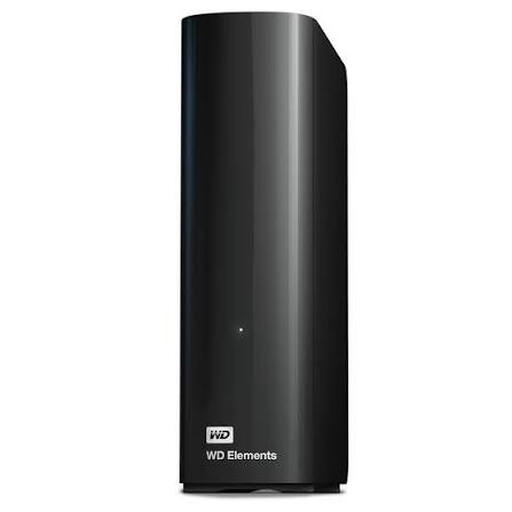
WD Elements Desktop Storage 8 TB, black
Desktop storage for a larger copy in a fixed location, if 8 TB suits the collection and expected growth.
8 TB of storage. The product description lists USB 3.0, USB 2.0 compatibility and plug-and-play use with Windows 10 or later.
Joybuy
Frequently asked questions
How do you work out how much storage your video archive needs?
Add up the files that actually need to be included in the copy and allow for expected growth. Compare the total with the capacity of the exact model: the desktop models reviewed have 8 TB, while the portable models reviewed have 4 TB. Without knowing the size of your collection, it's impossible to tell whether either capacity will be enough.
How do you check that a backup works?
Carry out a recovery test and open files from the backup. The NCSC recommends testing recovery; a message saying the copy was successful doesn't show whether the files will be usable later.
What costs and terms should you check besides the drive itself?
Allow for separate copies, possible storage in another location and time for recovery tests. Also check the terms and conditions for the specific purchase. ACM ConsuWijzer distinguishes between predominantly private and predominantly business use, so don't assume that consumer protection applies when making a purchase on behalf of the archive.
Which rules are relevant if people are identifiable in the videos?
The Dutch Data Protection Authority considers images of identifiable people to be personal data; when an organisation processes them, the GDPR applies. The organisation must decide on appropriate security based on the risks. The Dutch Data Protection Authority lists access controls, backups and encryption as possible measures, not as fixed product specifications for every drive.
Can the archive copy or make public every film it receives?
Don't assume there is a general archiving exception. The Government of the Netherlands states that permission from the creator is needed to use films protected by copyright, and that a private copy for personal use must not be distributed or made public. Check the rights for each item and its intended use separately.


