
Vandaag of morgen in huis

Kwaliteit gegarandeerd

Welkomstaanbiedingen ontgrendelen: GRATIS bezorging | Tot 80% korting | Gratis 30 dagen JoyPlus-proefperiode
Download de app
A wireless mouse keeps your desk tidier and is handy for working from home, travelling or gaming. But the range can be more complicated than it first appears. A low price tells you little about click noise, connectivity or comfort. And a high DPI figure is not automatically useful for everyday use.
This buying guide helps you compare wireless mice using practical criteria: connectivity, sensor, power, shape and intended use.
A Bluetooth mouse works without a separate dongle, but your laptop or PC must support Bluetooth. A mouse with a USB receiver usually uses a 2.4 GHz connection. This is handy for desktops and computers without Bluetooth, but it does take up a USB port.
Also check whether the receiver is included and whether your computer has USB-A or USB-C ports. You may need an adapter if your modern laptop only has USB-C ports.
DPI determines how far the cursor moves for the same hand movement. For office work, a range of around 1000 to 1600 DPI is often enough. A gaming mouse with 12,000, 24,000 or 30,000 DPI offers more settings, but its practical benefits depend on your screen, game and personal preference.
As well as DPI, look at the sensor type, adjustability and polling rate. According to the product information for some models, a high polling rate may use more system resources.
A manufacturer may quote a long battery life under specific conditions. According to the Logitech G309 product description, one AA battery can provide more than 300 hours of use; actual battery life depends on connectivity, settings and usage.
So check the power type:
For a laptop mouse, Bluetooth is often handy because you don’t need to carry a receiver. The HP 240, for example, uses Bluetooth 5.1 and doesn’t need a dongle, according to its product specifications. Do check that your operating system is supported.
A mouse with a USB receiver is suitable for a PC or office computer where you want a stable plug-and-play connection. A multi-device mouse combines both options. According to its product description, the Trust Ozaa+ can connect to up to three devices: one via 2.4 GHz and two via Bluetooth.
An ergonomic mouse should suit your hand, posture and grip. Look at:
A vertical shape may feel more comfortable for some users, but it won’t suit every hand. According to its product description, the Trust Bayo II has a 57-degree angle and is specifically designed for right-handed use. Left-handed users may be better off with a symmetrical model.
A quiet mouse is useful in a shared home office, library or workplace. Check whether only the main buttons are quiet, or whether the scroll wheel and side buttons are too.
For gaming or complex software, programmable buttons matter more than simply having lots of DPI settings. Also check whether configuration software is available for your system. Some gaming models let you customise buttons, macros, lighting and DPI using a driver.

Why it suits this profile: This wireless computer mouse is designed for everyday use, with a 2.4 GHz USB receiver, 1600 DPI and quiet clicks, according to the product description.
The specifications state both the connection method and DPI figure, so you don’t have to rely on a vague marketing claim alone.
1600 DPI, optical sensor, USB receiver and quiet clicks, according to the product description.
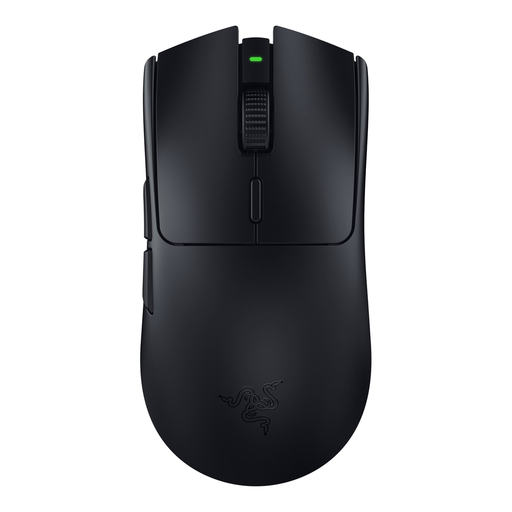
Why it suits this profile: A wireless gaming mouse for users who care about weight, sensor resolution and low latency. The product information lists a weight of 82 grams, up to 30,000 DPI and a polling rate of up to 4000 Hz.
The product details give specific figures for weight, sensor and polling rate. The quoted battery life is a manufacturer’s claim and may vary depending on use.
Razer Focus Pro optical sensor, six buttons, right-handed shape and HyperSpeed connectivity, according to the product specifications.
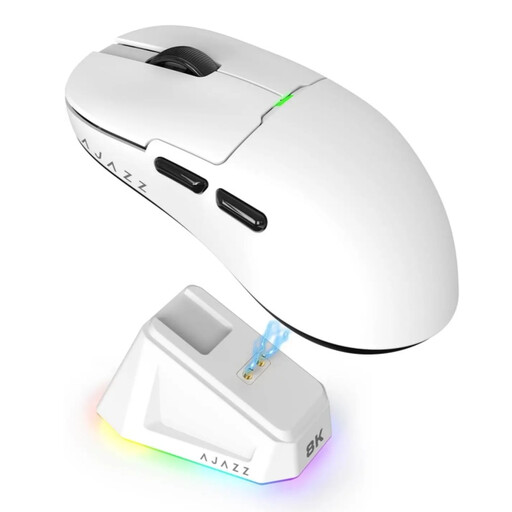
Why it suits this profile: According to the product details, this rechargeable mouse combines Bluetooth, 2.4G and USB-C with a PAW3395 sensor, 26,000 DPI and a weight of 56 grams.
The three connection modes reduce the risk of compatibility issues. The built-in battery means you don’t have to rely on separate AA batteries.
USB-C and magnetic charging base, six adjustable DPI settings and a quoted polling rate of up to 8000 Hz.

Why it suits this profile: A generously sized office mouse for anyone who switches between a laptop, PC and tablet. According to the product description, this model supports three devices and horizontal scrolling.
The connection options, number of devices and maximum DPI are clearly listed. This makes it easy to check whether the features suit your workspace.
Up to 3200 DPI, two Bluetooth channels, USB receiver, quiet buttons and a rechargeable battery.
We’ve put together a complete, up-to-date list of products that meet these strict selection criteria and current European safety regulations.
Not every mouse works in the same way. A Bluetooth mouse requires Bluetooth support and compatibility with your operating system. A model with a USB receiver needs a free USB port. If your laptop only has USB-C ports, check whether you need an adapter or a USB-C receiver.
It varies depending on the model, battery type, connection and usage. Manufacturer claims, such as a stated battery life of several months or hundreds of hours, are estimates based on certain conditions. You’ll need to charge a rechargeable mouse regularly; with AA or AAA models, you can carry spare batteries.
It can be, but consider its weight, shape and click noise. Gaming mice often have extra buttons, higher DPI and software features that aren’t needed for office work. For word processing and spreadsheets, a quiet mouse, ergonomic shape or multi-device connectivity may matter more than a very high polling rate.
