First, choose a vertical mouse that suits your mouse hand and can connect to the computer at the shared desk. Then consider scroll controls and cursor speed. If you switch between computers, multi-device connectivity can be useful, while a wired mouse doesn’t need battery management. A vertical shape alone doesn’t guarantee a comfortable fit or relief from discomfort.
Who is this choice relevant to?
Frequent scroller working with large folders
You often navigate long folder lists and want to assess the scrolling action and cursor speed before choosing. Logitech describes the Lift as having quiet operation, while Trust specifies two DPI settings for the Verto.
Switches between work computers
You use a shared desk but bring your own mouse to different computers. The connection options and ability to switch between devices will affect how practical the mouse is; HP and Trust describe models that connect to multiple devices.
Looks for a comfortable fit
You want to check whether the mouse suits your mouse hand and hand size, especially if colleagues will share it. Logitech offers the Lift in left- and right-handed versions and positions the model for small to medium-sized hands.
What should you look for when choosing?
First, assess how well the mouse fits your hand and connects to the computer. Then consider whether its controls suit scrolling through large folders and whether you need to switch between devices.
| What to consider |
What should you check? |
Who is this important for? |
| Scrolling and cursor control |
Try the scroll wheel and check whether you can adjust the cursor speed on the computer you use. According to Trust, the Trust Verto has 1000 and 1600 DPI settings. |
If you often work through long folder lists, you’ll want to scroll and select files in a way that suits your task. Around 38% of consumers prioritise control when working with folders. |
| Switching between computers |
For each computer, check whether Bluetooth or a USB receiver will work and how many devices the model supports. HP says the 925 supports up to three devices; Trust says the Bayo+ supports three connections. |
If you use your own mouse across work computers, you won’t want to have to reconnect or pair it every time. Around 25% of consumers give switching between devices top priority. |
| Fit in your hand |
Check whether the model is designed for left- or right-handed use, and assess its shape and button reach for the person who will actually use it. Logitech positions the Lift for small to medium-sized hands. |
If you or a colleague will use the mouse, it should suit that person and their mouse hand. Around 25% of consumers prioritise a comfortable fit. |
| Connecting and keeping it ready to use |
Check that there’s a suitable USB port and decide whether a cable or charging is a better fit for your fixed workstation. The Trust Verto has a 1,5-metre cable; the Trust Bayo+ is rechargeable. |
If the mouse stays with one computer, a straightforward connection may matter more than wireless switching. Around 12% of consumers prioritise easy connection and keeping the mouse ready to use. |
Avoid common buying mistakes
-
Buying one right-handed mouse for everyone at the shared desk
A mouse designed for one mouse hand won’t automatically suit every user. Logitech sells the Lift separately in left- and right-handed versions.
Before buying, find out who will use the mouse and which hand they use. Check the fit for everyone who will share it.
-
Assuming every wireless mouse can switch between computers
Wireless models differ in their connection options. Trust describes the Bayo II as having a USB receiver, while the Bayo+ supports connections to multiple devices.
Check the full model name and how many device connections it supports. Also check which connection options are available on the computers at the desk.
-
Assuming an ergonomic shape will solve every screen-related problem
A mouse is no substitute for varying your screen-based tasks, taking breaks or adjusting your workstation. Arboportaal mentions these measures alongside one another in its guidance on screen work.
Choose a mouse based on fit and task, and also pay attention to varying your work and setting up your workstation.
Brands to compare
Logitech
Logitech positions the Lift as a vertical mouse for small to medium-sized hands and offers left- and right-handed versions.
- Logitech says the Lift has quiet clicks and scrolling. According to Logitech, the MX Vertical has a separate switch for adjusting cursor speed.
- Check each user’s mouse hand and hand size. An ergonomic shape or manufacturer’s claim doesn’t guarantee a particular result for every user.
Trust
The wired Verto and wireless Bayo+ offer different connection options; the Bayo+ is designed for switching between multiple devices.
- Trust specifies two DPI settings and a 1,5-metre cable for the Verto. For the Bayo+, Trust lists two Bluetooth connections and one USB receiver.
- The Bayo+ needs charging. Check which connection option suits your computer and the way you work for each model.
HP
The HP 925 is designed for users looking for a vertical mouse with programmable buttons and connectivity to multiple devices.
- HP specifies five programmable buttons and connectivity to up to three devices.
- The stated battery life and ergonomic benefits are HP’s claims; they don’t guarantee how long the battery will last or what experience every buyer will have.
Joybuy products for this working setup
These vertical mice are suited to working with large folders at a shared desk, with options for multiple devices, a wired connection and different considerations around hand fit.
 No image available
HP 925 Ergonomic Vertical Mouse
An option to compare if you’re looking for a vertical mouse that supports connections to multiple devices.
HP lists support for up to three devices and five programmable buttons. Check whether Bluetooth or the HP dongle is available on the computers you use.
View at Joybuy
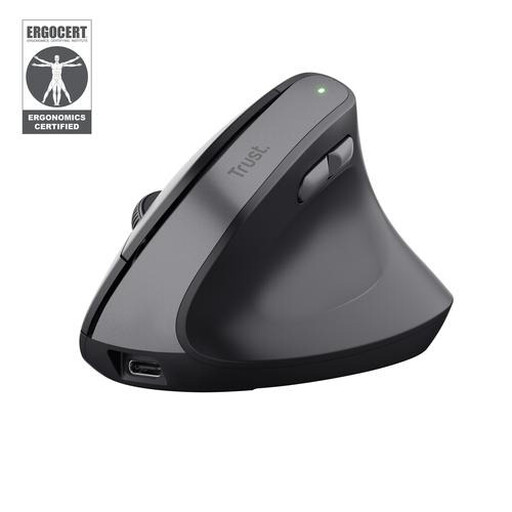 No image available
Trust Bayo II Medical Right-Handed Mouse
An option to consider if you’re looking for a right-handed mouse with a wireless USB connection.
The product name indicates that it’s designed for right-handed use. Check whether a single USB receiver suits the way you work, and bear charging in mind.
View at Joybuy
 No image available
Trust Bayo II Ergonomic Mouse, Vertical, Wired, Black
A wired option to consider if the mouse will stay connected to one computer with an available USB port.
The product name indicates that it has a wired connection. Bear in mind that you’ll have a cable on your desk.
View at Joybuy
 No image available
Logitech Lift Vertical Ergonomic Mouse, Graphite
An option to compare if you’re looking for a right-handed vertical mouse and the stated hand size suits you.
Logitech positions the Lift for small to medium-sized hands and says it has quiet clicks and scrolling. According to the product information, this version is for right-handed use.
View at Joybuy
 No image available
Razer Pro Click V2 Vertical Edition
A vertical option to compare with the other models for use at a computer workstation.
Before buying, check which connections and features suit your computers and the way you work.
View at Joybuy
Frequently asked questions
Is a vertical mouse compulsory at a shared screen-based workstation in the Netherlands?
Arboportaal’s guidance doesn’t specify a vertical mouse as a compulsory product. It does say that screen-based work should be alternated at set intervals with other work or a break. The workstation should also be adapted to the user.
How do you set up the mouse when different people use the desk?
Check which connections are available on each computer and assess the mouse for the person who’ll be using it. Arboportaal recommends adapting the workstation to the user’s body measurements; personal button settings are no substitute for this adjustment.
What maintenance does a wireless mouse need?
Remember to charge it and store any USB receiver safely. Trust says that the Bayo+ can be used while charging with the cable supplied.
Does the legal guarantee in the Netherlands always end after two years?
No. ACM ConsuWijzer explains that the seller must offer a solution if a product breaks during normal use sooner than you could reasonably expect. What you can reasonably expect from a product depends on the product and the circumstances; a seller’s or manufacturer’s guarantee doesn’t limit this legal right.


