
Working close to your keyboard
You want to make use of the space beside a compact keyboard to position your mouse closer to your body. Arboportaal also recommends adjusting a shared workstation whenever you sit down to use it.


A vertical mouse can work well at a shared desk with a compact keyboard if you choose a version that suits your hand size and dominant hand, and can position the mouse close to your body. Arboportaal points out that a slim keyboard leaves room to bring the mouse closer; then choose a connection that works with the shared computer. A vertical mouse is no substitute for adjusting your workstation or taking breaks from screen work.
You want to make use of the space beside a compact keyboard to position your mouse closer to your body. Arboportaal also recommends adjusting a shared workstation whenever you sit down to use it.
You take your mouse to different desks or computers and want to know in advance which connections are available and how to switch between devices. Logitech lists Bluetooth and Logi Bolt as connection options for the Lift.
Your hand size and dominant hand can help determine which version to consider. Logitech, CHERRY and R-Go offer models or versions that differ by dominant hand or size.
A slim keyboard can leave room to position your mouse closer to your body. Arboportaal also recommends adjusting a shared workstation whenever you sit down to use it.
Choose this if: you want to use your mouse with several computers and they support Bluetooth or the right receiver.
Bear in mind: pairing and using the right receiver; Logi Bolt and Unifying are different technologies.
Choose this if: you have a suitable USB port and don't want to manage a wireless connection.
Bear in mind: position the cable so it doesn't get in the way when you place the mouse close to your body.
Choose this if: the computer has a suitable USB port and you don't want to use Bluetooth.
Bear in mind: take the receiver with you when you move desks, and check the connection for the exact version.
| What to consider | What should you check? | Who is this important for? |
|---|---|---|
| Reach and posture | Can you position your keyboard and mouse so that your elbow stays close to your body? Adjust the shared workstation whenever you sit down to use it. | I want to make use of the space beside my compact keyboard and keep the mouse close. Around 33% of consumers rank reach and posture as their top priority. |
| Connecting and switching | Which connections and ports are permitted, and how many devices can the exact mouse work with? | I switch between shared computers and want to know whether I can connect my mouse to them. Around 27% of consumers prioritise connecting and switching. |
| Hand size and dominant hand | Check the size and whether the version is for left- or right-handed use. Evoluent recommends a hand length of around 178 mm or more for the VerticalMouse 4 Regular, measured from the wrist crease to the tip of the middle finger; a shorter hand may be better suited to the Small. This is a guide for those models. | I want a version that suits my hand size and dominant hand, not just the model name. Around 27% of consumers rank hand fit as their top priority. |
| Use and management | Check the battery type, receiver, any software, and the seller's returns and warranty terms. | I want to know in advance what I need to take with me or manage when I change workstations. Around 13% of consumers put use and management first. |
The extra space only helps if you actually use the mouse close to you and set up the shared workstation properly.
Try the keyboard and mouse together at your workstation and see how far you have to reach.
A model range may include versions for different hands, sizes or connections. The wrong version may not work with your workstation.
Check the full product variant, dominant hand, size and connection before choosing.
If the version you choose doesn't suit your hand or computer, you may need a different one.
Logi Bolt and Unifying are different receiver technologies; the right connection depends on the exact mouse and computer.
Check which receiver is required and permitted, or use a Bluetooth connection supported by both devices.
A mouse's shape is no substitute for adjusting your workstation or taking breaks from screen work.
Arboportaal states that, under Arbobesluit 5.10, screen work must be regularly alternated with other work or a break.
The Lift range includes versions for small to medium-sized hands, as well as a separate left-handed version.
The wired Verto is worth considering if you have a suitable USB port.
The wireless MW 4500 range includes a right-handed version and a separate LEFT version.
The HE Break range offers different sizes, versions for each dominant hand and connection options.
The VerticalMouse 4 is available in specific sizes and versions, including a wired right-handed model.
This selection includes vertical mice for switching between devices, using a USB receiver and working at a wired workstation. Check which connection works with the shared computer for each version.
 No image available
Worth considering if you switch between computers at a shared desk and want a vertical mouse. Check in advance which connections are permitted on your work computer.
 No image available
Consider this model if you're looking for a vertical mouse for use with multiple devices. Check which connection and receiver the exact version supports with your work computer.
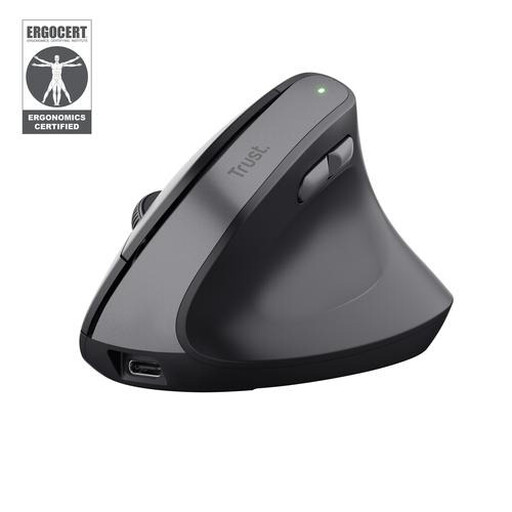 No image available
This right-handed version is worth considering if you're looking for a vertical mouse with a USB receiver. Check whether receiver use is permitted on the shared computer.
 No image available
A wired option if you don't want to manage a wireless connection. Check that there's a suitable USB port, and position the cable so it doesn't get in the way of your mouse movements.
 No image available
Consider this version if the stated fit for small to medium-sized right hands suits you. Check which connection your work computer supports.
Yes. According to Arboportaal, a slim keyboard leaves room to position your mouse closer to your body. Make use of that space and adjust a shared workstation whenever you sit down to use it.
It depends on the mouse, the connections available and the computer's rules. For the standard Lift, Logitech specifies Bluetooth Low Energy and Logi Bolt with three channels; a wired mouse needs a suitable USB port. Check with the person who manages your work computer before pairing a device or installing software.
A vertical mouse is no substitute for taking breaks from screen work. Arboportaal states that, under Arbobesluit 5.10, screen work must be regularly alternated with other work or a break; this applies to the work itself, not to the choice of mouse model.
Before buying, check the exact size, dominant hand, connection and returns policy. According to the Dutch government, you generally have a 14-day cooling-off period for distance purchases; if a product is faulty, the seller must offer a solution. In the Netherlands, there is no fixed statutory warranty period that applies to all products.