
Colleagues sharing one mouse
If colleagues have different dominant hands, a mouse that switches between left- and right-handed use may be worth considering, as R-Go Tools describes for the Waver.


If colleagues with different dominant hands use the same mouse, first look for a model that genuinely switches between left- and right-handed use. If you’ll mainly be using it yourself, give more weight to hand size and handedness. Then check that the connection works with the shared computer and that you can use the features you want without extra software. A study of 16 participants, published in Ergonomics, found less forearm pronation with a vertical mouse, but also slower pointing performance. This is not evidence that the mouse treats discomfort.
If colleagues have different dominant hands, a mouse that switches between left- and right-handed use may be worth considering, as R-Go Tools describes for the Waver.
If you usually prepare teaching materials yourself, you can start by comparing the right hand size and left- or right-handed version. Logitech describes the Lift as suitable for small to medium-sized hands, while R-Go Tools offers the HE Break in different sizes and for different hands.
If you share the computer with others, it’s important to choose a suitable connection and controls you can use without installing software you don’t want. Trust and Evoluent describe different connection and software options for their models.
First, decide whether the mouse will be shared by people with different dominant hands or used mainly by one person. Then check the fit for your hand and the connection to the shared computer.
| What to consider | What to look for when buying | Who should prioritise this? |
|---|---|---|
| Sharing between different hands | Check whether the specific mouse really switches between left- and right-handed use, or is designed for one hand only. | If colleagues with different dominant hands use the same mouse, I don’t want to need a different version each time. Around 36% of consumers give sharing the highest priority. |
| Hand size and posture | Check the size guide for the exact model and make sure you can reach the buttons and rests without gripping tightly. | If I mainly prepare teaching materials myself, I want the size and handedness to suit my hand. Around 29% of consumers prioritise this personal fit. |
| Connection and controls | Check which USB connection or Bluetooth options are available, and whether the features you want work without extra software. | On a shared computer, I want to be able to connect and use the mouse without installing settings I’m not allowed to change. Around 21% of consumers give straightforward connection the highest priority. |
| Quiet, easy navigation | Check the buttons and scroll wheel on the exact model, and find out whether any extra features work on the computer you use. | If colleagues work nearby, I want to navigate documents and web pages quietly. Around 14% of consumers put quiet, smooth operation ahead of the other points to consider. |
A mouse designed for one hand doesn’t become switchable just because several people use the same workspace.
Find out who will actually use the mouse, then compare a model that switches between hands with separate versions for each hand.
If a colleague can’t use the chosen version, you may need a second mouse.
Research into posture and pointing performance doesn’t prove that a vertical mouse treats discomfort. It may also take time to get used to the controls.
Choose a size and version that fit, and set up your workspace carefully. Arboportaal recommends alternating screen work with other tasks or taking a break at regular intervals.
The Trust Bayo II uses a USB receiver and a rechargeable battery; the Trust Verto is wired.
Check which connection works with the computer and, if the mouse is shared, agree where to keep the receiver and charging cable.
A lost receiver or flat battery can interrupt use at the shared desk.
R-Go Tools says the Waver switches between left- and right-handed use; the HE Break range comes in separate sizes and versions for each hand.
The Lift is a range of vertical mice available in versions for different dominant hands.
The wired Verto and wireless, rechargeable Bayo II offer different connection options.
The VerticalMouse 4 range includes models for different hand sizes and dominant hands.
This selection includes vertical mice for different hands and connection preferences, as well as an office mouse for anyone looking for quiet operation and connectivity with multiple devices.
 Image unavailable
This could suit you if quiet operation and switching between devices are important. The product name lists 2.4G+BT, adjustable DPI levels and a 1xAA battery; check the version if a vertical design is essential.
 Image unavailable
A vertical mouse for anyone looking for a version suited to their dominant hand. This version is right-handed, so check that it suits the people using the shared desk.
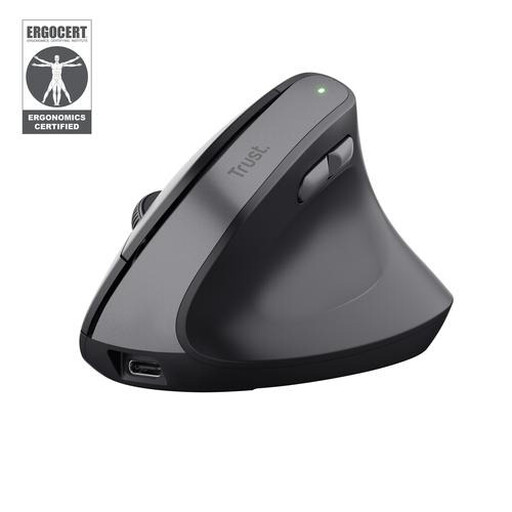 Image unavailable
This vertical Bayo II version could suit you if you’re looking for a right-handed mouse. The product name lists a wireless RF connection and 2400 DPI; make sure the USB receiver works with the shared computer and is kept somewhere safe.
 Image unavailable
A wired vertical mouse could suit a fixed computer with a free USB connection. This version is right-handed, so check that the cable can be positioned neatly on the shared desk.
 Image unavailable
A vertical Lift for anyone looking for a version suited to their dominant hand. Before choosing one for a shared desk, check that the version matches the user’s dominant hand.
No. If users have different dominant hands, a genuinely switchable model may be a good fit. If you’ll mainly be using the mouse yourself, compare the hand size and version that suit you.
That hasn’t been established by the available research. A study of 16 participants, published in Ergonomics, found less forearm pronation but also slower pointing performance with a vertical mouse than with a standard mouse. This result doesn’t prove that it treats discomfort, and it won’t necessarily apply to every user or model.
It depends on the model and the features you want. According to Evoluent, Mouse Manager for the VerticalMouse 4 Small VM4S isn’t compatible with macOS. Check the computer and any installation restrictions before relying on extra button functions.
Arboportaal’s guidance doesn’t prescribe a vertical mouse. It does state that screen work should be alternated with other tasks or a break at regular intervals; choosing a mouse doesn’t replace the need to consider your workstation and vary your tasks.
According to the Dutch government, a product must be of satisfactory quality, but the Netherlands has no fixed statutory warranty period. The retailer is your point of contact if there’s a problem; a manufacturer’s or retailer’s warranty may provide additional cover.