
Vandaag of morgen in huis

Kwaliteit gegarandeerd

Welkomstaanbiedingen ontgrendelen: GRATIS bezorging | Tot 80% korting | Gratis 30 dagen JoyPlus-proefperiode
Download de app
A worn filter, brush roll or mop pad can noticeably affect the performance of your vacuum cleaner or robot vacuum. Even so, ordering any inexpensive replacement part is not advisable. Many vacuum cleaner accessories appear universal, but are compatible with specific models only.
In this buying guide from the Joybuy Product Recommendation Officer, you will learn what to look for when choosing a vacuum cleaner filter, HEPA vacuum filter, brush or complete accessory kit. The recommendations are based on verifiable details such as model compatibility, package contents, dimensions and maintenance instructions.
An accessory with a similar shape will not automatically fit your appliance. Connections, clip systems, brush width and filter housing can vary by model. Always check the exact model number, such as Eureka J12 Ultra, Dreame L10s Ultra or MOVA E30 Ultra.
The wrong brush may jam or fail to make sufficient contact with the floor. In the case of a filter, a poor seal can allow dust to bypass the filter.
Terms such as “high filtration,” “long service life” or “suitable for all floor types” mean little without technical specifications. According to the product description for the Eureka J12 ULTRA HEPA 2-pack, a filtration efficiency of 99.97% is stated. This is a claim made in the product information and is not a general guarantee for every household environment.
Also pay attention to the difference between a washable filter and a filter intended for single use. According to the product information, the BISSELL 4343 PowerClean HEPA filter should not be washed or reused. The BISSELL CrossWave Vacuum Filter Black, by contrast, is described as washable and reusable. Always follow your appliance’s user manual.
Check how many components are actually included in the package. A kit may contain only side brushes and mop pads, for example, while you specifically need a main brush or dust bags. Also check the recommended replacement intervals. The three- to four-month period mentioned for some robot vacuum accessories is a guideline from the product description; usage intensity and the amount of hair or dirt also play a role.
Start by looking up the brand and full model name. Pay attention to suffixes such as “Pro,” “Ultra,” “FlexReach” or “HF3.” A part for a Dreame H12 Pro may not be the same as an accessory for the H12 Dual.
Examples of verifiable combinations:
A replacement vacuum cleaner filter must seal properly and be suitable for the appliance’s airflow. Check the following:
For example, the BISSELL CrossWave filters specify that the filter must be completely dry before installation. Reinstalling a wet filter may damage the appliance. Never install a filter without its filter cover.
For a vacuum cleaner brush roll, length, width, drive mechanism and bristles are important. According to the product description, nylon bristles may be suitable for hard floors and carpets, but always check whether your appliance supports this brush.
For robot vacuums, check:
A kit containing multiple consumable parts can be convenient if you perform regular maintenance. However, do not choose a larger kit if its components are not compatible with your robot.
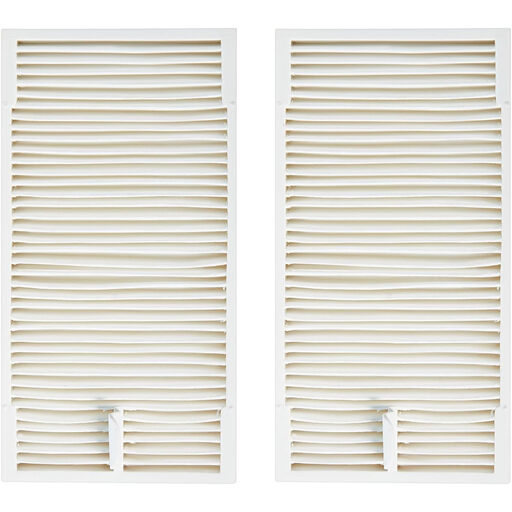
Why it is a good fit: A two-piece set for households with a Eureka J12 Ultra that need to replace a filter without using tools.
The product information mentions hand washing and reuse. Before purchasing, check the instructions for your J12 Ultra.
2 filters, a model-specific fit and tool-free installation.
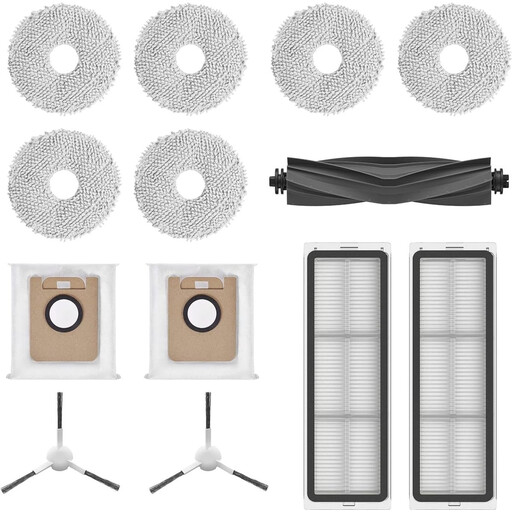
Why it is a good fit: Convenient for routine maintenance of the Dreame L10s Ultra, with multiple components in a single package.
The kit is specifically designed for the L10s Ultra. This makes it easier to avoid confusion with other Dreame models.
1 main brush, 2 side brushes, 6 mop caps, 2 dust bags and 2 filters.
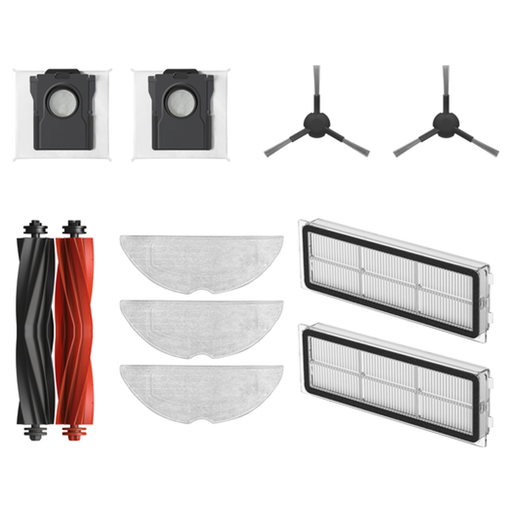
Why it is a good fit: For MOVA E30 Ultra users who want to replenish filters, brushes, mop pads and dust bags at the same time.
The kit explicitly lists the MOVA E30 Ultra as the compatible model, so it is not a general-purpose kit for every robot vacuum.
10 components: 1 main brush, 2 side brushes, 3 mop pads, 2 filters and 2 dust bags.
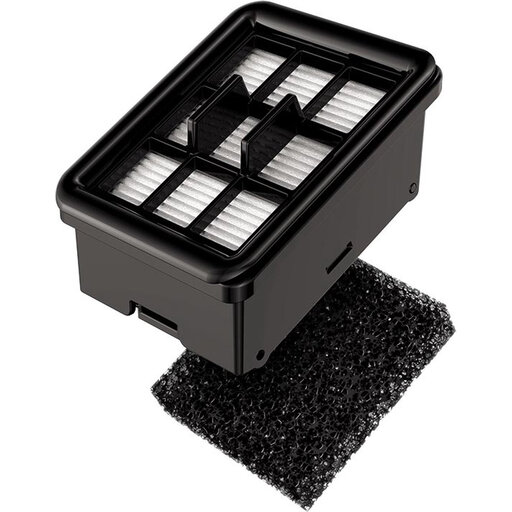
Why it is a good fit: For BISSELL CrossWave HF3 owners looking for a model-specific filter.
The product information specifies model 3668 and CrossWave HF3. Check this number before ordering.
Compact single filter designed for the CrossWave HF3 series.
Browse our current selection of vacuum cleaner accessories and compare filters, brushes, mop pads and accessory kits by compatibility and contents.
This depends on the filter type, frequency of use and the manufacturer’s instructions. Some product descriptions recommend replacing filters approximately every three to six months, but a visibly dirty, damaged or deformed filter should be replaced sooner. A washable filter can last through multiple cleaning cycles, provided it remains completely dry and undamaged.
Usually not. Side brushes, mop pads, main brushes and dust bags are often designed for a specific housing and connection. Always check the brand, model and any model code. “Universal” in a product title is no substitute for a confirmed compatibility list.
A kit can be convenient when you need multiple consumable components. However, compare the total contents with your actual requirements. If you only need to replace a worn filter, a standalone replacement vacuum cleaner filter is often the more sensible choice. For routine robot vacuum maintenance, a kit containing filters, brushes, pads and dust bags can save time.
