
Vandaag of morgen in huis

Kwaliteit gegarandeerd

Welkomstaanbiedingen ontgrendelen: GRATIS bezorging | Tot 80% korting | Gratis 30 dagen JoyPlus-proefperiode
Download de app
A USB-C cable may seem straightforward, but the differences between models can be significant. One cable may be mainly suitable for everyday charging, while another can also power a laptop or transfer large files. Choosing the wrong cable can result in slow charging, limited data speeds or a cable that is not compatible with your charger.
For households, home offices and travellers in the Netherlands, three common pitfalls are particularly relevant:
For a smartphone, a standard USB-C charging cable with 3A is often sufficient. For tablets, Nintendo Switch and some laptops, it is more important to check the maximum power. A Power Delivery cable may be suitable for devices that use USB Power Delivery. Support for a Quick Charge cable may also be relevant for compatible Android devices.
Pay attention to the combination of:
A cable marked as 60W or 100W will not automatically provide 60W or 100W charging. According to the product information, the UGREEN US264, for example, supports up to 60W and 3A, as well as Power Delivery, Quick Charge and AFC. The final charging speed still depends on the connected equipment.
If you only use the cable for charging, a USB-C cable 480 Mbps may be sufficient. This is the transfer speed listed for several USB 2.0 cables in the range. It is usually suitable for photos, documents and syncing between a smartphone and computer.
If you regularly transfer large video files, you may benefit more from a USB-C data cable with a higher speed. According to the product description, the Baseus Crystal Shine offers USB 3.2, up to 20 Gbps and supports 4K at 60 Hz. However, check that your computer, hub and device support the same standard. The slowest link determines the practical speed.
Choosing the right length prevents strain on the connection and helps keep your workspace tidy:
Also consider the outer coating. A braided USB-C cable can be useful if you often carry or coil the cable. A plastic or TPE coating may be more flexible and lightweight. Also check whether the plugs are reinforced and whether the connection between the cable and connector has extra protection.
A USB-C cable for iPhone is relevant for iPhone models with a USB-C port, as well as USB-C iPads and AirPods cases. According to the product description, the Apple 20W set combines a 20W USB-C mains adapter with a 1-metre braided cable. The set is intended for compatible Apple devices and other devices that support USB Power Delivery.
For a USB-C cable for Samsung or a USB-C cable for Google Pixel, the combination of charging protocol, charger and device is particularly important. According to their product specifications, the UGREEN models are suitable for various Samsung, Google Pixel and other USB-C devices. Always check your model's exact port and charging requirements before buying.
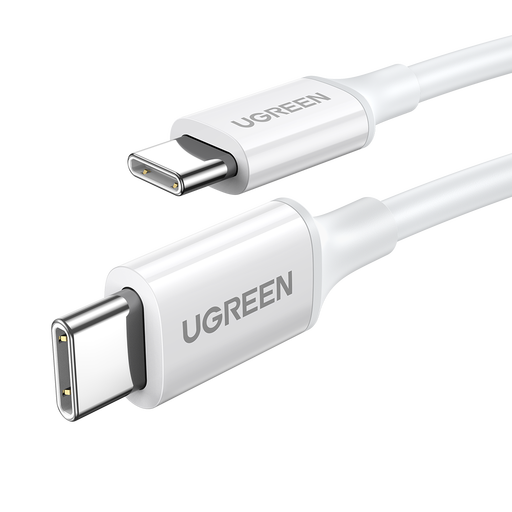
Why it suits this profile: A practical USB-C to USB-C cable for everyday charging and basic data transfer.
The specifications clearly state 1 metre, 3A, up to 60W and 480 Mbps. This shows you what the cable is designed for before you buy.
USB-C at both ends; according to the product information, support for PD, QC and AFC.
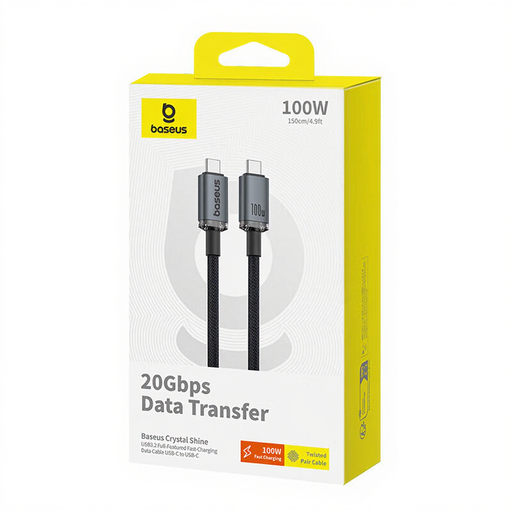
Why it suits this profile: Suitable for anyone who values higher data speeds and display support as well as charging.
The product description lists 100W, USB 3.2, 20 Gbps and 4K at 60 Hz separately. This makes it easier to check whether it is suitable for your intended use.
1.5-metre length; according to the product information, support for 100W charging and 20 Gbps data transfer.

Why it suits this profile: A practical choice for a workspace, sofa or bed where the socket is not right next to the device.
The stated USB 2.0 speed of 480 Mbps makes it clear that this is not intended to be a high-speed video cable. This helps prevent unrealistic expectations.
2-metre length; according to the product specifications, 3A, PD/PPS and a USB-C connector lifespan of 10,000 cycles.
Use a USB-C cable in a dry environment and avoid sharp bends near the plug. Coil the cable loosely rather than winding it tightly around a charger. Check the connector for dirt or bent parts before connecting a device. Do not use the cable if the outer coating is split or the connection becomes hot.
A higher-power cable is not automatically more energy-efficient. Energy consumption is mainly determined by the connected device and charger. Therefore, do not choose a 100W USB-C cable if you only charge a smartphone, unless you also want to use the same cable for a tablet or laptop later.
We have compiled a complete, up-to-date list of products that fully meet these strict selection criteria and the applicable European safety regulations.
No. Fast charging depends on the device, charger, protocol used and cable. Check whether the combination supports Power Delivery, Quick Charge or any other required protocol.
For a desk or bedside table, 1 metre is often practical. Choose 1.5 metres for extra freedom of movement and 2 metres when the socket is further away. A longer cable is less compact for travelling, however.
Its lifespan depends on bending, pulling, coiling and storage. A reinforced or braided USB-C cable can be practical for intensive use, but careful handling remains more important than the outer-coating material alone.
