
Torch owners with a single charging cable
If your main aim is to charge your torch, start by checking the manual and the cable you already have. For example, Olight specifies a USB-A-to-USB-C cable with a 5V power supply for the i5R EOS.


Start with your torch’s manual and charging cable: these determine which connector and power supply are suitable. If you only need to charge the torch, a compatible USB charger may be enough. A charging station is most useful if you want to connect several devices at once, while a USB extension lead is best if you also need extra mains sockets.
If your main aim is to charge your torch, start by checking the manual and the cable you already have. For example, Olight specifies a USB-A-to-USB-C cable with a 5V power supply for the i5R EOS.
If you also want to charge other devices in the same place, compare the port types, number of connections and power available when using them at the same time.
A USB extension lead may be suitable if you need extra mains sockets as well as a USB charging point. Check its positioning and cable length.
First check your torch’s charging requirements, then choose the number of ports and a charging point that suits your desk.
| What to consider | What to look for | Who should consider this? |
|---|---|---|
| Connector and power supply | Check the cable, port type and power supply specifications required for your torch model. | If I want to charge my torch using the cable I already have, I first check that the connector and power supply match the manual. Around 36% of consumers prioritise compatibility. |
| Charging several devices at once | Count the devices you actually use at the same time, then check the ports and how power is distributed. | If I want to connect other USB devices alongside my torch in one place, I check the number of suitable ports and the power available when they’re used at the same time. Around 29% of consumers prioritise charging several devices simultaneously. |
| Positioning on your desk | Measure the distance to the socket and make sure the charger has space and can dissipate heat. | If I need the charging point to be easy to reach and have limited desk space, I consider the layout, cable length and available space around the charger. Around 21% of consumers prioritise a suitable, safe spot on their desk. |
| Capacity you need | Compare your current usage with the number of ports; don’t base your choice on the highest wattage alone. | If I usually only charge a torch, I don’t want to choose ports or power that I don’t need. Around 14% of consumers prefer a straightforward solution. |
The cable and power supply you need depend on the torch model. A higher stated wattage doesn’t, on its own, prove that the torch will charge faster.
Read your torch’s manual and compare the connector and power supply it specifies with the charger’s specifications.
When using several ports, the power distribution needs to suit the connected devices. The maximum total output doesn’t automatically tell you what each port supplies.
Check the port layout and power specifications for the connections you want to use at the same time.
A cable that’s too short can make positioning awkward. Brandweer Nederland advises placing a charger in an open space so it can dissipate heat; Brandweer Brabant-Zuidoost warns against connecting extension leads to one another.
Measure the distance to the socket in advance, check the cable length and don’t use damaged extension leads.
Mains-powered electrical appliances placed on the market in the Netherlands must meet the applicable safety requirements. Ondernemersplein, the Dutch government’s business information portal, also explains CE marking and the EU Declaration of Conformity.
Before buying, check the product information and relevant conformity documentation for your chosen charging station.
Hama offers products including the 00223201 USB-A charging station, available in the Netherlands and designed for several devices.
The Anker 543 Charger (65W II), model A2046, is a charging station for several devices.
The BoostCharge Pro P-WCH010 combines USB-A and USB-C connections for a desk setup.
brennenstuhl offers extension leads for home-working setups, including versions with USB charging ports.
These product choices are suited to USB charging at a home-working desk, with extension leads and charging stations for several devices.
 No image available
Suitable for a desk setup where you want to combine USB-A and USB-C ports with extra mains sockets.
The product name lists USB-A and Type-C charging ports and a 1.5 m cable.
Do not connect this extension lead to other extension leads.
 No image available
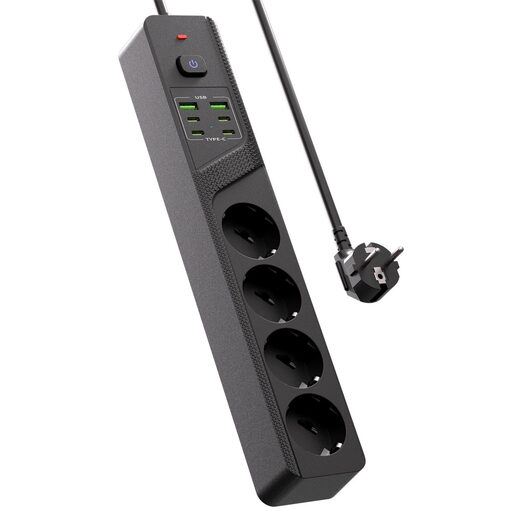
May be suitable if you want to connect both USB devices and extra mains-powered devices at your desk.
The product name lists four Schuko sockets, four USB-C ports and two USB-A ports.
 No image available
Suitable if you want to charge your torch alongside other USB devices and use both types of USB port.
The product name lists USB-A and USB-C charging ports.
 No image available
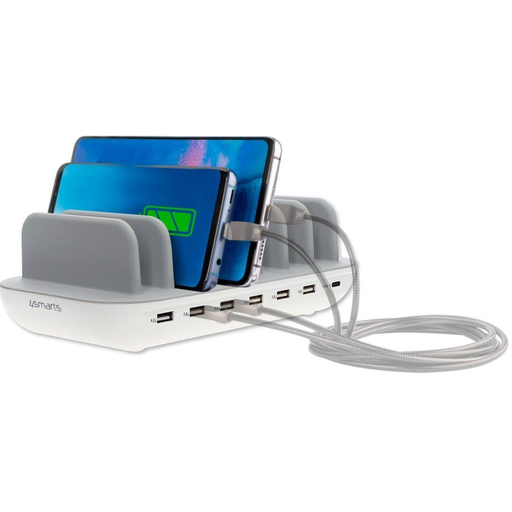
May be suitable if you want to charge several devices with USB-A and USB-C connections at your desk.
The product name lists a 60 W charging station for the office.
Do not cover the charging station while it is in use.
 No image available
May be suitable if you want to combine USB ports and mains connections in one place on your desk.
The product name lists USB-C and USB-A ports and a clamp mount.
No, not based on the connector alone. Check your torch’s manual for the required cable and power supply; Olight and Fenix specify different connectors and charging requirements for their torch models.
Place the charger in an open space so it can dissipate heat, and follow the instructions from the torch and charger manufacturers. Brandweer Nederland advises against covering a charger.
If there’s a fault, contact the seller. According to the Dutch government, the seller must provide a solution if there’s a problem with a product; a manufacturer’s guarantee is separate from your statutory guarantee.
The European Commission lists specific product categories covered by the common charger rules, but torches aren’t among them. Check which connector and cable the manufacturer specifies for your torch.
Mains-powered electrical appliances placed on the market in the Netherlands must meet the applicable product safety requirements. Ondernemersplein, the Dutch government’s business information portal, explains CE marking and the EU Declaration of Conformity, among other things.