
Torch user with a changing workspace
Wants to charge their USB torch without relying on a hard-to-reach socket. First, check the torch model’s connection and charging instructions; NITECORE and Ledlenser describe different charging methods.


First, choose a charging station with a connection and charging output that match your torch’s instructions. Then work out how many other devices need a port at the same time. A charger with USB-A and USB-C gives you more options for different cables, while a desk charging station with a mains cable can keep the ports within reach without you having to reach under the desk. The stated total power isn’t necessarily available from every port.
Wants to charge their USB torch without relying on a hard-to-reach socket. First, check the torch model’s connection and charging instructions; NITECORE and Ledlenser describe different charging methods.
May need to connect a torch and other devices with different USB cables at the same time. Hama, UGREEN and Belkin product information shows why both the mix of ports and the way power is shared matter.
Wants accessible ports, tidy cable routing and a charging area that stays clear for heat to escape. Brandweer Nederland advises keeping chargers uncovered and not using damaged cables.
| What to consider | What should you check? | Who is this important for? |
|---|---|---|
| Connection and charging compatibility | Read your torch’s instructions and check the charging port, required output and suitable cable or holder. | If I want to charge my torch, I need to know that the cable and charging method are right for the exact model. Around 36% of consumers put compatibility first. |
| Ports for simultaneous use | Count the devices that will be charging at the same time, then check the port types and how power is shared when several devices are connected. | If colleagues want to connect devices as well as my torch, I need enough suitable ports. Around 29% of consumers prioritise having space to charge several devices at once. |
| Accessibility and cable routing | Check where the socket is, where the station can go and whether the ports will be easy to reach. | If several people use the charging area, I want to reach the connections without trailing cables across the workspace. Around 21% of consumers prioritise an accessible, tidy charging area. |
| Safe use and maintenance | Check the product information and CE marking, follow the instructions and leave the charger uncovered so heat can escape. | If several people use the charger, I want to know how we’ll spot damage and keep the charging area clear. Around 14% of consumers prioritise safe use and maintenance. |
Charging requirements vary between torches, and some multi-port chargers share their power between connected devices.
Compare your torch’s instructions with the output of the port you plan to use. Only then should you look at the charger’s total power.
A computer hub adds ports to a computer. Some torches, on the other hand, need their own dedicated charging holder.
Check whether the product works directly from the mains and whether its connection is compatible with your torch.
A desk-based solution is only practical if the charger and cables don’t get in the way in a shared workspace and the device can sit uncovered.
Plan the setup from the socket and leave the charger uncovered so heat can escape.
Hama describes model 00201979 as a 65 W charging station with two USB-C ports and two USB-A ports.
UGREEN’s Dutch product information describes a compact 100 W Nexode charger with four ports, including one USB-A port.
Belkin describes the BoostCharge Pro WCH014 as having three USB-C ports and one USB-A port.
Anker Support describes model A2154 as a charger with six ports and separate USB-A and USB-C outputs.
These products are mains-powered extension leads with USB charging ports for a shared desk. The Dutch Food and Consumer Product Safety Authority states that CE marking is mandatory for applicable electrical products. However, the mark alone doesn’t prove that a specific item meets all the requirements. So check the product information and follow your torch’s instructions.
 No image available
Could suit a shared charging area where several USB cables need to stay connected at once.
Lists 4 AC sockets, 3 USB-A ports, 2 USB-C ports and a digital clock.
The product description lists a 3 m cable.
 No image available
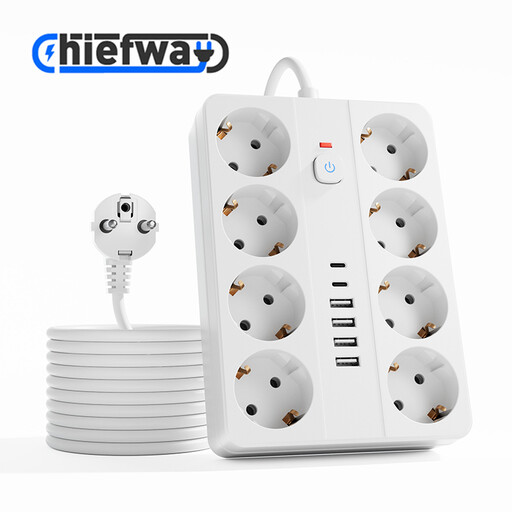
Could suit a shared desk where several USB devices are connected at the same time.
Lists 8 AC sockets, 4 USB-A ports and 2 USB-C ports.
The product description lists a 3 m cable.
 No image available
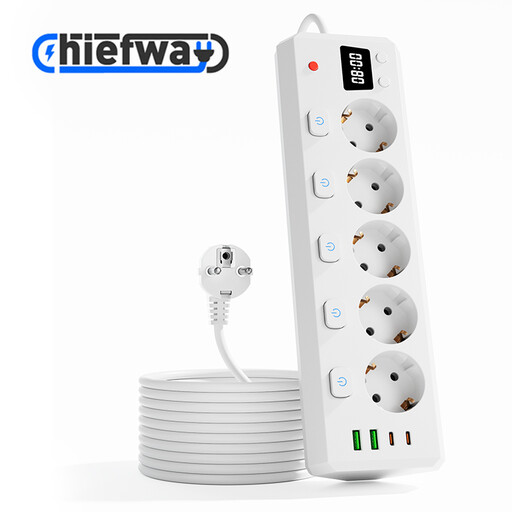
Could suit a shared charging area where a torch and other USB devices need a port.
Lists 5 AC sockets, 2 USB-A ports, 2 USB-C ports and individual switches for the AC sockets.
The product description lists a 3 m cable.
 No image available
Could suit a desk where several USB devices and AC plugs need to share a connection point.
Lists 3 AC sockets with individual switches, 3 USB-A ports and 1 USB-C port.
The product description lists a 1.5 m cable.
 No image available
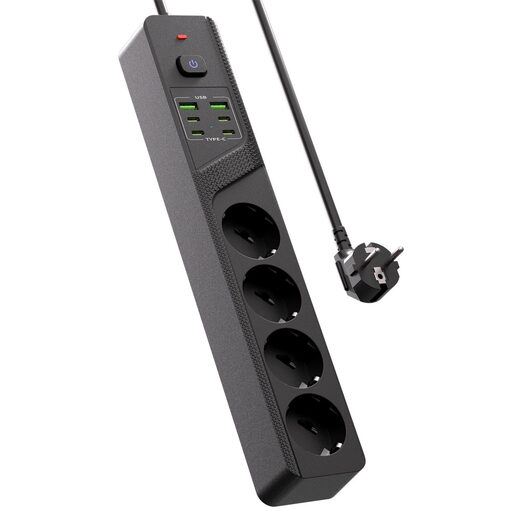
Could suit a shared charging area where several USB devices are connected at once.
The product title lists 4 Schuko sockets, 4 USB-C ports, 2 USB-A ports and an on/off switch.
No. First, check the connection and charging instructions for the exact torch model. Manufacturers describe both torches that charge directly via USB-C and models that need a separate cable or a model-specific holder.
Follow the torch’s instructions and leave the charger uncovered so heat can escape. Brandweer Nederland advises against using damaged cables and counterfeit chargers. If the area is shared, agree how to report any damage.
No. Your statutory guarantee depends on what you could reasonably expect from the product under normal use. ACM ConsuWijzer explains that the seller must offer an appropriate solution if the product doesn’t meet those expectations.
CE marking is mandatory for applicable electrical products, according to the Dutch Food and Consumer Product Safety Authority. The mark alone doesn’t prove that a specific item on sale meets all the applicable safety requirements.
Don’t assume so without checking the torch model. The European Commission’s list in force on 13 October 2026 includes products such as phones, tablets and laptops, but not torches.