
Someone with one spare socket
Wants to charge a USB torch alongside other everyday devices without using a separate mains adaptor for each one.


Choose a mains-powered charging station with outputs that suit your torch cable and the devices you want to charge at the same time. Check the charging instructions, whether the connection is USB-A or USB-C, and how much power is available when several ports are in use. You don’t necessarily need extra power for a torch alone, and a USB data hub is no substitute for a mains-powered charging station.
Wants to charge a USB torch alongside other everyday devices without using a separate mains adaptor for each one.
Wants to check whether the plug at the charging end of their existing torch cable will fit a USB-A or USB-C output.
Wants to charge a higher-power device as well as a torch, so needs to consider how power is shared when several ports are used at once.
| What to consider | What should you check? | Who should consider this? |
|---|---|---|
| Enough charging ports | Count the devices you want to connect at the same time and check that the outputs you need are USB charging ports. | If you want to connect several devices to one socket, the number of usable charging ports is what matters most; around 36% of consumers say this is their main consideration. |
| Cable and connection | Check your torch’s manual, the plug at the charger end of the cable, and which USB-A and USB-C outputs are available. | If you want to keep using your existing torch cable, a compatible connection is essential; around 29% of consumers prioritise this. |
| Power when charging several devices | Compare the power available to the ports you plan to use together with the charging instructions for your connected devices. | If you’re charging a higher-power device as well as your torch, check how much power is available for each port combination; around 21% of consumers focus on this. |
| Origin and safe use | Check the manufacturer and model details, applicable CE information, instructions for use, and the condition of the charger and cable. | If you want to avoid damaged equipment and unclear product information, check where it comes from and how to use it safely; around 14% of consumers put this first. |
A hub powered by a connected computer isn’t a standalone charger for a wall socket. It won’t solve a shortage of sockets in the same way.
Check whether the device has its own mains connection and suitable charging outputs.
When you use several ports, the power available to each one may differ from what’s available when you use just one. Belkin lists a maximum of 65 W from one port and 45 W plus 20 W when both ports are in use for the WCH013.
Check the power distribution for the exact combination of ports you plan to use at the same time.
A product name alone doesn’t always tell you which USB outputs are included in a particular version. The wrong layout could mean your cable won’t fit directly.
Before buying, check the ports on the specific version in the product information or on the packaging.
According to the Netherlands Food and Consumer Product Safety Authority, CE marking is mandatory for electrical products covered by the applicable rules. The manufacturer is responsible for the declaration of conformity; a visible logo isn’t an independent safety test of the individual item.
Check the product information and instructions for use, and don’t use a damaged charger or cable.
The BoostCharge WCH013 is a compact mains charger with two USB-C ports.
The Nexode Desktop is designed for charging several devices from one mains connection, with USB-C and USB-A outputs.
The Office range is designed for anyone who wants to charge several USB devices from one connection.
The A2154 is a multi-port charger for anyone who wants to connect different USB devices to one mains connection.
The 00201978 is designed for combining a torch with USB-C devices that may need more power.
This selection includes charging stations and extension leads with USB outputs, for charging a torch and other devices from one socket. For each model, check that the connection suits your cable and note any power or usage limitations.
 No image available
An option to consider if you need several other connections as well as USB ports.
The product name lists several AC sockets, USB-A and USB-C charging ports, a 1.5 m cable and a maximum of 2500 W. Don’t connect extension leads to each other or exceed the stated total maximum.
 No image available
Could suit anyone considering a charging station with built-in USB-C cables; check that the cables are compatible with your torch.
The product name lists two retractable USB-C cables and 320 W. Check the port layout and how much power is available when several ports are in use.
 No image available
A mains charger with USB connections to consider if you’re looking for a compact set-up.
The product name lists Dual USB-C + USB and 65 W. Charging cables aren’t included, so check which cable you need and whether you already have one.
 No image available
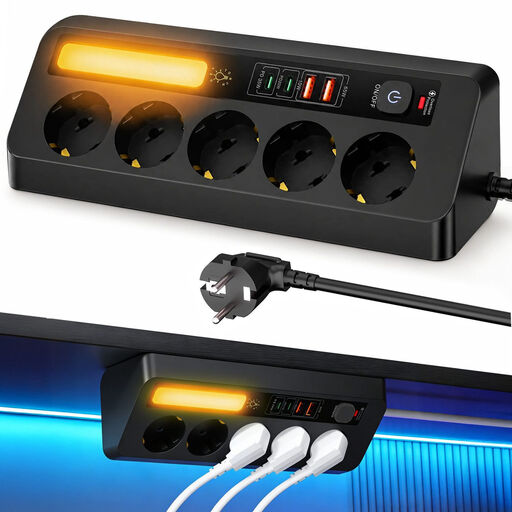
Worth considering if you want to combine USB charging with extra sockets on a desk or at home.
The product name lists five sockets, four USB ports, PD 35 W and a 2 m cable. Check which USB connections are included and how the power is shared.
 No image available
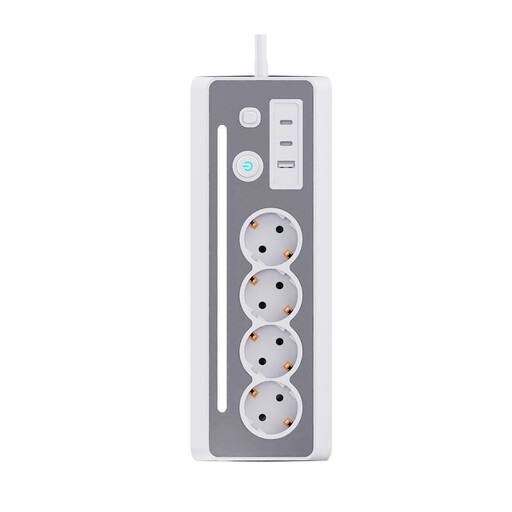
Could be a good fit if you want to combine USB charging with standard sockets on your desk.
The product name lists three Schuko sockets, three USB ports, LED lighting and an on/off switch. Check that the USB connections are compatible with your torch cable.
No, it depends on your torch’s connection and charging instructions. Check the plug at the charger end of the cable and follow the guidance for your specific model.
Not if the hub is powered by a connected computer. Belkin says its USB-C mini hub draws power from the host device; for charging from a wall socket, choose a charging station with its own mains power supply.
Follow the instructions for both your torch and charger, and don’t use damaged cables or equipment. The Netherlands Fire Service, Twente region, recommends charging devices during the day where possible, on a hard surface and near a smoke alarm, then unplugging the charger once charging is complete.
Yes. CE marking is mandatory for electrical equipment covered by the applicable rules of the Netherlands Food and Consumer Product Safety Authority. The manufacturer is responsible for the declaration of conformity; a visible logo isn’t an independent safety test of the individual product.
Don’t assume so. The European Commission lists the device categories covered by the common charger rules, but torches aren’t on that list. Check your torch’s connection and its charging instructions instead.